Smart Locker Systems for Property Developers: How They Work
See how a smart locker system for property developers secures parcels, streamlines courier access, and simplifies resident pickup across property types.

Package delivery is a property-management workflow, not just a storage problem. A smart locker system for property developers combines secure compartments with software that manages courier access, assigns compartments, and notifies residents when deliveries are ready. Residents collect parcels with a PIN or QR code, while the system logs locker activity.
That connected process can reduce manual handovers and give property teams a clearer view of package handling. The right setup depends on who will use the lockers, where they fit in the building, and what kinds of parcels arrive. This guide explains how lockers fit into property management, how they support secure delivery and collection, and how buildings can account for refrigerated or oversized parcels. You’ll also see where locker software and courier access fit into the overall workflow.
Key Takeaways
- Map how courier access, compartment assignment, resident notifications, and pickup connect with your property’s existing management workflow.
- Assess package volume and staff handling needs to determine whether lockers can improve parcel security across residential, commercial, retail, and mixed-use properties.
- Plan for parcel types as well as pickup convenience: refrigerated items and oversized packages may need a different handling approach from standard parcels.
- Understand how smart locker hardware, management software, and access tools work together to support secure, contactless collection.
How Smart Lockers Work in Offices and Residences
A locker workflow connects compartment hardware with software, recipient access, and courier entry. For property managers, it can replace manual handovers with recorded, contactless collection.
Building Software and Platform Integrations
Integrations connect a building app, property-management software, and identity or access platforms to locker operations. This lets property managers coordinate parcel handling with systems residents and staff already use. Smart lockers can integrate with platforms such as Microsoft Entra ID, Okta, HID, and Siemens SIPORT. For a U.S. development, building-code, fire-safety, accessibility, and privacy considerations depend on the site, locker placement, access route, and resident data handled; account for these in the project design.
Resident Data and Notifications
Accurate recipient records help the system send pickup notifications to the right person. When a courier deposits a parcel, the system associates it with the recipient and sends an SMS or email with a one-time pickup code. This reduces manual messaging and helps property teams track uncollected parcels. Establish a process for keeping resident records accurate and aligned with the locker software.
Access Codes and Locker Access
Access codes connect an authorized recipient to the assigned compartment. A resident uses a PIN or QR code to open it, while the system records the locker activity. Integrations can coordinate permissions between locker software and access-control platforms; delivery services use a courier access interface to deposit packages. For a new development, define users, parcel types, access timing, identity checks, and required system data, then plan installation around site conditions, power, network access, and configuration. Test notifications and collection before launch to identify workflow gaps.
How Smart Lockers Prevent Package Theft in Apartments
Secure compartments keep parcels in controlled storage until collection. Multifamily, commercial, retail, and mixed-use properties can use the same basic workflow, with a setup sized to the property's delivery volume.
Secure Individual Package Access
With individual access, a recipient opens the compartment assigned to their delivery instead of searching a shared package pile. After a courier deposits a parcel, the system sends the recipient a one-time PIN or QR code. This controlled handoff limits casual access and creates an activity record for property managers. Teams still need processes for monitoring occupancy, handling uncollected parcels, and responding to reports of open doors.
Uncollected Package Reminders
Reminders notify residents when packages remain in storage, while a hold window defines how long they stay assigned. A 48-hour expiry period is considered optimal for most buildings, giving residents time to collect parcels while helping lockers turn over. Property teams need a clear process for overdue items, including who handles them and where they go next. Accurate occupancy records help staff identify available compartments and parcels awaiting action.
Package Operations Across Property Types
Locker workflows help property teams replace manual package logging with delivery records, resident notifications, and collection activity. They can serve apartment residents, retail customers, office users, or separate groups in mixed-use buildings. Assigning access by recipient and property area keeps each pickup organized. A sign that manual handling has become burdensome is staff spending more than a few hours a week managing packages. The U.C. Irvine study found that 68% of building staff spend at least four hours per week managing incoming deliveries.
Ongoing responsibilities include reviewing failed collections, overdue parcels, and occupancy alerts, then keeping the handling process clear for residents and staff. For properties planning this workflow, a smart package locker setup can bring secure storage and contactless pickup together.
Should residential smart lockers support refrigerated or oversized packages?
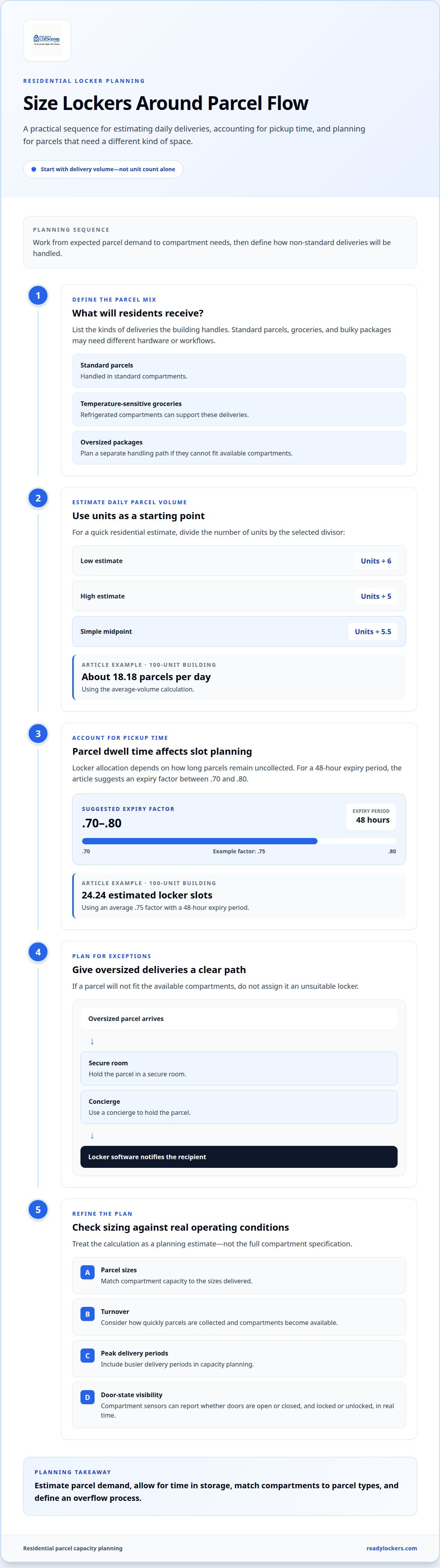
Parcel mix matters as much as locker count in multifamily communities. A building receiving groceries, standard parcels, and bulky deliveries needs hardware and workflows suited to each item. Refrigerated compartments can support temperature-sensitive grocery deliveries, while standard compartments handle everyday packages. Consider these needs during installation planning, alongside courier access and site accessibility.
Capacity planning should start with delivery volume, not unit count alone. A quick estimate for daily residential parcels uses units divided by 6 for a low estimate or divided by 5 for a high estimate; 5.5 offers a simple midpoint divisor. For example, a 100-unit building estimates about 18.18 parcels daily using the average-volume calculation. Package volume over a typical week gives a stronger sizing basis than door count by itself.
Locker allocation also depends on how long parcels remain uncollected. For a 48-hour expiry period, the suggested expiry factor is between .70 and .80. A 100-unit example using an average .75 factor estimates 24.24 locker slots. Treat this as a planning calculation, then consider parcel sizes, turnover, and peak delivery periods when selecting compartment capacity.
Oversized parcels need a separate path if they cannot fit the available compartments. A property can hold them with a concierge or in a secure room, then use locker software to notify the recipient. This keeps the package workflow visible without assigning an unsuitable compartment. Frequent grocery orders may justify refrigerated options, while communities with bulky deliveries need a clear overflow process.
Compartment sensors can report whether each door is open or closed, locked or unlocked, in real time. Software can allocate a compartment based on parcel size and required temperature, then send the recipient a one-time PIN or QR code. These controls support convenient pickup, including 24/7 tenant access, without requiring residents to coordinate collection with a courier. During installation, plan accessible routes for couriers and residents, and place the locker where deliveries can reach it.
Smart locker system definition and delivery workflow
A smart locker system for property developers combines secure compartments, electronic locks, and management software to coordinate deliveries, recipient access, and package records. Unlike static storage, a connected system assigns compartments, manages access, and logs activity.
A typical delivery moves through these stages:
- Courier access: The courier uses the designated access process to enter a parcel into the workflow.
- Compartment assignment: Software allocates an available compartment based on package size and system rules.
- Recipient notification: The resident receives a pickup message with an access method, such as a PIN or QR code.
- Collection record: The recipient opens the assigned compartment, and the system logs the activity for an audit trail.
Each stage links a physical action to a software record. A courier's deposit updates compartment occupancy, and a resident's collection frees that space for another delivery. Property teams can use the cloud-based dashboard to view package activity, review usage, and track available compartments. This makes parcel status easier to follow than separate paper logs.
Configuration determines how the workflow fits a property. Planning a smart locker system for property developers means defining users, access permissions, parcel rules, and the information shared with other systems. Locker platforms can integrate with identity, workplace, IT service management, payment, and booking systems. POS, ERP, or order-management connections can also bring locker activity into existing business software. The useful connections depend on what staff need to coordinate.
Installation timing depends on site conditions, power and network access, and the selected configuration. Those factors shape when hardware and software can operate together. Before launch, property teams can map the courier deposit, resident notification, and collection record as one complete workflow. Plan a connected locker workflow for your property’s delivery operations.
ReadyLockers: Smart Package Lockers
ReadyLockers brings together Smart Package Lockers, Locker Management Software, a Contactless Pickup System, and a Courier Access Interface. For property teams seeking to organize parcel deliveries, these offerings connect courier deposits with resident notifications and secure collection. Recipients receive an SMS or QR code, then collect packages contactlessly, with pickup available 24/7.
ReadyLockers provides smart lockers and management tools for a range of property types, including apartments, offices, campuses, warehouses, hotels, hospitals, schools, retail locations, and homeowners associations. Couriers handle delivery, while the system manages locker access and notifications. Refrigerated storage and in-unit lockers are not part of the offering.
To discuss how ReadyLockers fits your property’s package workflow, contact ReadyLockers.
Build Package Planning Into Your Next Development
Use the planning stage to define how deliveries will fit into the building's daily operations. Decide who manages package workflows, how residents will learn to use the system, and how the property team will review activity after launch. Clear ownership makes parcel handling part of the operating plan rather than an afterthought.
A smart locker system for property developers should suit the property's users, delivery patterns, and management processes. Aligning those needs early helps teams plan a practical setup and prepare staff and residents for the transition from development to ongoing management.
ReadyLockers offers smart package lockers, locker management software, and a contactless pickup system. Together, these components support a connected package workflow, from courier deposit to resident collection.
Discuss your development’s package-handling needs and next steps with ReadyLockers. Contact ReadyLockers to discuss your property, and move forward with a clearer plan for resident deliveries.
Frequently Asked Questions
How Smart Lockers Fit Into Your Property Management Stack?
Smart lockers work alongside property-management tools, resident communications, and building access systems. Decide which team handles exceptions, such as a parcel addressed to the wrong recipient or an overdue pickup, and how staff record the resolution. This process helps connect locker operations with the property's usual service-desk workflow.
How do smart lockers integrate with other apartment technologies or smart building ecosystems?
Integration can connect locker activity with identity, access, and building security platforms. ReadyLockers supports Genetec video integration and HID badge access, and provides an API for integrations. Property teams can plan how badge access and video events relate to package handling, then determine which staff need access to those records.
How should you choose a smart locker system?
Choose a system by matching its workflow to the property’s users, parcel mix, access needs, and operating process. Consider whether residents need badge access or PIN and QR options, who handles delivery exceptions, and which systems should exchange data. Then compare the proposed configuration with package volume and site conditions, rather than selecting equipment based on unit count alone.
Are apartment building package locker systems scalable for mid-sized or growing properties?
Yes, modular configurations can suit different property sizes, and capacity planning should account for package volume as occupancy and delivery patterns change. A 50-unit complex and a 500-apartment development may need different configurations, but unit count alone doesn’t determine demand. Review parcel volume and compartment use as the property grows, then adjust the workflow and capacity to fit observed needs.
How do users open a smart locker?
Recipients can open a ReadyLockers compartment at the kiosk with a PIN or QR code; using the free mobile app is optional. A resident can collect a delivery with the code provided, without installing an app. The system links access to the assigned compartment, so pickup does not depend on a physical key or staff handoff.
How is the Smart Locker investment recovered in a real-estate asset?
There is no universal payback calculation. Property teams can assess whether the system reduces staff time spent receiving, sorting, recording, and distributing parcels. Compare those tasks before and after launch, alongside package-related service requests and pickup activity. ReadyLockers offers purchase, partnership, and licensing models, so assess the financial fit against the chosen model and the property's operating priorities.

Frequently Asked Questions
How Smart Lockers Fit Into Your Property Management Stack?+
Smart lockers work alongside property-management tools, resident communications, and building access systems. Decide which team handles exceptions, such as a parcel addressed to the wrong recipient or an overdue pickup, and how staff record the resolution. This process helps connect locker operations with the property's usual service-desk workflow.
How do smart lockers integrate with other apartment technologies or smart building ecosystems?+
Integration can connect locker activity with identity, access, and building security platforms. ReadyLockers supports Genetec video integration and HID badge access, and provides an API for integrations. Property teams can plan how badge access and video events relate to package handling, then determine which staff need access to those records.
How should you choose a smart locker system?+
Choose a system by matching its workflow to the property’s users, parcel mix, access needs, and operating process. Consider whether residents need badge access or PIN and QR options, who handles delivery exceptions, and which systems should exchange data. Then compare the proposed configuration with package volume and site conditions, rather than selecting equipment based on unit count alone.
Are apartment building package locker systems scalable for mid-sized or growing properties?+
Yes, modular configurations can suit different property sizes, and capacity planning should account for package volume as occupancy and delivery patterns change. A 50-unit complex and a 500-apartment development may need different configurations, but unit count alone doesn’t determine demand. Review parcel volume and compartment use as the property grows, then adjust the workflow and capacity to fit observed needs.
How do users open a smart locker?+
Recipients can open a ReadyLockers compartment at the kiosk with a PIN or QR code; using the free mobile app is optional. A resident can collect a delivery with the code provided, without installing an app. The system links access to the assigned compartment, so pickup does not depend on a physical key or staff handoff.
How is the Smart Locker investment recovered in a real-estate asset?+
There is no universal payback calculation. Property teams can assess whether the system reduces staff time spent receiving, sorting, recording, and distributing parcels. Compare those tasks before and after launch, alongside package-related service requests and pickup activity. ReadyLockers offers purchase, partnership, and licensing models, so assess the financial fit against the chosen model and the property's operating priorities.