Commercial Property Package Lockers: A 2026 Selection and Planning Guide
Choose the right commercial property package lockers for your building. Learn how to plan capacity, courier access, and workflow to streamline deliveries.

The building label is a poor place to start when choosing package lockers. Commercial property package lockers should fit the delivery workflow, whether packages arrive in bursts, need to be handled by front-desk staff, or must be available for pickup outside staffed hours. A system that suits an office may not work for a residential community, university, or warehouse.
That mismatch matters. Unplanned package volume can crowd mailrooms and pull staff away from other tasks, while unclear deposit and pickup steps can frustrate couriers and recipients. The right choice depends on how deliveries move through your property, not just its type or size.
This guide explains how to evaluate locker capacity, compartment configuration, courier access, recipient pickup, and software management before selecting a system. You’ll learn how to assess delivery patterns, available space, user needs, and the capabilities required to reduce manual handling. We’ll also cover how connected locker hardware and management software can support a clearer package process, and what to compare when assessing options for your site.
Key Takeaways
- Choose commercial property package lockers around delivery patterns and handoffs, not simply the building category.
- Map courier deposit, compartment assignment, recipient notification, and pickup to see where a locker workflow can reduce friction.
- Use observed delivery volumes, peak periods, available space, and user needs to compare capacity and access requirements.
- Involve property managers, facilities teams, couriers, recipients, and IT stakeholders in rollout planning so the configuration and management process fit the site.
- Assess whether modular locker hardware and connected software, including courier access management and SMS or QR notifications, match your property’s needs.
Why commercial property package lockers solve a workflow problem
Commercial property package lockers are designated compartments where couriers deposit packages for recipients to collect. A connected smart locker can add managed courier access, compartment assignment, and recipient notifications to that basic handoff. For a neutral overview of how parcel locker systems work and where they’re used, see Wikipedia.
The operational problem often starts before a package reaches its recipient. A courier may arrive while the front desk is busy, staff may need to accept and sort deliveries, and recipients may not know where or when to collect them. If staff can’t readily confirm who accepted a package or where it was stored, they may spend time tracking it down.
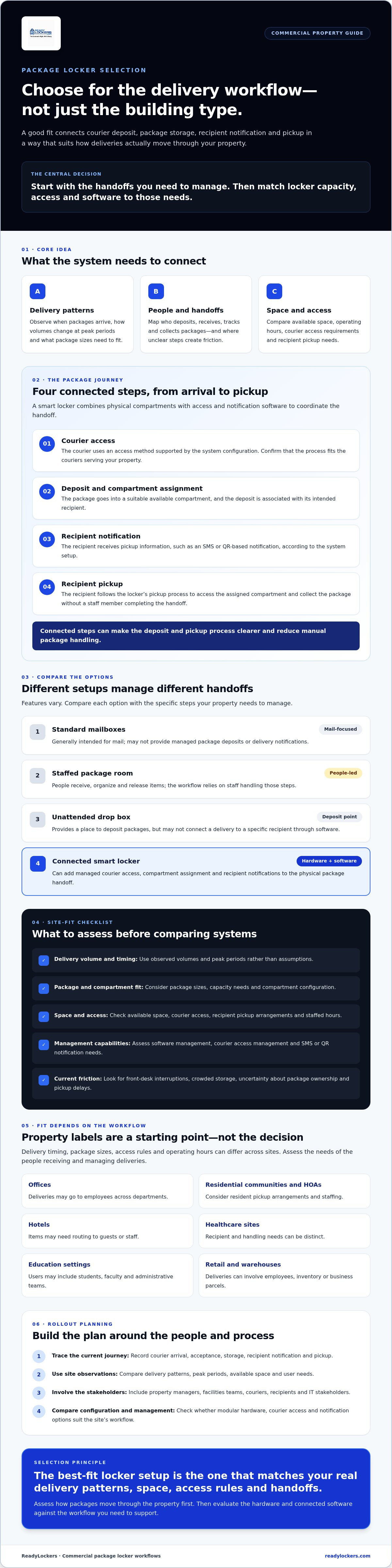
Smart lockers differ from nearby alternatives. Standard mailboxes are generally intended for mail and may not provide managed package deposits or delivery notifications. A staffed package room relies on people to receive, organize, and release items. An unattended drop box provides a deposit point, but may not connect a delivery to a specific recipient through software. Features vary, so compare each option against the handoffs your property needs to manage.
Secure self-service pickup can reduce the number of packages staff must manually receive, track, and hand over.
Which commercial properties can use package lockers?
Use depends on the workflow, not the property label. Office deliveries may go to employees across departments; hotels may need to route items to guests or staff. Healthcare sites can have distinct recipient and handling needs, while education settings may serve students, faculty, and administrative teams. Retail and warehouse deliveries can involve employees, inventory, or business parcels. HOA properties may handle deliveries for residents, often with different staffing and pickup arrangements. Across these settings, package sizes, delivery timing, access rules, and operating hours vary. Assess site requirements before deciding whether lockers fit.
What delivery problems should a property assess first?
Trace the current process from arrival to collection: when couriers arrive, who accepts packages, how recipients are notified, where items wait, and how pickup is completed. Look for recurring friction, such as front-desk interruptions, crowded storage, uncertainty about package ownership, or pickup limited by staffing hours. Record what actually happens before assuming lockers will solve it. This baseline helps you decide whether the issue calls for different access, clearer notifications, more suitable storage, or a change to the overall handoff.
- Courier arrival: When do deliveries come, and who can receive them?
- Intake and storage: Where are packages placed, and how are they associated with recipients?
- Notification and pickup: How do recipients learn about deliveries, and what can delay collection?
How commercial package locker systems connect couriers, recipients, and managers
A locker workflow links a physical compartment to the people responsible for depositing, collecting, and overseeing a package. A smart locker system combines hardware with access and notification software to coordinate package deposits and recipient pickup. Commercial property package lockers can therefore do more than hold deliveries: software can help structure the handoff and give managers operational visibility.
What happens from courier deposit to recipient pickup?
The process begins when a courier uses an access method supported by the system’s configuration. The courier places the package in an available, suitable compartment and completes the deposit according to the interface. The system then connects the delivery with the intended recipient. Don’t assume a particular third-party courier integration is available; confirm how the locker’s access process fits the couriers serving your property.
Next, the recipient receives a notice, such as an SMS or QR-based notification, with information for locating and collecting the package. The recipient follows the system’s pickup process to access the assigned compartment and remove the delivery without a staff member completing the handoff. This contactless approach can simplify collection while keeping the deposit and pickup steps connected.
What do locker management software and notifications add?
Without a clear link between deposit and recipient, staff may have to identify, locate, and communicate about packages manually. Locker management software can centralize courier access administration and provide a management view of locker use. Available status details and controls depend on the system. Usage analytics can also help property teams understand how lockers are being used and inform operational decisions.
SMS and QR notifications bridge the gap between a courier’s completed deposit and a recipient’s next action. The exact message and pickup method vary by configuration, so confirm what users receive and what they need to do. For more detail on the software side, see this smart locker management software guide.
Research from the University of California, Davis considers innovative last-mile delivery strategies, including alternative pickup points. A locker can serve this role when its access process, recipient communications, and management tools align with the property’s delivery workflow.
When comparing options, map each system to the courier access steps, notification methods, pickup experience, and management visibility your site requires. To see how connected hardware and software can work together, explore ReadyLockers smart package locker systems.
How to compare commercial property package locker requirements
Turn delivery observations into requirements before comparing equipment. Track package counts, arrival patterns, package sizes, time spent handling deliveries, and periods when storage fills. Include peak days or seasonal surges when your records show them. There’s no universal capacity threshold: use site-specific data to test whether a proposed setup can accommodate actual demand without taking up space the property needs for other work.
| Requirement | What to assess | Useful site evidence |
|---|---|---|
| Users | Who receives packages, and who may deposit or collect them? | Recipient groups, access responsibilities, and handoff questions |
| Volume and frequency | How many deliveries arrive, and when do they cluster? | Package logs across typical and peak periods |
| Space | Where could lockers or a mailroom fit without disrupting circulation? | Available footprint, access routes, and package storage areas |
| Access | How should couriers and recipients reach the package area? | Staffing patterns, entry controls, and pickup routines |
| Management | What oversight, notifications, or usage information does the team need? | Current manual tasks and reporting responsibilities |
Compare the operating model, not just the storage format. A staffed mailroom depends on personnel to receive, sort, and release items. Basic parcel lockers provide compartments, but may leave access administration and delivery communication outside the locker workflow. A smart locker system connects compartments with software for courier access, recipient notices, and management visibility. The right approach depends on which responsibilities your property wants to automate and which it will retain.
How should property type shape locker requirements?
Office employees may collect packages around work schedules, while hotel guests and retail teams can need a more guest- or customer-facing process. Healthcare and education sites should consider controlled access and accountable handling alongside the needs of staff, patients, students, or faculty. Warehouses may prioritize internal routing and staff access; HOAs may serve residents through shared spaces. These are starting points, not fixed rules. Local delivery patterns and site requirements determine fit.
Which hardware and software criteria belong on a shortlist?
Check whether a modular configuration can fit the layout and observed package mix. Review courier and recipient access steps, along with supported notification options such as SMS or QR. Then assess management tools and analytics against the property team’s actual responsibilities. For a broader checklist of selection considerations, consult the commercial locker buyer’s guide. Compare options using the same site data so commercial property package lockers meet operational needs, not assumptions.
How to plan a commercial package locker rollout
A successful rollout starts with the people and processes around the equipment. Property managers, facilities teams, couriers, recipients, and IT stakeholders can each identify requirements others may miss. Successful implementation depends on aligning site conditions with delivery workflows. Use a staged plan to turn those requirements into a configuration, setup, and review process.
- Gather stakeholder needs. Ask property managers where package handling creates work, facilities teams what the site can accommodate, couriers what access instructions they need, and recipients what pickup guidance would be clear. Involve IT when connectivity, user access, or software administration needs review.
- Document the site and current process. Record available space, delivery routes, recipient access, and existing package-handling steps. Estimate delivery volume from observed records and note periods when arrivals cluster. Use this information to guide capacity and layout decisions.
- Confirm infrastructure and configuration. Share site findings and workflow requirements with the provider. Ask them to confirm the selected configuration’s installation and site-readiness needs, including any requirements for power, connectivity, placement, and access. Don’t assume these are identical across hardware configurations.
- Prepare operating instructions. Define courier directions, access responsibilities, and escalation steps before launch. Give recipients clear guidance on the notification they’ll receive, how pickup works, and which property contact or support channel to use if they encounter a problem.
- Review and refine. After launch, gather feedback and review available usage analytics. Check whether the configuration and instructions match actual delivery patterns, then adjust operational processes where needed.
What should a site assessment establish?
A useful assessment connects physical conditions to package movement. Consider where couriers approach, how recipients reach the pickup area, and whether the proposed location fits the property’s circulation and responsibilities. Compare delivery records across typical and busy periods rather than relying on a single day or an untested estimate. Ask the provider to verify installation and infrastructure requirements for the chosen setup before finalizing site-readiness plans.
How can teams prepare couriers and recipients?
Clear instructions make the intended process easier to follow. Confirm who manages courier access, how exceptions are escalated, and who updates instructions if the site process changes. Recipient guidance should explain what an SMS or QR notice means, how to complete pickup, and where to seek help. After launch, use staff and user feedback alongside available analytics to identify friction and make targeted adjustments.
For a rollout discussion based on your site’s layout and delivery workflow, contact ReadyLockers about smart package lockers.
When ReadyLockers fits a commercial property package workflow
ReadyLockers is worth evaluating when package handling involves repeated staff handoffs, gaps in recipient notifications, or a need for clearer courier access and package oversight. Fit depends on whether the property’s delivery patterns, available space, and management responsibilities align with the system’s configuration. Commercial property package lockers aren’t a universal fix, so bring site-specific requirements to any solution discussion.
Which ReadyLockers capabilities match the requirements?
ReadyLockers combines modular smart locker hardware with a cloud-based management platform. Modular configurations can be tailored to property layouts and delivery-volume requirements, while courier access management helps define how couriers use the lockers. Confirm the available configuration and site requirements before selecting a setup.
The platform supports SMS or QR notifications to connect a package deposit with recipient pickup. It also enables contactless pickup and provides usage analytics for property oversight. These tools can help teams manage the locker workflow; analytics provide operational information, not a promise of a particular outcome. ReadyLockers supplies locker hardware and software, not courier or delivery services.
What should buyers do before requesting a solution discussion?
Prepare a short readiness brief so a product discussion can focus on fit rather than assumptions. Include the site’s current handling process and the workflows the system would need to support. A property management platform connection may also be relevant, so review the property management integration guide as you define requirements.
- Property and users: Identify the property type, recipient groups, and who oversees package handling.
- Delivery patterns: Gather observed delivery frequency, package volume, and peak arrival periods.
- Site constraints: Document available space, delivery routes, and any access or infrastructure considerations that need provider confirmation.
- Workflow requirements: List courier access responsibilities, preferred recipient notices, pickup steps, and the reporting or usage information managers need.
With these details in hand, compare the proposed modular configuration and software workflow against actual property needs. If the requirements align, request a ReadyLockers product discussion to explore whether its smart package lockers and management platform suit your site.
Build a Package Workflow That Fits Your Property
The right locker choice starts with the way deliveries move through your site. Use observed package patterns, peak periods, available space, and user access needs to guide capacity and configuration decisions. Then plan courier instructions, recipient pickup guidance, and management responsibilities before rollout.
Commercial property package lockers work best when hardware and software support the same clear handoff. ReadyLockers offers modular configurations designed around property layouts and delivery volumes, paired with a cloud platform that includes SMS or QR notifications, courier access management, and usage analytics. Evaluate these capabilities against your site’s specific workflow rather than assuming one setup fits every property.
Ready to explore options for your requirements? Discuss package locker options for your property. With a clear plan and the right fit, your team can create a more organized package process for couriers, recipients, and managers.
Frequently Asked Questions
Can commercial package lockers serve more than one type of property?
Yes. Commercial package lockers can be considered for offices, hotels, healthcare facilities, schools, retail locations, warehouses, and homeowners associations. The right setup depends on who receives packages, how deliveries arrive, where lockers can be placed, and how access is managed. For example, an office serving employees may need a different pickup process from a hotel handling guest deliveries. Evaluate the property’s actual workflow rather than assuming one configuration suits every building or organization.
How do commercial property package lockers notify recipients?
Depending on the system configuration, a smart locker platform can notify recipients by SMS or provide a QR code when a package is ready. The notice should identify that a delivery is available and explain how to retrieve it. Before selecting a system, confirm which notification methods are supported, what recipient information is needed, and how users can get help. Clear instructions reduce confusion between courier deposit and recipient pickup.
Are commercial package lockers available for pickup 24/7?
Self-service lockers can support package pickup outside staffed desk or mailroom hours, and ReadyLockers’ system enables contactless pickup around the clock. Actual access still depends on the property’s operating rules, access to the locker area, and system configuration. Check how recipients enter the building, what they should do if they miss a notification, and which team handles access or package questions. A locker’s pickup hours don’t automatically determine building access.
How should a property estimate the locker capacity it needs?
Start with package records or an observation period that covers typical and peak delivery activity. Note delivery frequency, how packages accumulate, pickup timing, user groups, and seasonal variation. Share these findings with the provider so the proposed modular configuration reflects the site’s real patterns. Avoid estimating capacity from total building occupancy alone or relying on a generic rule of thumb. Local delivery data offers a more useful basis for comparing options.
Do commercial package lockers replace a staffed mailroom?
Not necessarily. Lockers can automate parts of package intake, recipient notification, and pickup, while staff may still handle exceptions, oversized deliveries, or other mailroom tasks. Compare today’s process with the workflow you expect after installation, then identify which responsibilities remain manual. For example, a property might use lockers for routine parcels while staff continue managing deliveries that don’t fit the selected compartments. A site-specific review clarifies whether lockers supplement or substantially change existing operations.
What should a buyer check before installing commercial package lockers?
Assess the proposed location, delivery routes, recipient access, expected package volume, and the team’s management responsibilities. Ask the provider to confirm site, infrastructure, installation, courier access, and software requirements for the chosen configuration. Before launch, prepare clear courier instructions and recipient guidance explaining notifications and pickup. After deployment, review system usage and operational feedback to identify adjustments. Confirming these details early helps align installation with the property’s actual delivery workflow.

Frequently Asked Questions
Which commercial properties can use package lockers?+
Use depends on the workflow, not the property label. Office deliveries may go to employees across departments; hotels may need to route items to guests or staff. Healthcare sites can have distinct recipient and handling needs, while education settings may serve students, faculty, and administrative teams. Retail and warehouse deliveries can involve employees, inventory, or business parcels. HOA properties may handle deliveries for residents, often with different staffing and pickup arrangements. Across these settings, package sizes, delivery timing, access rules, and operating hours vary. Assess site requirements before deciding whether lockers fit.
What delivery problems should a property assess first?+
Trace the current process from arrival to collection: when couriers arrive, who accepts packages, how recipients are notified, where items wait, and how pickup is completed. Look for recurring friction, such as front-desk interruptions, crowded storage, uncertainty about package ownership, or pickup limited by staffing hours. Record what actually happens before assuming lockers will solve it. This baseline helps you decide whether the issue calls for different access, clearer notifications, more suitable storage, or a change to the overall handoff. A locker workflow links a physical compartment to the people responsible for depositing, collecting, and overseeing a package. A smart locker system combines hardware with access and notification software to coordinate package deposits and recipient pickup. Commercial property package lockers can therefore do more than hold deliveries: software can help structure the handoff and give managers operational visibility.
What happens from courier deposit to recipient pickup?+
The process begins when a courier uses an access method supported by the system’s configuration. The courier places the package in an available, suitable compartment and completes the deposit according to the interface. The system then connects the delivery with the intended recipient. Don’t assume a particular third-party courier integration is available; confirm how the locker’s access process fits the couriers serving your property. Next, the recipient receives a notice, such as an SMS or QR-based notification, with information for locating and collecting the package. The recipient follows the system’s pickup process to access the assigned compartment and remove the delivery without a staff member completing the handoff. This contactless approach can simplify collection while keeping the deposit and pickup steps connected.
What do locker management software and notifications add?+
Without a clear link between deposit and recipient, staff may have to identify, locate, and communicate about packages manually. Locker management software can centralize courier access administration and provide a management view of locker use. Available status details and controls depend on the system. Usage analytics can also help property teams understand how lockers are being used and inform operational decisions. SMS and QR notifications bridge the gap between a courier’s completed deposit and a recipient’s next action. The exact message and pickup method vary by configuration, so confirm what users receive and what they need to do. For more detail on the software side, see this smart locker management software guide. Research from the University of California, Davis considers innovative last-mile delivery strategies, including alternative pickup points. A locker can serve this role when its access process, recipient communications, and management tools align with the property’s delivery workflow. When comparing options, map each system to the courier access steps, notification methods, pickup experience, and management visibility your site requires. To see how connected hardware and software can work together, explore ReadyLockers smart package locker systems. Turn delivery observations into requirements before comparing equipment. Track package counts, arrival patterns, package sizes, time spent handling deliveries, and periods when storage fills. Include peak days or seasonal surges when your records show them. There’s no universal capacity threshold: use site-specific data to test whether a proposed setup can accommodate actual demand without taking up space the property needs for other work. Compare the operating model, not just the storage format. A staffed mailroom depends on personnel to receive, sort, and release items. Basic parcel lockers provide compartments, but may leave access administration and delivery communication outside the locker workflow. A smart locker system connects compartments with software for courier access, recipient notices, and management visibility. The right approach depends on which responsibilities your property wants to automate and which it will retain.
How should property type shape locker requirements?+
Office employees may collect packages around work schedules, while hotel guests and retail teams can need a more guest- or customer-facing process. Healthcare and education sites should consider controlled access and accountable handling alongside the needs of staff, patients, students, or faculty. Warehouses may prioritize internal routing and staff access; HOAs may serve residents through shared spaces. These are starting points, not fixed rules. Local delivery patterns and site requirements determine fit.
Which hardware and software criteria belong on a shortlist?+
Check whether a modular configuration can fit the layout and observed package mix. Review courier and recipient access steps, along with supported notification options such as SMS or QR. Then assess management tools and analytics against the property team’s actual responsibilities. For a broader checklist of selection considerations, consult the commercial locker buyer’s guide. Compare options using the same site data so commercial property package lockers meet operational needs, not assumptions. A successful rollout starts with the people and processes around the equipment. Property managers, facilities teams, couriers, recipients, and IT stakeholders can each identify requirements others may miss. Successful implementation depends on aligning site conditions with delivery workflows. Use a staged plan to turn those requirements into a configuration, setup, and review process.
What should a site assessment establish?+
A useful assessment connects physical conditions to package movement. Consider where couriers approach, how recipients reach the pickup area, and whether the proposed location fits the property’s circulation and responsibilities. Compare delivery records across typical and busy periods rather than relying on a single day or an untested estimate. Ask the provider to verify installation and infrastructure requirements for the chosen setup before finalizing site-readiness plans.
How can teams prepare couriers and recipients?+
Clear instructions make the intended process easier to follow. Confirm who manages courier access, how exceptions are escalated, and who updates instructions if the site process changes. Recipient guidance should explain what an SMS or QR notice means, how to complete pickup, and where to seek help. After launch, use staff and user feedback alongside available analytics to identify friction and make targeted adjustments. For a rollout discussion based on your site’s layout and delivery workflow, contact ReadyLockers about smart package lockers. ReadyLockers is worth evaluating when package handling involves repeated staff handoffs, gaps in recipient notifications, or a need for clearer courier access and package oversight. Fit depends on whether the property’s delivery patterns, available space, and management responsibilities align with the system’s configuration. Commercial property package lockers aren’t a universal fix, so bring site-specific requirements to any solution discussion.
Which ReadyLockers capabilities match the requirements?+
ReadyLockers combines modular smart locker hardware with a cloud-based management platform. Modular configurations can be tailored to property layouts and delivery-volume requirements, while courier access management helps define how couriers use the lockers. Confirm the available configuration and site requirements before selecting a setup. The platform supports SMS or QR notifications to connect a package deposit with recipient pickup. It also enables contactless pickup and provides usage analytics for property oversight. These tools can help teams manage the locker workflow; analytics provide operational information, not a promise of a particular outcome. ReadyLockers supplies locker hardware and software, not courier or delivery services.
What should buyers do before requesting a solution discussion?+
Prepare a short readiness brief so a product discussion can focus on fit rather than assumptions. Include the site’s current handling process and the workflows the system would need to support. A property management platform connection may also be relevant, so review the property management integration guide as you define requirements. With these details in hand, compare the proposed modular configuration and software workflow against actual property needs. If the requirements align, request a ReadyLockers product discussion to explore whether its smart package lockers and management platform suit your site. The right locker choice starts with the way deliveries move through your site. Use observed package patterns, peak periods, available space, and user access needs to guide capacity and configuration decisions. Then plan courier instructions, recipient pickup guidance, and management responsibilities before rollout. Commercial property package lockers work best when hardware and software support the same clear handoff. ReadyLockers offers modular configurations designed around property layouts and delivery volumes, paired with a cloud platform that includes SMS or QR notifications, courier access management, and usage analytics. Evaluate these capabilities against your site’s specific workflow rather than assuming one setup fits every property. Ready to explore options for your requirements? Discuss package locker options for your property. With a clear plan and the right fit, your team can create a more organized package process for couriers, recipients, and managers.
Can commercial package lockers serve more than one type of property?+
Yes. Commercial package lockers can be considered for offices, hotels, healthcare facilities, schools, retail locations, warehouses, and homeowners associations. The right setup depends on who receives packages, how deliveries arrive, where lockers can be placed, and how access is managed. For example, an office serving employees may need a different pickup process from a hotel handling guest deliveries. Evaluate the property’s actual workflow rather than assuming one configuration suits every building or organization.
How do commercial property package lockers notify recipients?+
Depending on the system configuration, a smart locker platform can notify recipients by SMS or provide a QR code when a package is ready. The notice should identify that a delivery is available and explain how to retrieve it. Before selecting a system, confirm which notification methods are supported, what recipient information is needed, and how users can get help. Clear instructions reduce confusion between courier deposit and recipient pickup.
Are commercial package lockers available for pickup 24/7?+
Self-service lockers can support package pickup outside staffed desk or mailroom hours, and ReadyLockers’ system enables contactless pickup around the clock. Actual access still depends on the property’s operating rules, access to the locker area, and system configuration. Check how recipients enter the building, what they should do if they miss a notification, and which team handles access or package questions. A locker’s pickup hours don’t automatically determine building access.
How should a property estimate the locker capacity it needs?+
Start with package records or an observation period that covers typical and peak delivery activity. Note delivery frequency, how packages accumulate, pickup timing, user groups, and seasonal variation. Share these findings with the provider so the proposed modular configuration reflects the site’s real patterns. Avoid estimating capacity from total building occupancy alone or relying on a generic rule of thumb. Local delivery data offers a more useful basis for comparing options.
Do commercial package lockers replace a staffed mailroom?+
Not necessarily. Lockers can automate parts of package intake, recipient notification, and pickup, while staff may still handle exceptions, oversized deliveries, or other mailroom tasks. Compare today’s process with the workflow you expect after installation, then identify which responsibilities remain manual. For example, a property might use lockers for routine parcels while staff continue managing deliveries that don’t fit the selected compartments. A site-specific review clarifies whether lockers supplement or substantially change existing operations.
What should a buyer check before installing commercial package lockers?+
Assess the proposed location, delivery routes, recipient access, expected package volume, and the team’s management responsibilities. Ask the provider to confirm site, infrastructure, installation, courier access, and software requirements for the chosen configuration. Before launch, prepare clear courier instructions and recipient guidance explaining notifications and pickup. After deployment, review system usage and operational feedback to identify adjustments. Confirming these details early helps align installation with the property’s actual delivery workflow.