Touchless package retrieval system options for different settings
Explore touchless package retrieval system options for offices, campuses, apartments, and healthcare. Compare indoor and outdoor setups and simplify pickup.

Most smart locker installations take 1-3 days, depending on system size and site preparation. A touchless package retrieval system lets couriers place parcels in secure compartments, then notifies recipients so they can collect them without a handoff. The installation timeline is only part of the decision: placement and the pickup experience matter just as much.
Installation speed matters, especially when package volume is already disrupting daily operations. But a touchless package retrieval system also needs to suit the site and make collection simple for every recipient.
This guide explains how the locker process works, what indoor and outdoor options offer, and how recipient portals and pickup scheduling can support different settings. You’ll also see how a touchless package retrieval system can serve offices, campuses, apartments, healthcare sites, and other facilities. From secure access to clear pickup instructions, each element shapes how smoothly couriers, recipients, and property teams can use the system.
Key Takeaways
- Understand how courier deposits, pickup notifications, and recipient access work together to make parcel collection contactless.
- Compare indoor and outdoor placement by considering access, site layout, and the recipient experience.
- Match locker workflows to the needs of offices, campuses, apartments, healthcare facilities, and other settings.
- See how recipient portals and pickup scheduling can organize collection and reduce friction for property teams and recipients.
What is a smart locker system?
A touchless package retrieval system connects courier deliveries to recipient access through secure compartments and digital notifications. Instead of a person-to-person handoff, the process follows three steps: deposit, notification, and pickup.
Automated Package Deposit and Retrieval
A courier places a parcel in an available compartment, records its destination through the system, and secures the door. The recipient then uses the provided access method to retrieve it. This sequence matters in facilities where parcels arrive from multiple carriers and staff might otherwise sort or distribute them manually. For example, a campus mailroom can route a delivery to a locker instead of arranging a direct handoff.
Pickup Notifications and Reminders
After a deposit, an automated notification tells the recipient that a parcel is ready and explains how to access it. SMS and QR code notifications are examples of ways recipients can receive pickup information. Reminders can bring an uncollected parcel back to a recipient’s attention, while clear instructions reduce confusion at the locker. For a busy office, that means each person can act on their own delivery message.
Parcel Tracking and Retrieval
Automated parcel tracking connects delivery and pickup events, helping facilities follow a package through the locker process. A recorded deposit shows that a parcel reached its assigned location; a completed pickup closes the retrieval step. At warehouse scale, automation can support processes handling thousands of parcels per month. AI may help analyze operational data, but it doesn’t replace clear access rules or accurate parcel records.
Comparing Retrieval Options
A staffed package room relies on personnel to receive and hand out deliveries. Smart lockers give recipients access to parcels stored in assigned compartments, without requiring a staff handoff. The term touchless package retrieval system describes this contact-free pickup process; the lockers provide the secure storage. Building, fire, and accessibility requirements depend on the site and local jurisdiction, so consider accessible routes and safe placement when planning. Protect recipient information and prevent unauthorized access or misdelivery with clear access controls and careful records management.
Parcel locker options for indoor and outdoor installations
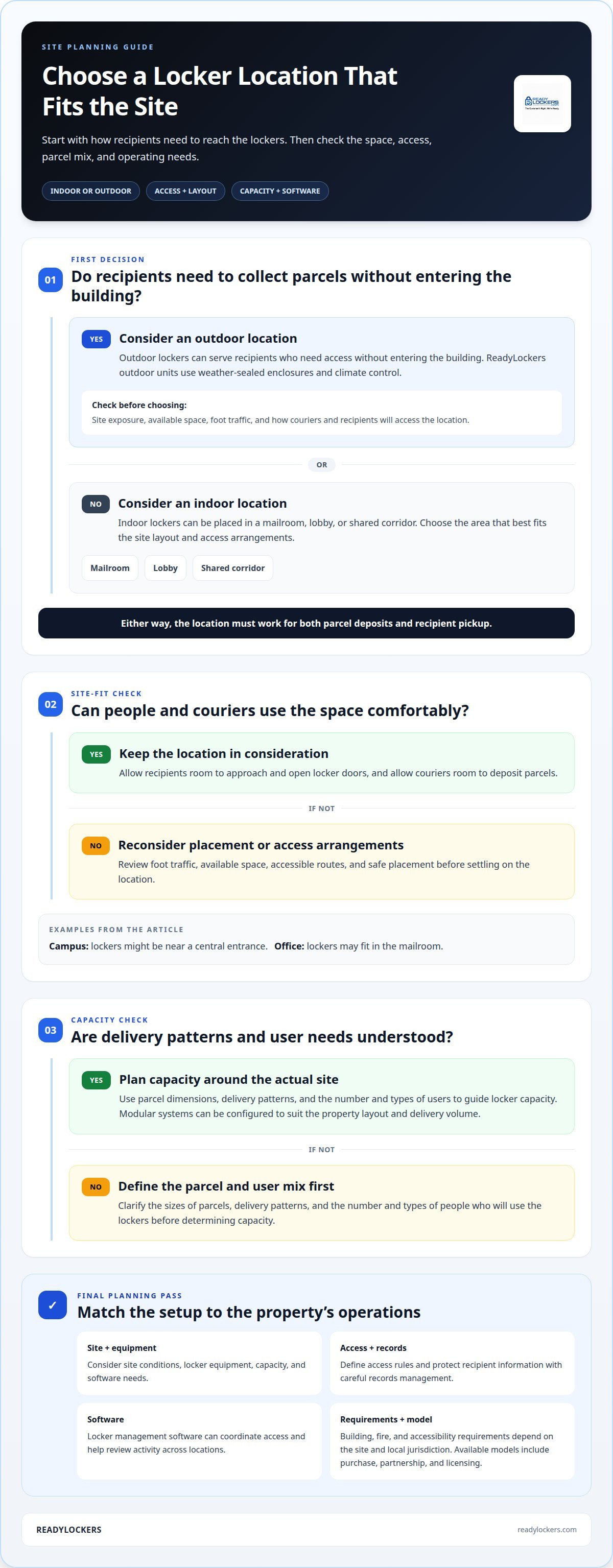
Indoor lockers can be placed in a mailroom, lobby, or shared corridor. Outdoor models can serve recipients who need access without entering the building; Enclosure and weather-protection details for ReadyLockers outdoor units are confirmed for each model and site. Compare foot traffic, available space, site exposure, and access arrangements before choosing a location. A campus might place lockers near a central entrance, while an office may use its mailroom.
Plan capacity around parcel dimensions, delivery patterns, and the number and types of users. ReadyLockers configures modular locker systems to suit a property’s layout and delivery volume. Allow space for recipients to approach and open doors, and for couriers to deposit parcels. Locker management software helps coordinate access and review activity across locations.
When planning a project, consider the locker equipment, site conditions, capacity, and software needs. ReadyLockers offers custom quotes, with purchase, partnership, and licensing models. Define the required integrations and intended uses early so the system configuration reflects the property’s operations rather than an assumed standard setup.
For healthcare sites, lockers can support exchanges such as distributing testing kits or collecting returned kits and patient samples. Plan a clear route to the locker, usable controls, and straightforward pickup instructions. Recipients can use the access details they receive, such as a PIN or QR code, to open their assigned compartment. If access details are lost or a parcel cannot be found, staff can review the system’s delivery records and compartment assignment.
For a project involving indoor or outdoor placement, smart locker planning can help connect capacity, site layout, and recipient access requirements.
Applications across offices, campuses, apartments, healthcare, and law enforcement
Offices can direct employee deliveries to shared lockers, reducing reception handoffs and mailroom interruptions. On a university campus, lockers can serve residence halls, libraries, and administrative buildings. Apartment properties can give residents a designated collection point instead of coordinating each parcel individually. In every setting, placement and access rules should reflect how people and deliveries move through the site.
Healthcare uses extend beyond ordinary parcels. Hospitals and pharmacies can distribute medication through lockers, while healthcare organizations can issue testing kits and collect returned kits or patient samples. This creates an exchange point that reduces person-to-person contact while giving patients another way to engage with healthcare services. For a specific pilot, such as one associated with Fairview Health Services, useful results would include completed exchanges, collection patterns, and staff workflow effects. No measured Fairview pilot results are included here, so no outcome should be inferred.
Law enforcement facilities can consider locker-based handoffs for routine administrative deliveries or staff supplies, keeping collection separate from front-desk interactions. These lockers are not a substitute for evidence storage procedures: evidence handling requires its own controls and records. The key question is whether the parcel workflow can be clearly separated from sensitive inventory and existing facility processes.
The right setup depends on the purpose and the people using it. An office may prioritize employee access, while a campus needs to serve multiple buildings and recipient groups. Healthcare teams need workflows suited to the items being exchanged. Before choosing locker locations, map delivery points, recipient groups, and collection steps. This helps identify which handoffs the system can simplify and where staff involvement remains necessary.
Recipient portals and pickup scheduling
A recipient’s digital experience should make parcel information and pickup instructions easy to access. With ReadyLockers, recipients receive an instant SMS or email notification when a parcel is deposited, along with a one-time pickup code. They can use the code or a QR code at the kiosk; the free iOS and Android app is optional. The important thing is that recipients can readily find out where and how to collect their parcel.
Pickup scheduling may suit sites that need to coordinate collection around building access, shared spaces, or busy periods. Before adding scheduling, check whether it solves a specific operational problem and fits locker availability and site procedures. Avoid creating a separate manual process for staff to manage.
Access information, locker records, and recipient notifications need to stay aligned. If a parcel is assigned to one compartment but the message points to another, the recipient faces an avoidable problem. Clear status updates help property teams see whether a delivery is awaiting pickup or the process is complete. In multi-building environments, use consistent instructions across locations.
Use the portal to make the next step obvious: show the parcel status, explain how access works, and present any relevant pickup timing. Keep messages concise so recipients can act without searching through several screens. For example, an apartment resident checking a phone should see the collection details before reaching the locker. With a coordinated workflow, collecting a package no longer depends on staff relaying routine updates. Explore a contactless pickup system to connect digital recipient guidance with locker access.
ReadyLockers: Smart Package Lockers
ReadyLockers combines secure parcel storage with digital access for properties that want a more organized pickup process. Its Smart Package Lockers, cloud-based Locker Management Software, Contactless Pickup System, and Courier Access Interface support the handoff from delivery to collection.
For a property team, this setup can connect courier deposits with recipient notifications and secure access. Recipients receive SMS or QR code notifications, then collect packages without a person-to-person handoff. Pickups are contactless and available 24/7, helping prevent package theft and missed deliveries. This option fits offices, campuses, apartments, and other properties managing shared package areas. It doesn’t provide courier or delivery services, residential in-unit lockers, or refrigerated storage lockers.
To discuss a smart locker setup for your property, contact ReadyLockers.
Plan a smoother parcel experience
Start by deciding what you want to improve at your property. Consider where recipients collect parcels, how couriers access the lockers, and which tasks staff should no longer need to coordinate manually. These priorities help shape a touchless package retrieval system around actual building operations, rather than assuming every site needs the same setup.
ReadyLockers offers Smart Package Lockers, Locker Management Software, and a Contactless Pickup System to support secure parcel access and collection. The modular system can be configured around the property layout and delivery volume, helping teams plan for recipient needs and daily workflows.
Bring your site’s priorities and pickup challenges into the conversation. Contact ReadyLockers to discuss your system and identify a practical next step for your property.
Frequently Asked Questions
How long does installation take?
Most installations take 1-3 days, depending on system size and site preparation. Apartment systems are often installed in a single day, while larger industrial deployments with network integration may take about a week. A property’s readiness, placement plan, and integration needs shape the schedule. Preparing the installation area and defining access workflows helps keep setup aligned with site operations.
What is a touchless package retrieval system and how does it work?
Couriers place parcels in secure compartments, and recipients collect them without a direct handoff. The courier records the delivery, deposits the parcel, and closes the compartment. The recipient receives a one-time pickup code by SMS or email and can use a PIN or QR code at the kiosk. For example, an office can direct deliveries to a shared collection point, reducing reliance on reception staff.
What technologies do these systems use, such as QR codes, PINs, or biometrics?
Access methods vary by system and can include PINs, QR codes, or badges. ReadyLockers supports all three at its kiosk, and recipients can use a PIN or QR code without an app. Choose access methods that suit recipient needs and building procedures. Don’t assume biometric access is available across systems.
How much does installation and maintenance cost?
ReadyLockers provides custom quotes and offers purchase, partnership, and licensing models. To define your project, identify delivery volume, required capacity, site conditions, software needs, and integration requirements. These details help shape the system configuration and how it will operate. A quote based on the property’s requirements is more useful than a general market estimate.
Which systems suit apartments, offices, and retail locations?
The right system depends on recipient access, parcel volume, and the site’s daily workflow. Apartment teams can plan for resident access; offices can prioritize employee collection and courier entry; retailers can align pickup with customer service. Compare locker capacity, placement, access options, and management tools. ReadyLockers serves apartments, offices, and retail locations with configurable locker systems.
What steps are needed to install and set up a system?
Start by assessing delivery patterns, parcel sizes, site layout, and who needs access. Then plan locker placement and capacity, and define courier entry, recipient notifications, and access methods. Identify software and building-system integration needs as part of the plan. After installation, test a sample delivery from deposit to collection. Clear instructions for couriers, staff, and recipients help establish consistent use from the start.

Frequently Asked Questions
How long does installation take?+
Most installations take 1–3 days, depending on system size and site preparation. Apartment systems are often installed in a single day, while larger industrial deployments with network integration may take about a week. A property’s readiness, placement plan, and integration needs shape the schedule. Preparing the installation area and defining access workflows helps keep setup aligned with site operations.
What is a touchless package retrieval system and how does it work?+
Couriers place parcels in secure compartments, and recipients collect them without a direct handoff. The courier records the delivery, deposits the parcel, and closes the compartment. The recipient receives a one-time pickup code by SMS or email and can use a PIN or QR code at the kiosk. For example, an office can direct deliveries to a shared collection point, reducing reliance on reception staff.
What technologies do these systems use, such as QR codes, PINs, or biometrics?+
Access methods vary by system and can include PINs, QR codes, or badges. ReadyLockers supports all three at its kiosk, and recipients can use a PIN or QR code without an app. Choose access methods that suit recipient needs and building procedures. Don’t assume biometric access is available across systems.
How much does installation and maintenance cost?+
ReadyLockers provides custom quotes and offers purchase, partnership, and licensing models. To define your project, identify delivery volume, required capacity, site conditions, software needs, and integration requirements. These details help shape the system configuration and how it will operate. A quote based on the property’s requirements is more useful than a general market estimate.
Which systems suit apartments, offices, and retail locations?+
The right system depends on recipient access, parcel volume, and the site’s daily workflow. Apartment teams can plan for resident access; offices can prioritize employee collection and courier entry; retailers can align pickup with customer service. Compare locker capacity, placement, access options, and management tools. ReadyLockers serves apartments, offices, and retail locations with configurable locker systems.
What steps are needed to install and set up a system?+
Start by assessing delivery patterns, parcel sizes, site layout, and who needs access. Then plan locker placement and capacity, and define courier entry, recipient notifications, and access methods. Identify software and building-system integration needs as part of the plan. After installation, test a sample delivery from deposit to collection. Clear instructions for couriers, staff, and recipients help establish consistent use from the start.