Remote Locker Access Control: Secure and Simplify Package Handoffs
See how remote locker access control streamlines package handoffs. Coordinate courier deposits, automate notifications, and provide secure 24/7 pickup today.

Remote locker access control helps organize package handoffs by connecting courier deposits with recipient pickup. Instead of relying on staff to pass packages from one person to another, property teams can use smart lockers and a connected management platform to coordinate access and notifications. The key is to distinguish access control from general locker software and define a clear process for each user.
A workable process makes responsibilities clear for couriers, recipients, and property teams. Smart locker hardware and a cloud-based management platform bring those steps together, with courier access management and SMS or QR code notifications for recipients. Contactless pickup is available 24/7, so recipients can collect packages without arranging an in-person handoff with staff.
This guide explains how remote access control fits into the package workflow, how to plan for courier deposits and recipient pickup, and what to assess when comparing options. You’ll also find practical ways to reduce manual coordination and support a more organized package handoff across settings such as apartments, offices, schools, and hotels.
Key Takeaways
- Remote locker access control works best when courier deposits and recipient pickup are treated as distinct steps in one package workflow.
- Assess access options by how they support courier handoffs, recipient access, administrative oversight, and your property’s package volume.
- Map users, package flow, site needs, and operating responsibilities before deciding how locker access should work.
- Delivery frequency and locker capacity shape the workflow, so plan how packages move from deposit to pickup.
- ReadyLockers combines smart locker hardware with a cloud platform that includes courier access management, usage analytics, and SMS or QR code notifications.
What Remote Locker Access Control Solves in Package Delivery
Remote locker access control manages who can use package lockers through a connected access system. It defines how the people involved in a handoff use the lockers. It is distinct from the locker cabinet itself and from the company transporting parcels.
These are separate parts of the process. The physical locker provides compartments for package storage. A delivery service transports the parcel to the property. The access-control layer supports the locker handoff, from courier deposit to recipient pickup. Keeping those roles clear helps property teams coordinate deliveries without relying on staff to oversee every exchange.
A parcel locker supports parcel collection and delivery through secure storage. Access control connects that storage to the handoff. The practical questions are where a package can be placed, how couriers can deposit it, and how the intended recipient can collect it with minimal friction.
How parcel locker access differs from door access
Building access and locker access serve different purposes. A door permission determines who can enter a building or secured area. A package locker interaction supports a parcel handoff: a courier deposits an item, and its recipient retrieves it later.
That difference matters because couriers and recipients have separate tasks. Courier access supports delivery into the locker; recipient access supports collection. Treating both as general building entry can leave the handoff unclear, especially if property staff are expected to receive, sort, or release packages manually. A well-defined workflow gives each role a clear place in the process and lets the property team oversee how the service operates.
Who uses remote locker access in a property
Four user groups typically shape the workflow: couriers making deposits, recipients collecting packages, property teams coordinating day-to-day operations, and system administrators managing access arrangements. Their needs overlap, but they aren’t identical. Couriers need a practical deposit process; recipients need clear pickup instructions; staff need an orderly operation; administrators need to manage the system’s setup.
The details vary by property. In an apartment community, recipients may be residents, while the property team supports shared deliveries. At an office, recipients may be employees whose schedules differ from delivery times. A school or retail site may have designated staff or other site-specific handoff routines. The same access model won’t automatically fit every location because users, delivery patterns, and operating responsibilities differ.
Plan for convenience and package handling together to avoid a process that works for one group but adds work for another. Map who deposits, who collects, and who manages the workflow. This gives property teams a practical foundation for evaluating locker access options.
How Remote Locker Access Connects Couriers, Lockers, and Recipients
A package handoff has distinct stages, each involving a different user. A courier completes a deposit, the recipient learns the package is ready, and property teams manage a process that doesn’t depend on staff physically passing the parcel along. Remote locker access control connects these steps through a managed workflow.
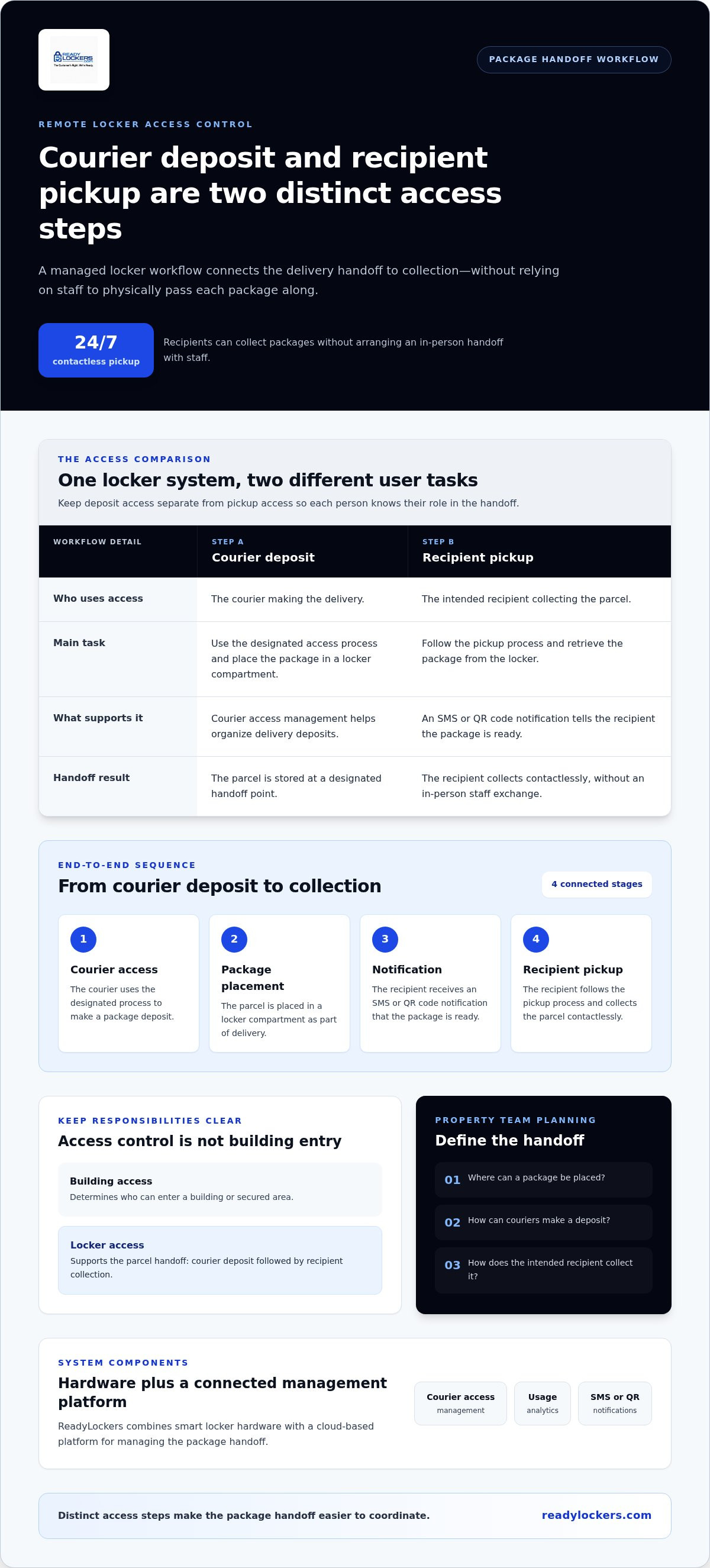
A courier deposits a package in a locker, the recipient receives a notification, and the recipient collects the package through a separate pickup step. Keeping courier responsibilities distinct from recipient pickup helps make clear who is using the locker and why. It also gives property teams a consistent process rather than treating every interaction as general building entry.
Courier access and package deposit
The courier’s role is to place a package in the locker as part of delivery. A defined deposit flow gives this task a clear endpoint: the parcel is stored, and the handoff can move to recipient collection. Courier access management helps organize the process around delivery instead of requiring staff to receive and transfer every package manually. The access setup should fit the system and the property’s workflow.
Clear steps matter. If couriers need to locate staff or wait for someone to accept a package, deliveries can interrupt both the property team and the courier. A locker-based process provides a designated handoff point, while access management helps distinguish deposit activity from recipient pickup.
Recipient notification and contactless pickup
After a deposit, the recipient needs a clear signal that a package is ready. ReadyLockers sends recipients instant SMS or QR code notifications. Recipients can use the notification to identify the package handoff and proceed with pickup, without needing a staff member to coordinate the exchange in person. Contactless pickup is available 24/7, giving recipients flexibility to collect packages outside the hours when property staff may be available.
A practical end-to-end workflow has four stages:
- Courier access: The courier uses the designated access process to make a package deposit.
- Package placement: The parcel is placed in a locker compartment as part of the delivery handoff.
- Recipient notification: The recipient receives an SMS or QR code notification that the package is ready.
- Recipient pickup: The recipient follows the pickup process and collects the parcel contactlessly.
Separating these roles supports a more orderly handoff. It keeps the courier’s deposit task distinct from the recipient’s collection and gives staff a process they can explain and oversee. For more on the software side of this process, see this smart locker management software guide.
For a complete package handoff, ReadyLockers’ package locker solutions bring locker hardware and a cloud-based management platform into one workflow.
How to Evaluate Remote Locker Access Control Options
Remote locker access control involves more than a digital lock or credential. The credential is one part of the system; the full setup also includes the physical locker, the software that manages package activity, and the workflow connecting courier deposits to recipient pickup. Compare options by how these elements work together, not just by the access method named in a feature list.
Start your comparison with the package handoff the system needs to support. Consider how couriers make deposits, how recipients proceed to pickup, what administrators can oversee, and whether the locker setup fits the property’s package volume. A method that’s convenient for one user group may add friction for another.
Access methods and role-based permissions
Locker systems may use RFID cards or fobs, NFC-enabled devices, mobile credentials, PINs, or QR codes. Each approach creates a different user interaction, and availability varies by system. Evaluate methods against the task: couriers need a clear deposit process, recipients need straightforward pickup, and staff need an understandable way to support the operation. Don’t assume one credential type automatically provides the right controls for both roles.
Ask how the system distinguishes courier activity from recipient collection and how access responsibilities fit into its workflow. Check whether the system’s actual capabilities match the handoff your property needs, rather than assuming every option offers the same permissions or administration tools.
| Access approach | Typical user task | Operational consideration |
|---|---|---|
| RFID card or fob | Users present a physical credential | Consider how credentials are issued and handled by each user group. |
| NFC or mobile credential | Users access the system with a compatible device | Assess whether the interaction suits couriers and recipients at the locker. |
| PIN | Users enter a code as part of access | Understand how codes fit the deposit and collection steps. |
| QR code | Users scan a code where the system supports that method | Distinguish a notification containing a QR code from a code used to access a locker. |
Centralized visibility, system model, and workflow fit
Cloud-managed systems use a connected platform for management, while locally managed approaches place more responsibility within the site’s own operating environment. The practical differences depend on the system. Consider where administration takes place, what information staff can access, and how the approach fits the property’s resources. ReadyLockers provides a cloud-based management platform with courier access management and usage analytics, along with SMS or QR code notifications for recipients.
Finally, test the end-to-end process against expected package volume. Can couriers complete deposits without routine staff handoffs? Can recipients understand how to collect packages? Can the property team manage the workflow as activity changes? These questions keep the comparison focused on operational fit, not just a standalone lock feature.
Plan a Remote Locker Access Control Workflow for Your Property
Start with the package journey, then decide how access should support it. Planning for remote locker access control means clarifying who deposits packages, who collects them, and who manages the process before finalizing locker placement or system setup. A defined workflow can reduce confusion and help property teams prepare for routine operations.
Use this checklist to establish the basics:
- Identify users: List the couriers making deposits, the recipients collecting packages, and the staff or administrators responsible for managing the process.
- Map package flow: Describe how a delivery moves from arrival at the property to locker deposit, recipient notification, and collection.
- Estimate activity: Consider delivery frequency, package mix, and when recipients are likely to collect items. Compare expected demand with available locker capacity.
- Set expectations: Decide what recipients need to know about pickup and what staff should do when users have questions or need help with routine operations.
- Review the site: Consider the locker area’s location, how users reach it, and whether the layout supports a clear handoff journey.
Map users, delivery volume, and pickup expectations
Delivery frequency and capacity shape the workflow. If deliveries arrive throughout the day, for example, the property may need a process that lets couriers deposit packages without waiting for staff. If package activity is concentrated at certain times, consider whether available capacity and recipient pickup patterns can accommodate that flow. Base the plan on the site’s actual needs rather than a one-size-fits-all assumption.
Define operating expectations in plain language. Recipients should understand how they’ll be notified and what to do next. Property teams should know who handles routine questions and how package activity fits into their responsibilities. This planning is separate from installation details: establish the user journey and operating roles first, then coordinate the physical locker setup around them. A contactless delivery locker technology guide can provide broader context on contactless handoffs.
Coordinate the locker setup with property operations
Check how the locker area connects to the routes couriers and recipients already use. A location that’s convenient for staff may not create an intuitive pickup journey, so consider each user’s path through the property. Assign responsibility for explaining the process and handling routine questions, too. These decisions help the access workflow function as part of the site rather than as a disconnected piece of equipment.
Keep access planning distinct from software analytics. Permissions and user steps define how a handoff works; usage analytics can help a property review locker activity after the system is in use. They serve different purposes. For broader hardware and purchasing considerations, use the smart package locker buyer’s guide alongside your workflow plan.
Ready to plan a package handoff around your property’s users and operations? Explore ReadyLockers’ package locker solutions.
How ReadyLockers Supports Remote Package Locker Access
A package locker workflow needs both a place to store parcels and a way to coordinate the handoff. ReadyLockers combines smart package locker hardware with a cloud-based management platform, connecting courier deposits and recipient pickups within one package-management solution. The platform includes courier access management, usage analytics, and SMS or QR code notifications for recipients.
These components support different parts of the process. Courier access management supports the deposit stage, while notifications let recipients know when a package is ready for collection. Usage analytics give property teams information about locker activity to support operational planning. Together, the hardware and platform help organize package handling without requiring property staff to mediate every handoff.
One workflow for courier deposits and recipient pickups
For a courier, the workflow centers on placing a package in the locker. For the recipient, it begins with an SMS or QR code notification and continues with collection. Keeping these steps distinct clarifies each user’s responsibilities while connecting them as one handoff. ReadyLockers supports contactless pickup, available 24/7, so recipients can collect packages without coordinating an in-person exchange with property staff.
The system supports package handling; it does not replace the courier or guarantee delivery outcomes. Property teams can plan how the locker workflow fits their operations, while the connected platform supports courier access management and recipient notifications. The result is a more organized way to coordinate the handoff from deposit to pickup.
A platform for different property environments
Package workflows differ across apartments, offices, warehouses, hotels, hospitals, schools, retail locations, and HOAs. A residential community may plan around resident pickups, while an office may need to account for employees who collect packages when they’re on site. Each property has its own layout, delivery activity, user groups, and operating responsibilities, so don’t assume one configuration fits every location.
ReadyLockers offers modular locker units designed around property layouts and package volume requirements, paired with a cloud-based management platform. Property teams can consider the physical locker setup alongside how couriers deposit packages, how recipients collect them, and how staff oversee routine operations. Usage analytics can also inform reviews of locker activity as the property’s package workflow develops.
Remote locker access control works best when access management supports the full parcel handoff rather than functioning as a standalone digital lock. ReadyLockers connects locker hardware and software with courier access management, recipient notifications, and contactless pickup to support that end-to-end approach.
Explore ReadyLockers to see how smart package lockers and management software can support your property’s package workflow.
Turn Your Package Workflow Into a Practical Next Step
Remote locker access control is most useful when it supports how people need to exchange packages. Before choosing a setup, identify where handoffs create delays or extra coordination, then decide what a smoother process should look like for your property. This gives your evaluation a clear purpose and keeps technology decisions grounded in day-to-day operations.
Set a baseline by noting which parts of package handling require staff involvement, where users need clearer guidance, and what your team wants to improve. These observations can help shape a solution around your property’s priorities instead of adding technology without a defined operational goal.
Ready to explore a package locker approach for your property? Explore ReadyLockers’ solutions and take the next step toward a more organized handoff.
Frequently Asked Questions
Is remote locker access control secure?
Remote locker access control can make package access more deliberate, but no system removes the need for sound security practices. Review how permissions are assigned, how users are instructed, and how the locker area is supervised as part of normal property operations. For example, decide who handles a report of a package in the wrong compartment and how staff respond. Clear responsibilities complement the system’s access process.
Can couriers use package lockers without property staff present?
A locker workflow can support courier deposits without staff completing each handoff. The property still needs a defined delivery process, including clear directions to the locker area and an understood deposit procedure. ReadyLockers includes courier access management, and recipients receive notifications when packages are ready. Align the workflow with the site’s delivery routines so couriers know where to go and staff know how to support the process.
How do recipients know when a package is ready for pickup?
ReadyLockers sends recipients instant SMS or QR code notifications. These messages signal that a package is ready and help recipients understand the next step. Pair the notification with clear instructions about where the locker is located and how pickup works at your property. For instance, distinguish the locker area from a reception desk or mailroom so recipients can find the right handoff point without asking staff.
Can remote locker access control support different types of properties?
Yes. Package locker workflows can be used in varied property settings, with the process shaped around each site’s users and operations. ReadyLockers serves apartments, offices, warehouses, hotels, hospitals, schools, retail locations, and homeowners associations. A hotel may need to account for guest packages, while a warehouse may plan around staff and site procedures. In each case, consider who receives parcels, how people reach the lockers, and who oversees package handling.
Does remote locker access control replace a building’s door access system?
Not necessarily. Locker access supports package deposits and collections, while building access systems manage entry to a property or secured area. A courier may need to reach a designated locker location, but locker access does not replace the property’s entry controls. Treat them as separate parts of site operations, and define how couriers reach the locker area in a way that aligns with the property’s existing access procedures.
What happens if a recipient does not collect a package promptly?
The property should set a clear procedure for uncollected packages rather than relying on access technology to resolve the situation. Decide who monitors items that remain in lockers, how staff follow up, and where a package goes if it needs to be removed. Communicate pickup expectations to recipients in advance. A consistent procedure also helps staff handle exceptions, such as a recipient who says they did not receive or cannot locate a notification.
What should property managers consider before adopting remote locker access control?
Start by documenting a typical delivery from arrival through pickup, then note where staff currently intervene or answer repeated questions. Include package size and delivery patterns in the assessment, along with the location users will access and who will manage routine issues. For example, identify who is responsible for explaining the process to new occupants or employees. These details help managers assess the full operating workflow, not just the electronic access method.

Frequently Asked Questions
Is remote locker access control secure?+
Remote locker access control can make package access more deliberate, but no system removes the need for sound security practices. Review how permissions are assigned, how users are instructed, and how the locker area is supervised as part of normal property operations. For example, decide who handles a report of a package in the wrong compartment and how staff respond. Clear responsibilities complement the system’s access process.
Can couriers use package lockers without property staff present?+
A locker workflow can support courier deposits without staff completing each handoff. The property still needs a defined delivery process, including clear directions to the locker area and an understood deposit procedure. ReadyLockers includes courier access management, and recipients receive notifications when packages are ready. Align the workflow with the site’s delivery routines so couriers know where to go and staff know how to support the process.
How do recipients know when a package is ready for pickup?+
ReadyLockers sends recipients instant SMS or QR code notifications. These messages signal that a package is ready and help recipients understand the next step. Pair the notification with clear instructions about where the locker is located and how pickup works at your property. For instance, distinguish the locker area from a reception desk or mailroom so recipients can find the right handoff point without asking staff.
Can remote locker access control support different types of properties?+
Yes. Package locker workflows can be used in varied property settings, with the process shaped around each site’s users and operations. ReadyLockers serves apartments, offices, warehouses, hotels, hospitals, schools, retail locations, and homeowners associations. A hotel may need to account for guest packages, while a warehouse may plan around staff and site procedures. In each case, consider who receives parcels, how people reach the lockers, and who oversees package handling.
Does remote locker access control replace a building’s door access system?+
Not necessarily. Locker access supports package deposits and collections, while building access systems manage entry to a property or secured area. A courier may need to reach a designated locker location, but locker access does not replace the property’s entry controls. Treat them as separate parts of site operations, and define how couriers reach the locker area in a way that aligns with the property’s existing access procedures.
What happens if a recipient does not collect a package promptly?+
The property should set a clear procedure for uncollected packages rather than relying on access technology to resolve the situation. Decide who monitors items that remain in lockers, how staff follow up, and where a package goes if it needs to be removed. Communicate pickup expectations to recipients in advance. A consistent procedure also helps staff handle exceptions, such as a recipient who says they did not receive or cannot locate a notification.
What should property managers consider before adopting remote locker access control?+
Start by documenting a typical delivery from arrival through pickup, then note where staff currently intervene or answer repeated questions. Include package size and delivery patterns in the assessment, along with the location users will access and who will manage routine issues. For example, identify who is responsible for explaining the process to new occupants or employees. These details help managers assess the full operating workflow, not just the electronic access method.