Reduce Package Handling for Staff: A Practical 2026 Guide
Discover how reduced package handling for staff streamlines daily deliveries. Map workflows, automate handoffs with smart lockers, and save valuable staff time.

Every incoming package shouldn’t become a staff task. Reduced package handling for staff starts by identifying where routine work builds up: receiving parcels, recording arrivals, notifying recipients, and coordinating handoffs. When each delivery interrupts someone’s primary responsibilities, the workload can become difficult to manage, especially during peak periods.
Manual processes may feel straightforward, but repeated logging and follow-up can turn package receipt into a steady stream of administrative work. The goal isn’t to make pickup harder or remove staff from every situation. It’s to automate routine handoffs so staff can focus on exceptions that need attention.
This guide shows you how to map your current package workflow, spot the touchpoints that take staff time, and compare manual handling with a locker-assisted process. You’ll also learn what to assess before choosing smart lockers, how locker hardware and management software can support recipient notifications and contactless pickup, and how to plan a measured rollout. The result is a practical way to decide whether automation fits your operation and how to evaluate its impact.
Key Takeaways
- Trace each package from courier arrival through recipient handoff to pinpoint where staff time and interruptions accumulate.
- Use a step-by-step workflow review to reduce repeat handoffs while keeping clear procedures for exceptions and staff oversight.
- Compare manual handling, process changes, and locker-supported workflows based on staff touchpoints, recipient access, tracking, and exception management.
- Plan a focused pilot with baseline measures for package volume, interruptions, staff touchpoints, and exceptions.
- Reduced package handling for staff depends on matching the solution to your handoff patterns, space, courier process, and oversight needs.
Where Does Staff Time Go in a Package-Handling Workflow?
Package handling can interrupt work long before anyone collects a delivery. A courier arrives while a front-desk employee is answering questions; later, another staff member logs the parcel, finds a place to store it, and contacts the recipient. Each step may seem brief, but repeated interruptions and handoffs can fragment time meant for other responsibilities.
Package-handling workload is the staff time spent receiving, recording, sorting, notifying, storing, and handing off incoming packages, including the work needed to resolve exceptions. This is one practical way to view package handling within the broader field of Material handling, which concerns how goods are moved and stored.
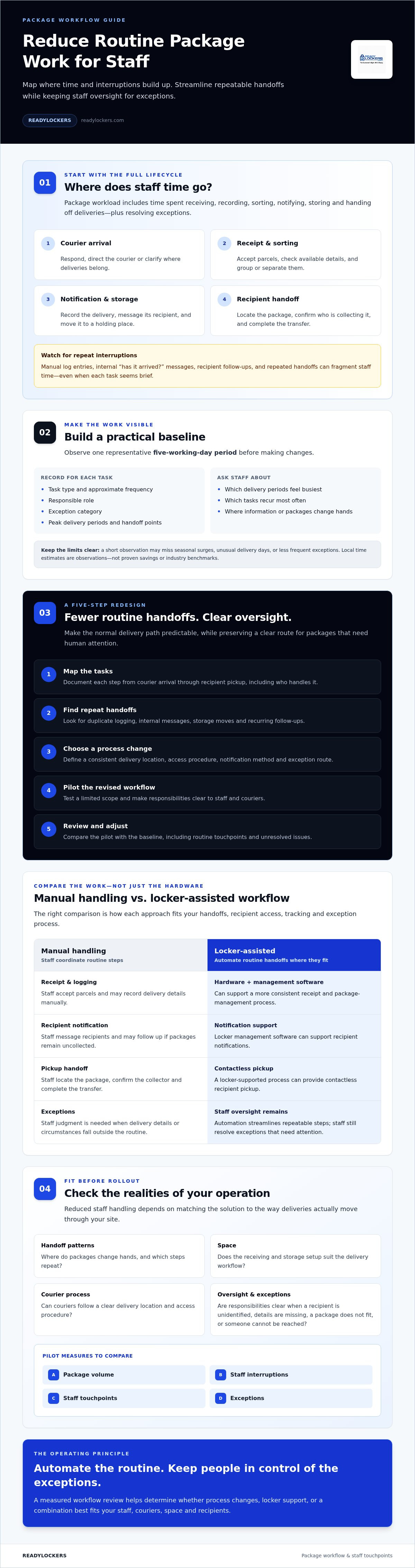
Map the full lifecycle, rather than counting only the moment a package reaches the front desk:
- Courier arrival: Staff respond, direct the courier, or clarify where deliveries belong.
- Receipt and sorting: Someone accepts parcels, checks available details, and groups or separates them.
- Notification and storage: Staff record the delivery, message the recipient, and move the package to a holding location.
- Handoff: Staff locate the package, confirm who is collecting it, and complete the transfer.
Most of these are routine steps. Exceptions include an unidentified recipient, missing delivery details, a package that does not fit the usual storage area, or a recipient who cannot be reached. Separating exceptions from routine work helps reveal which tasks could follow a clearer process and which still need staff judgment.
Which package tasks create repeated staff interruptions?
Look for front-desk interruptions, manual log entries, internal messages asking whether a package arrived, and follow-ups to recipients who haven’t collected it. Repeated handoffs can break concentration even when each action takes little time. Ask staff which delivery periods feel busiest and which tasks recur most often. Reduced package handling for staff starts with this operational picture, not an assumption about where the biggest burden lies.
How to document the current process before changing it
For a practical baseline, observe one representative five-working-day period. Record each task type, approximate frequency, responsible role, and exception category. Note when delivery activity peaks and where information or packages change hands. This short observation can identify recurring patterns, but it may not capture seasonal surges, unusual delivery days, or less frequent exceptions. State those limits, and treat recorded time estimates as local observations, not proven savings or industry benchmarks.
How to Redesign Package Handling to Reduce Staff Touchpoints
Once you know where packages create work, redesign the process around fewer routine handoffs, not less oversight. Reduced package handling for staff comes from making the normal path predictable while keeping a clear route for deliveries that need human attention.
Automation can streamline repeatable receipt, notification, and pickup steps; staff still need to resolve exceptions that require judgment. Use this five-step method to make changes deliberately:
- Map the tasks. Document what happens from courier arrival through recipient pickup, including who handles each step.
- Find repeat handoffs. Look for duplicate logging, internal messages, storage moves, and follow-ups that recur during routine deliveries.
- Choose a process change. Define a consistent delivery location, access procedure, notification method, and exception route.
- Pilot the revised workflow. Test it with a limited scope and make responsibilities clear to staff and couriers.
- Review and adjust. Compare the pilot with your baseline, including routine touchpoints and unresolved issues.
Clear procedures reduce ad hoc decisions without removing staff control. If package movement still involves manual lifting or carrying, review handling practices alongside the workflow. The CDC and NIOSH resource Ergonomic Guidelines for Manual Material Handling offers guidance for considering physical demands as part of process design.
Set clear delivery, storage, and notification procedures
Specify where couriers should leave packages, who can access the designated receiving area, and how deliveries should be directed into storage. Make it equally clear how recipients will learn that a package is ready. For exceptions, document who handles misdeliveries, unclaimed items, and access problems, and how those issues are escalated. Written steps help staff apply the same process across shifts while preserving a defined point for human review.
Use smart lockers to shift routine handoffs to self-service
In a locker-supported workflow, a courier places a package in a designated locker, the recipient receives a pickup notice, and the recipient collects the package. ReadyLockers’ platform supports SMS or QR-code notifications, while its courier access interface supports managed courier access. This arrangement can replace routine staff notification and direct handoff steps; staff remain responsible for exceptions according to the site’s procedures.
For a closer look at how software supports locker operations, see the smart locker management software guide. If you’re evaluating this approach, review smart package locker options alongside your workflow requirements.
Manual Handling vs. Smart Lockers: Compare the Work, Not Just the Hardware
The useful comparison is how each workflow distributes routine work and exceptions. Reduced package handling for staff may be achievable through clearer procedures alone, or a locker-supported process may be worth testing if repeated handoffs remain a burden. The right fit depends on package volume, available space, recipient access needs, and staffing procedures, not the hardware in isolation.
| Workflow | Staff touchpoints | Recipient access | Tracking and oversight | Exceptions |
|---|---|---|---|---|
| Manual handling | Staff receive, log, store, notify, and hand off parcels. | Pickup follows staff procedures and availability. | Depends on the local log and staff updates. | Staff address issues as they arise. |
| Process-only redesign | Clear instructions and consistent steps may reduce duplicate actions. | Access still follows the site’s defined handoff process. | A standard log can support consistent oversight if staff maintain it. | Staff follow an agreed escalation route. |
| Locker-supported workflow | Routine placement, notification, and handoff may shift to self-service. | Recipients collect packages from lockers; confirm access arrangements meet site needs. | Locker management software can provide usage analytics. Confirm whether its records meet your package-level tracking needs. | Staff handle misdeliveries, access issues, and other exceptions under site procedures. |
Each model still requires oversight. If handling includes frequent lifting or carrying, consider physical demands alongside workflow design. NIOSH provides ergonomic handling guidelines for evaluating manual material handling practices.
When process improvements may be enough
If package volume and interruptions are manageable, begin with clearer courier instructions and a defined storage location. A consistent log and notification procedure may address the main bottleneck without adding equipment. Assign an owner to maintain the process, check that staff follow it, and review exceptions. A procedure only helps if it remains clear and consistently used.
When a locker-supported workflow merits evaluation
Consider a pilot if recurring handoffs burden reception or mailroom staff, or recipients need access beyond staffed pickup periods. Assess available space for modular locker configurations and whether courier access can follow site procedures. A locker-supported workflow may shift routine steps, but measure that as a hypothesis rather than assuming labor reductions. For broader selection criteria, consult the smart package locker buyer’s guide.
How to Plan a Staff-Friendly Package Handling Pilot
A pilot tests whether a revised workflow changes the work in practice. Before introducing lockers or new procedures, set a baseline for package volume, staff touchpoints, interruptions, and exception frequency. Reduced package handling for staff should be a measured outcome, not an assumption attached to new equipment.
Keep the first test limited to a defined area, team, or package flow. Choose a scope that staff can manage alongside normal responsibilities, and assign an operational owner to coordinate courier instructions, staff questions, and unresolved delivery issues. Before the pilot begins, write down what success would look like and how you’ll assess it. For example, decide whether the aim is fewer manual notifications, fewer staff handoffs, or less time spent locating parcels.
Choose measures that show whether work actually changed
Use the same simple tracking method before and during the pilot. Record package volume, staff handling steps, repeat follow-ups, interruptions, and exception types. These measures can show whether routine work or its distribution changed; they don’t, on their own, prove a specific amount of labor was saved.
Locker usage analytics can add context about use of the system, but activity data alone doesn’t show how much staff time was spent. Compare equivalent periods where practical, and note differences such as staffing levels, delivery patterns, or unusual volume. Gather staff and recipient feedback as well: it can explain why a metric shifted and reveal problems the counts miss.
Prepare staff, couriers, and package recipients
Make responsibilities explicit before launch. Assign an owner for courier instructions and access management, and name the person or team responsible for exceptions such as misdeliveries or access problems. Tell recipients how they’ll receive pickup information and what steps to follow. With ReadyLockers, notifications can be sent by SMS or QR code; explain the chosen process in clear, accessible language.
During the pilot, invite feedback on confusing instructions, access difficulties, and tasks that remain manual. Review comments alongside the baseline and usage data. If recipients struggle to collect packages or staff still need to intervene frequently, refine the process before expanding the test. For practical preparation around site setup, review locker installation planning considerations.
Once your measures and responsibilities are clear, explore smart package locker options as one potential part of the pilot.
How to Decide Whether Smart Lockers Fit Your Staff’s Workflow
Smart lockers are worth evaluating when routine package handoffs repeatedly pull staff away from other work, or recipients need a pickup process that doesn’t depend on a direct staff handoff. Reduced package handling for staff is a potential workflow outcome, not a guaranteed result. Fit depends on how deliveries arrive, where lockers can be placed, who needs access, and how the site will manage exceptions.
Consider the trade-offs as well as the potential benefits. A locker-supported process may shift routine storage, notification, and pickup steps away from staff, but it also requires setup, staff and courier adoption, clear exception procedures, and ongoing attention to the management platform. ReadyLockers combines modular smart locker hardware with software supporting recipient notifications, courier access management, and usage analytics. Confirm that the configuration and platform capabilities align with your site’s specific requirements.
Questions to resolve before selecting a solution
Start with the actual workflow, not a preferred piece of equipment. Clarify who receives deliveries today, which tasks create repeated handoffs, and what you want the revised process to change. Then work through the practical requirements:
- Courier access: How will couriers be directed to the lockers, and how will their access be managed?
- Recipient pickup: How will recipients know a package is ready, and what steps will they follow to retrieve it?
- Site and volume: Where could modular lockers fit, and what package volume and delivery patterns must the configuration accommodate?
- Staff oversight: Who will resolve misdeliveries, access issues, or packages that don’t follow the routine process?
Also consider staff adoption and ongoing platform responsibilities. A workflow that looks efficient on paper may still create confusion if instructions are unclear or exception ownership is missing.
Turn the evaluation into a clear next step
Before requesting a solution discussion, summarize your current bottlenecks, baseline measures, and any pilot findings. Note which staff tasks changed, what remained manual, and what recipients or couriers found difficult. This gives the conversation a practical starting point and keeps conclusions tied to your organization’s experience.
Confirm the proposed hardware configuration, platform requirements, responsibilities, and implementation details directly. Ask how the workflow would address your stated needs, and avoid treating projected benefits as proven results until your own operation has measured them.
If the use case appears to fit, discuss your package workflow with ReadyLockers and use your operational findings to guide the conversation.
Make Your Next Package Workflow Decision With Confidence
Reduced package handling for staff starts with understanding where routine work and interruptions occur. Map the steps, define a consistent process, and compare manual handling with process changes or a locker-supported workflow before choosing what fits.
A focused pilot can help your team assess whether handoffs, repeat follow-ups, and exception handling change in practice. Track package activity alongside staff and recipient feedback, and treat results as specific to your operation rather than guaranteed savings.
ReadyLockers combines modular smart package lockers with management software that supports courier access management, usage analytics, and SMS or QR-code recipient notifications. These features can support a revised workflow, while your staff remain responsible for exceptions that need attention.
Use your workflow findings to guide the next step. Discuss a more efficient package workflow with ReadyLockers and explore whether smart lockers align with your operational needs. A clear, measured approach can help your team make a confident decision.
Frequently Asked Questions
How can staff spend less time handling incoming packages?
Staff can spend less time on routine package tasks by mapping the delivery process, removing duplicate handoffs, and setting clear receipt and pickup procedures. Reduced package handling for staff starts with identifying which steps interrupt other work, such as manual notifications or locating stored parcels. A process redesign may be enough; smart lockers are another option when repeated staff handoffs remain a challenge. Measure changes in your own operation rather than assuming a particular time saving.
Can package lockers reduce front-desk interruptions?
Package lockers can reduce some front-desk interruptions by shifting routine package storage and recipient pickup to a self-service process. Instead of staff repeatedly answering arrival questions or arranging direct handoffs, recipients can receive a pickup notification and collect the parcel from a locker. Staff still need procedures for misdeliveries, access issues, and other exceptions. Whether interruptions decline depends on delivery patterns, staff and recipient adoption, and how the revised workflow is managed.
How do smart lockers notify employees that a package has arrived?
ReadyLockers supports SMS or QR-code notifications to tell recipients that a package is ready for pickup. The notification method should be explained clearly during rollout so employees know what to expect and how to collect their parcels. Check that recipient contact details and the chosen notification process are suitable for your workplace. Notifications help replace routine staff follow-ups, but staff should still know how to respond when a message is missed or a delivery needs attention.
What package-handling tasks can automation reduce?
Automation can help reduce repeatable steps such as coordinating routine package placement, notifying recipients, and arranging a direct staff-to-recipient handoff. In a locker-supported workflow, a courier places a package in a locker, the recipient receives a notice, and the recipient collects it. The precise tasks that shift depend on your procedures and system setup. Staff may still need to resolve unidentified recipients, misdeliveries, access problems, or parcels that don’t fit the usual process.
Will smart lockers eliminate the need for staff oversight?
No. Smart lockers can support routine package receipt and pickup, but staff oversight remains important for exceptions and operational procedures. Assign responsibility for issues such as misdeliveries, access difficulties, unclaimed parcels, and courier instructions. Locker management software can support courier access management and provide usage analytics, but those features don’t replace staff judgment or prove that every package followed the intended process. Define who monitors exceptions and how they should be escalated before introducing lockers.
How should an organization measure staff time spent handling packages?
Start with a baseline that records package volume, staff touchpoints, interruptions, repeat follow-ups, and exception frequency. Use the same approach during a pilot, and compare periods with similar operating conditions where practical. Note differences in staffing or delivery patterns that could affect results. Usage analytics can show activity within the locker system, while staff observations help explain remaining work. Together, these measures inform your decision, but they don’t automatically prove labor savings.
Are smart package lockers suitable for offices with different delivery volumes?
They may suit offices with different delivery volumes, but the configuration and workflow should match each site’s needs. Assess recurring handoffs, package patterns, available space, recipient pickup requirements, and how couriers will access the lockers. Modular smart locker configurations can be considered alongside those site requirements. A pilot or operational review can help test fit before wider adoption. Don’t assume a system will produce the same results across offices with different layouts, procedures, or delivery activity.
What should staff and couriers know before a locker system is introduced?
Before launch, staff and couriers need clear instructions on delivery locations, access procedures, and how to handle packages that can’t follow the routine process. Employees should know how recipient notifications work and what steps to take to collect a package. ReadyLockers supports SMS or QR-code notifications and courier access management. Assign an operational owner for questions and exceptions, then gather feedback to identify unclear instructions, access problems, and tasks that still require manual handling.

Frequently Asked Questions
Which package tasks create repeated staff interruptions?+
Look for front-desk interruptions, manual log entries, internal messages asking whether a package arrived, and follow-ups to recipients who haven’t collected it. Repeated handoffs can break concentration even when each action takes little time. Ask staff which delivery periods feel busiest and which tasks recur most often. Reduced package handling for staff starts with this operational picture, not an assumption about where the biggest burden lies.
How can staff spend less time handling incoming packages?+
Staff can spend less time on routine package tasks by mapping the delivery process, removing duplicate handoffs, and setting clear receipt and pickup procedures. Reduced package handling for staff starts with identifying which steps interrupt other work, such as manual notifications or locating stored parcels. A process redesign may be enough; smart lockers are another option when repeated staff handoffs remain a challenge. Measure changes in your own operation rather than assuming a particular time saving.
Can package lockers reduce front-desk interruptions?+
Package lockers can reduce some front-desk interruptions by shifting routine package storage and recipient pickup to a self-service process. Instead of staff repeatedly answering arrival questions or arranging direct handoffs, recipients can receive a pickup notification and collect the parcel from a locker. Staff still need procedures for misdeliveries, access issues, and other exceptions. Whether interruptions decline depends on delivery patterns, staff and recipient adoption, and how the revised workflow is managed.
How do smart lockers notify employees that a package has arrived?+
ReadyLockers supports SMS or QR-code notifications to tell recipients that a package is ready for pickup. The notification method should be explained clearly during rollout so employees know what to expect and how to collect their parcels. Check that recipient contact details and the chosen notification process are suitable for your workplace. Notifications help replace routine staff follow-ups, but staff should still know how to respond when a message is missed or a delivery needs attention.
What package-handling tasks can automation reduce?+
Automation can help reduce repeatable steps such as coordinating routine package placement, notifying recipients, and arranging a direct staff-to-recipient handoff. In a locker-supported workflow, a courier places a package in a locker, the recipient receives a notice, and the recipient collects it. The precise tasks that shift depend on your procedures and system setup. Staff may still need to resolve unidentified recipients, misdeliveries, access problems, or parcels that don’t fit the usual process.
Will smart lockers eliminate the need for staff oversight?+
No. Smart lockers can support routine package receipt and pickup, but staff oversight remains important for exceptions and operational procedures. Assign responsibility for issues such as misdeliveries, access difficulties, unclaimed parcels, and courier instructions. Locker management software can support courier access management and provide usage analytics, but those features don’t replace staff judgment or prove that every package followed the intended process. Define who monitors exceptions and how they should be escalated before introducing lockers.
How should an organization measure staff time spent handling packages?+
Start with a baseline that records package volume, staff touchpoints, interruptions, repeat follow-ups, and exception frequency. Use the same approach during a pilot, and compare periods with similar operating conditions where practical. Note differences in staffing or delivery patterns that could affect results. Usage analytics can show activity within the locker system, while staff observations help explain remaining work. Together, these measures inform your decision, but they don’t automatically prove labor savings.
Are smart package lockers suitable for offices with different delivery volumes?+
They may suit offices with different delivery volumes, but the configuration and workflow should match each site’s needs. Assess recurring handoffs, package patterns, available space, recipient pickup requirements, and how couriers will access the lockers. Modular smart locker configurations can be considered alongside those site requirements. A pilot or operational review can help test fit before wider adoption. Don’t assume a system will produce the same results across offices with different layouts, procedures, or delivery activity.
What should staff and couriers know before a locker system is introduced?+
Before launch, staff and couriers need clear instructions on delivery locations, access procedures, and how to handle packages that can’t follow the routine process. Employees should know how recipient notifications work and what steps to take to collect a package. ReadyLockers supports SMS or QR-code notifications and courier access management. Assign an operational owner for questions and exceptions, then gather feedback to identify unclear instructions, access problems, and tasks that still require manual handling.