Digital Package Log for Properties: A Practical Guide for 2026
Streamline deliveries with a digital package log for properties. Learn how smart workflows, automated alerts, and lockers simplify parcel tracking in 2026.

What happens when a resident asks who handled a package, but the answer is split between a paper log, an email, and a staff member’s notes? A Digital package log for properties brings delivery and pickup activity into one consistent workflow, making it easier to see what happened without adding unnecessary busywork.
Property teams need clear handoffs. Manual entry can slow staff during delivery rushes, while scattered records make it harder to establish when a package arrived or whether it was collected. The goal isn’t to record every detail. It’s to capture the information staff need to manage each handoff reliably.
This guide explains what a property package log should record, how digital logging works, and how to choose an approach that fits your building’s delivery volume. You’ll also learn how smart lockers, courier access management, automated SMS or QR-code notifications, and usage analytics can support a structured process from drop-off through contactless pickup.
Key Takeaways
- A Digital package log for properties brings package handling activity into one consistent workflow, from courier drop-off through recipient pickup.
- Build records around the delivery sequence, using practical details such as arrival date, package identifier, handling status, and pickup completion.
- Compare paper logs, spreadsheets, and connected locker workflows by accessibility, consistency, handoff visibility, and staff effort.
- Set up a process staff can follow: map package flow, assign responsibilities, standardize entry, and review how the workflow is used.
- Smart lockers paired with management software support courier access, SMS or QR-code notifications, contactless pickup, and visibility through usage analytics.
What Is a Digital Package Log for Properties, and Why Use One?
Deliveries arrive throughout the day, but staff, couriers, and recipients may follow different routines. A courier leaves a parcel in a designated area, a staff member handles it later, and the recipient asks whether it has arrived. When details live in separate notes or someone’s memory, even a simple question can trigger a search.
A digital package log for properties is an electronic record of package-handling activity that helps teams follow a parcel from arrival to pickup. It gives staff a consistent place to document and check handoffs. It doesn’t replace careful handling or resolve every delivery issue automatically.
A property log is different from carrier tracking. Carrier tracking follows a shipment through the delivery network and reports the carrier’s updates. A property package log focuses on what happens after a courier reaches the property: where the package is placed, how the recipient is notified, and whether pickup is complete. The two records answer related but distinct questions.
The term Package manager describes software that organizes and tracks software components. That’s a different use of “package,” but the general idea of managing items through structured information offers a useful analogy: consistent records are easier to follow than disconnected notes.
How a property package log fits the delivery lifecycle
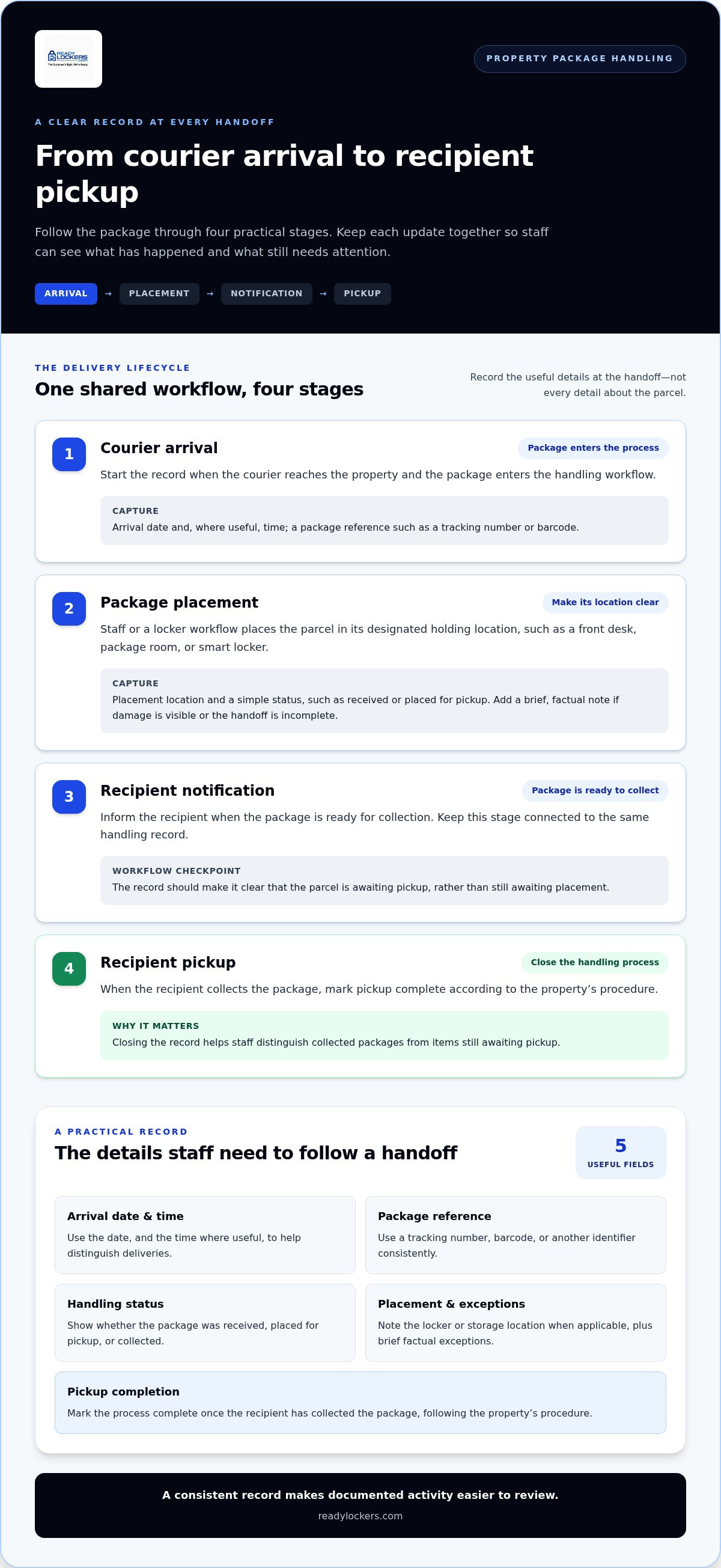
Organize the process around handoffs. When each stage has a clear next step, staff can tell whether a package is awaiting placement, ready for its recipient, or already picked up.
- Courier arrival: A package reaches the property and enters the handling process.
- Package placement: Staff or a locker workflow places it in the designated holding location.
- Recipient notification: The recipient is informed that the package is ready for collection.
- Pickup: The package leaves the holding area and the handling process is complete.
In an apartment building, deliveries may be handled at a front desk, in a package room, or through smart lockers. The right arrangement depends on the property’s layout and workflow. For a closer look at locker considerations in residential settings, the apartment package locker guide explores how lockers fit into apartment package handling.
When paper or scattered notes stop being enough
Paper records can be hard to read when handwriting varies. Updates may be entered well after a parcel arrives, and separate staff notes can leave gaps when shifts change. A digital process keeps handling information together, as long as staff use it consistently and record updates at the relevant handoff.
That consistency helps teams answer resident questions with a clearer picture of a package’s status, rather than searching through multiple notebooks or messages. It also gives staff a shared reference when investigating a missing update or confirming whether pickup was completed. The record makes documented activity easier to review, but it doesn’t prove that every physical handoff was performed correctly.
What Should a Digital Package Log Record From Delivery to Pickup?
A useful record follows the package through the property’s handling process, rather than capturing only that a delivery arrived. Connect each delivery event with its next handoff. This gives staff a practical way to understand what has happened and what still needs attention.
Keep the process proportionate: record details that help staff identify a package, locate it, and understand whether it has been collected. A short, consistent entry is easier to maintain than a long form staff may skip during busy periods.
- Arrival date and, where useful, time: Helps staff distinguish recent deliveries and investigate questions about when an item reached the property.
- Package reference: A tracking number, barcode, or another identifier can help staff match the record to the parcel. Use a consistent approach that fits the property’s workflow.
- Handling status: A simple status, such as received, placed for pickup, or collected, shows the package’s current stage.
- Placement and exception details: Note a locker or designated storage location when the process supports it. Record a brief exception if the parcel appears damaged or the handoff is incomplete.
- Pickup completion: Mark the process complete once the recipient has collected the package, according to the property’s procedure.
Record the arrival and placement event
Start the record when the package enters the property’s handling process. A consistent arrival date and usable package reference make it easier for staff to find the item and distinguish it from similar deliveries. If packages go into assigned lockers or a designated storage area, capture the location as part of the workflow.
Keep exception notes factual and brief. For example, staff might note visible damage or that a parcel was left without the expected handoff. This documents what was observed without assuming why it happened.
Close the record when the recipient collects the package
Pickup completion matters because an open record can make a collected package appear to be awaiting pickup. Closing the workflow gives staff a clearer view of what still needs attention and helps them respond to recipient questions without treating every older entry as unresolved.
Linking notification and pickup steps makes the process easier to follow: notify the recipient when a package is ready, then mark the handoff complete after collection. Notification alone doesn’t confirm pickup, and a record shouldn’t imply a particular identity check unless the process actually uses one.
For properties considering a locker-based workflow, smart lockers and management software bring courier access, SMS or QR-code notifications, and contactless pickup into package handling. Explore ReadyLockers’ smart package locker approach as one way to structure those handoffs, while keeping the record process aligned with your team’s actual workflow.
Digital Package Log vs. Paper or Spreadsheet: What Changes?
Moving a package record from paper to a screen doesn’t automatically make the process faster. The practical difference depends on whether the new workflow replaces repeated entry and clarifies who handles the next step. A well-maintained paper log or spreadsheet may suit a lower-volume property; a digital process is more useful when information needs to be shared across staff or connected to package placement and pickup.
Use this comparison to assess the trade-offs for your property. Results depend on how each method is set up and used.
| Approach | Accessibility | Consistency | Handoff visibility | Staff effort |
|---|---|---|---|---|
| Paper log | Available where the log is kept | Depends on clear, consistent entries | Can rely on staff reading and updating the same record | May be simple for a small, steady flow; searching or rewriting entries takes time |
| Spreadsheet | Can be shared digitally, depending on access and file setup | Depends on common field definitions and update habits | Can show status, but updates may be missed or split across copies | Can reduce paper handling; duplicate entry may remain |
| Connected locker workflow | Uses locker hardware with management software | Connects package handling steps through a shared workflow | Courier access and recipient notifications support clearer transitions | Can reduce manual steps when it replaces, rather than duplicates, existing records |
Where manual package logs create friction
Handwriting can be difficult to read, and a record may not be updated until a busy period ends. At shift changes, one staff member may leave a note while another checks a spreadsheet or email. If the same package status is entered in multiple places, those records can disagree. These issues aren’t inevitable: a simple paper or spreadsheet process can work when staff share clear routines and update one source consistently.
Before changing tools, map where staff currently record arrivals, placements, and pickups. If digitization adds another screen but leaves the paper log and message updates in place, it may increase effort rather than reduce it.
What a connected digital workflow can improve
In a locker workflow, courier access management supports package placement, while automated SMS or QR-code notifications tell recipients that a package is ready. Connecting these steps reduces reliance on separate reminders and makes the process easier for staff to follow. The benefit comes from aligning the workflow, not simply from using digital tools.
Usage analytics help a property review activity patterns and consider whether its package process fits demand. They aren’t a guaranteed audit trail or proof of every handoff. A smart locker management software guide can help explain how a broader platform supports locker operations. For any Digital package log for properties, the key test is practical: does it give staff a clearer shared process without asking them to record the same event twice?
How to Set Up a Digital Package Log That Staff Can Actually Use
A digital process works best when it fits the way deliveries already move through the property. Map the real workflow first, then decide what to record and who updates it. Map package flow, assign responsibilities, standardize records, and review usage. This sequence keeps setup practical and prevents a new log from becoming a task disconnected from daily operations.
- Map package flow. Follow a delivery from courier arrival to placement, recipient notification, and collection. Note where delays or unclear handoffs occur.
- Assign responsibilities. Identify who receives deliveries, handles exceptions, and helps recipients follow the process.
- Set a consistent record process. Agree on the information staff enter and when they update a package’s status. Avoid duplicate entry across tools.
- Review usage. Check whether the process is being followed and where staff encounter bottlenecks. Adjust instructions or workflow as needed.
Property type shapes the details. Apartment teams may need to account for shared package areas and resident pickup routines. Offices can consider how deliveries move between reception, departments, and employees. Hotels may need a process that fits guest turnover and front-desk responsibilities, while schools should align package handling with their access and staff procedures. Adapt the same basic sequence to the property’s layout, volume, and users.
Plan any locker arrangement around available space and delivery volume. Consider where couriers can access the lockers, how recipients will reach them, and whether the location supports a clear handoff. A configuration suited to the property’s layout can keep the process understandable. The right setup depends on the site’s practical requirements.
Define roles, handoffs, and exception handling
Make ownership clear at each stage. Specify who receives deliveries, who responds to damaged or unidentified packages, and who assists recipients with the property’s process. Decide how staff should handle packages that remain uncollected, so the next shift can follow the same steps instead of guessing.
Keep instructions brief enough to use during a busy delivery period. A short checklist can explain where packages go, what staff record, how to report an exception, and how to close the process after pickup. Clear directions reduce uncertainty without requiring staff to study a long procedure at the point of handoff.
Introduce the process and review its use
Brief couriers on the property’s delivery and access procedure, staff on their responsibilities, and recipients on how they’ll be notified and collect packages. Keep each explanation relevant to that group. Contactless workflows can shape how these steps fit together, as explored in this contactless delivery locker technology guide.
Usage analytics help teams review activity patterns and identify points that may need attention. Use those observations to refine the process, not as proof that every handoff was completed correctly. To align locker hardware and management software with your property’s package workflow, explore ReadyLockers solutions.
How ReadyLockers Connects Property Package Handling With Digital Tools
A package record is most useful when it reflects how deliveries move through the property. ReadyLockers combines smart package lockers with cloud-based management software, connecting physical package placement with tools for courier access, recipient notifications, and pickup. This gives property teams a structured workflow to build on, rather than treating the locker and recordkeeping process as separate concerns.
The platform includes automated SMS or QR-code notifications, courier access management, and usage analytics. Property teams can use these tools to organize package handling and review activity patterns. The analytics provide insight into usage, while the property’s procedures establish how staff document and manage each handoff.
Connect courier drop-off with recipient notification
Courier access management gives couriers an organized way to access the locker workflow and place packages. Once a package is ready for its recipient, automated SMS or QR-code notifications communicate the next pickup step. This connects placement and notification instead of relying entirely on separate staff reminders.
Recipients can collect packages through contactless pickup 24/7, including beyond staffed service hours. That gives properties another way to manage pickup without requiring a staff member to be present for each collection. The property’s setup and instructions determine how the process works for couriers, staff, and recipients.
Match the platform and locker setup to the property
Package needs vary by setting. Apartments may handle deliveries for residents, while offices route parcels to employees or departments. Hotels, hospitals, schools, warehouses, retail locations, and homeowners associations each have their own layouts, users, and delivery routines. Start with the path a package takes through your site, the space available for lockers, and the volume and types of packages the workflow needs to accommodate.
Modular locker configurations can be planned around a property’s layout and delivery volume, helping teams decide where lockers fit and how people will access them. The aim is a setup that supports a clear handoff without adding unnecessary steps. A property with a staffed receiving area may organize delivery differently from one where recipients collect packages directly from lockers, so align the process and placement with how the site operates.
A Digital package log for properties is most useful when it’s part of a consistent workflow. Smart locker hardware and cloud-based software bring access, notification, pickup, and activity insights together, while teams define how records are handled in practice. This connected approach supports apartments, workplaces, and other property types without assuming that every site needs the same configuration.
Explore ReadyLockers package handling solutions to see how smart lockers and digital tools can support a package workflow shaped around your property.
Make Your Next Package Workflow More Deliberate
Turn your property’s current package routine into a clear operational plan. Identify where staff lose time or residents need better visibility, then agree on the improvement that matters most. That shared priority can guide decisions about process, locker placement, and the digital tools your team uses.
A Digital package log for properties should fit the way people work at your site, not create extra steps just to capture more information. Bring the staff who handle deliveries into the planning conversation, consider the recipient experience, and focus on a workflow your team can apply consistently.
Ready to consider a connected approach for your property? Explore ReadyLockers package handling solutions to see how smart lockers and digital tools can support a more organized package process.
Frequently Asked Questions
What is a digital package log for a property?
It’s an electronic record of package activity within a property. Unlike carrier tracking, which reports a shipment’s progress through the delivery network, the property log helps staff understand what happened after the courier arrived. For example, a carrier update may say “delivered,” while the property’s process can clarify whether the package was received at a desk, placed in a locker, or handed to its recipient.
How does a digital package log help property managers?
A Digital package log for properties gives managers a shared reference when a resident or employee asks about a delivery. Staff can use the record to identify the last documented handling step and direct their follow-up accordingly. This can reduce time spent checking separate messages or asking multiple colleagues, but it doesn’t guarantee that a parcel won’t be delayed, misplaced, or disputed. Consistent staff procedures remain essential.
Can a digital package log work for apartments and offices?
Yes. The approach can suit apartments, offices, hotels, schools, and other properties when the workflow reflects how packages are received and distributed. An apartment team might plan around resident collection from a shared area; an office may need to account for deliveries routed to different departments. Before setup, clarify who receives packages, where they go, and how recipients learn what to do next.
What should staff do if a package is missing from the log?
Start by checking the property’s established procedure and the package’s last known handling point. Confirm whether it was placed in the expected area, whether another staff member received it, and whether a pickup was recorded. Distinguish a package that may have arrived without an entry from one that was logged but can’t be located. Document what staff find and follow the property’s process for unresolved cases.
How long should a property keep digital package log records?
There isn’t one retention period that suits every property. Set a policy based on operational needs, internal recordkeeping practices, and applicable privacy requirements rather than keeping information indefinitely by default. Define which records are useful, who can access them, and when they should be reviewed or removed. Apply the same approach consistently, with the appropriate policy owner considering the requirements that apply to the property.
Does a digital package log replace a property package policy?
No. A log records activity; a policy sets expectations for how packages should be handled. The policy can clarify who accepts deliveries, what staff do with unusual or damaged items, and how recipients are informed. For example, if a parcel arrives without enough information to identify its recipient, staff need a defined next step. Aligning the digital process with written procedures helps employees apply the same rules.

Frequently Asked Questions
What is a digital package log for a property?+
It’s an electronic record of package activity within a property. Unlike carrier tracking, which reports a shipment’s progress through the delivery network, the property log helps staff understand what happened after the courier arrived. For example, a carrier update may say “delivered,” while the property’s process can clarify whether the package was received at a desk, placed in a locker, or handed to its recipient.
How does a digital package log help property managers?+
A Digital package log for properties gives managers a shared reference when a resident or employee asks about a delivery. Staff can use the record to identify the last documented handling step and direct their follow-up accordingly. This can reduce time spent checking separate messages or asking multiple colleagues, but it doesn’t guarantee that a parcel won’t be delayed, misplaced, or disputed. Consistent staff procedures remain essential.
Can a digital package log work for apartments and offices?+
Yes. The approach can suit apartments, offices, hotels, schools, and other properties when the workflow reflects how packages are received and distributed. An apartment team might plan around resident collection from a shared area; an office may need to account for deliveries routed to different departments. Before setup, clarify who receives packages, where they go, and how recipients learn what to do next.
What should staff do if a package is missing from the log?+
Start by checking the property’s established procedure and the package’s last known handling point. Confirm whether it was placed in the expected area, whether another staff member received it, and whether a pickup was recorded. Distinguish a package that may have arrived without an entry from one that was logged but can’t be located. Document what staff find and follow the property’s process for unresolved cases.
How long should a property keep digital package log records?+
There isn’t one retention period that suits every property. Set a policy based on operational needs, internal recordkeeping practices, and applicable privacy requirements rather than keeping information indefinitely by default. Define which records are useful, who can access them, and when they should be reviewed or removed. Apply the same approach consistently, with the appropriate policy owner considering the requirements that apply to the property.
Does a digital package log replace a property package policy?+
No. A log records activity; a policy sets expectations for how packages should be handled. The policy can clarify who accepts deliveries, what staff do with unusual or damaged items, and how recipients are informed. For example, if a parcel arrives without enough information to identify its recipient, staff need a defined next step. Aligning the digital process with written procedures helps employees apply the same rules.