Contactless package pickup solutions for retailers and mailrooms
Explore contactless package pickup solutions for retailers and mailrooms. Learn how smart lockers optimize delivery workflows and manage outages effectively.

A power outage doesn’t automatically mean a locker will keep operating. Whether recipients can access packages depends on the system’s backup power and access design. Contactless package pickup solutions differ, so retailers and mailrooms should confirm how a specific system handles access during an outage rather than assume it will work.
That distinction matters when deliveries, online order pickup, and daily mailroom handoffs depend on reliable access. Lockers reduce face-to-face coordination, but recipients still need a way to receive notice and open their assigned compartment. A dependable process links courier deposit, recipient notification, and access credentials, while accounting for interruptions to power or connectivity.
This article explains how locker pickup supports parcel delivery and buy online, pick up in store workflows, how notifications and credentials guide recipients, and which operational details shape a smooth handoff. It also covers mailroom organization and outage procedures to consider when planning a system. The goal is practical: understand how the system works in normal conditions and where its limitations matter.
Key Takeaways
- Map each handoff, from courier deposit to recipient collection, so package ownership stays clear throughout the process.
- Connect online orders to a self-service pickup flow that fits store operations and gives customers a straightforward collection experience.
- Assess delivery costs by looking at repeat delivery attempts, staff handling, and the time spent coordinating individual pickups.
- Set up mailroom routines for package intake, compartment assignment, recipient alerts, and completed collection records.
- Choose locker access and management tools that match your site’s workflow, including how recipients are notified and how staff oversee usage.
Locker delivery, customer notifications, and access credentials
A self-service contactless pickup locker lets a courier secure a parcel in a compartment for the recipient to collect using a credential. Unlike doorstep delivery, the parcel stays inside a designated locker; unlike staffed pickup, collection doesn’t require an employee to retrieve it. For example, a recipient can scan the QR code in a notification to open the assigned compartment. Contactless package pickup solutions suit sites that need a consistent handoff without arranging face-to-face collection.
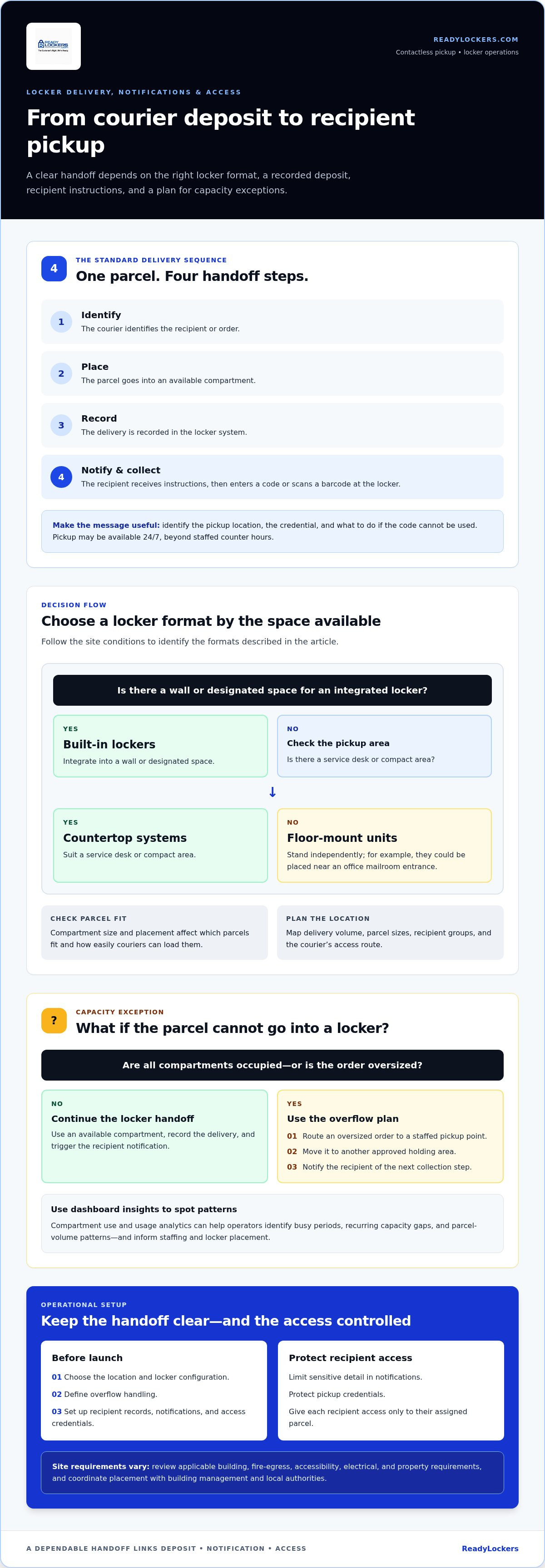
The delivery sequence has four practical steps: the courier identifies the recipient or order, places the parcel in an available compartment, records the delivery in the locker system, and triggers a notification. The recipient follows the message instructions and enters a code or scans a barcode at the locker. A pickup can be available 24/7, giving recipients access beyond staffed counter hours. Clear instructions should identify the pickup location, credential, and what to do if the code cannot be used.
Choose a locker format that fits the site. Built-in lockers integrate into a wall or designated space, countertop systems suit a service desk or compact area, and floor-mount units stand independently. An office mailroom, for example, might place floor-mount lockers near its entrance, while a retailer could use a countertop unit for order handoffs. Compartment size and placement determine which parcels fit and how easily couriers can load them.
When all compartments are occupied, the workflow needs an overflow plan. Staff can route an oversized order to a staffed pickup point, move it to another approved holding area, or notify the recipient of the next collection step. A locker dashboard can show compartment use and usage analytics, helping operators spot busy periods, recurring capacity gaps, and parcel-volume patterns. Use these insights to inform staffing and locker placement.
For an apartment or business, start by mapping delivery volume, parcel sizes, recipient groups, and the courier’s access route. Then choose a location and locker configuration, define overflow handling, and set up recipient records, notifications, and access credentials. Couriers use the designated access interface to open an available compartment, deposit the parcel, and enter the recipient details needed to send a pickup notice.
In the United States, installation requirements depend on local rules and the building. Review applicable building, fire-egress, accessibility, electrical, and property requirements, and coordinate placement with building management and local authorities. Security and privacy risks include shared pickup codes, exposed recipient details, and unauthorized access. Limit notification content, protect credentials, and give each recipient access only to their assigned parcel.
How can retailers support Buy Online Pickup In-Store strategies with lockers?
Retailers can connect an online order to locker pickup by assigning it to a compartment after staff prepare it. The customer receives collection instructions, visits the store, and retrieves the order without waiting at a service counter. For example, a shopper can order through a retailer’s website, select store pickup, then use the provided credential to collect the purchase from a locker. This keeps online ordering connected to in-store fulfillment while simplifying the handoff.
In the United States, retailers, grocery businesses, pharmacies, campuses, and property operators can offer contactless pickup through lockers or staffed collection points. Locker systems support these workflows, but the right setup depends on the order process, available space, pickup volume, and how staff prepare and route purchases. Start by mapping the customer journey, from payment and picking through compartment assignment and collection.
Integration is central to a clear BOPIS experience. Store teams need a reliable way to identify an order, place it in the right compartment, and connect pickup instructions to the correct customer. Before launch, define who stages orders, how staff handle late collections, and what happens when an item is too large for the available lockers. A simple sequence helps: prepare the order, assign a compartment, notify the customer, and record collection.
Lockers can also support returns when retailers define a separate process for drop-off. For example, a customer may start a return online, receive instructions, and place the item in an assigned compartment. Staff can then retrieve it for inspection and processing. This workflow is not automatic: the retailer must explain accepted items, package requirements, and how the return enters its existing system. A good returns experience matters to shoppers, with 62% saying they would buy more from a brand based on it.
Support planning should cover everyday exceptions, not just a successful pickup. Document steps for an incorrect code, an order placed in the wrong compartment, a full locker bank, or a customer who needs assistance. Assign responsibility to store staff or the designated support team, and make customer instructions easy to find. In a Momentive study, 88% of shoppers said they want businesses to offer both online and in-store shopping options. A defined support process helps connect those choices to practical collection and return workflows.
Cost efficiency and reduced delivery expenses
Locker pickup can change delivery costs by consolidating handoffs at one location. A driver can deposit several parcels at a retail site instead of coordinating separate meetings with recipients. This may reduce repeat delivery attempts and time spent arranging individual handoffs. The actual effect depends on route design, parcel volume, locker capacity, and how staff handle exceptions. Compare these factors with the current workflow before estimating operational value.
Begin with a straightforward process review. Track repeat driver attempts, staff time spent locating or handing over parcels, and how long packages wait before collection. For example, a mailroom that records each parcel’s arrival and pickup can identify recurring bottlenecks. Compare the same measures after introducing lockers to see whether the new process reduces manual handling or shifts it to another team.
Storage capacity also affects efficiency. Compartments suited to typical parcel sizes can reduce the need to move packages between temporary holding areas. But if oversized orders regularly exceed available space, staff still need an overflow process. Review parcel dimensions and busy periods, then establish a clear route for items that do not fit. Locker capacity is not a substitute for all storage.
Pickup speed can also influence store visits. Customers who wait less than 2 minutes for parcel pickup are more than four times as likely to return to the store. Separately, 19% of shoppers made an additional in-store purchase while picking up products bought online. These findings show potential retail value, not guaranteed savings. A retailer can monitor queue time and pickup-related purchases to understand how its own BOPIS process performs.
Evaluate costs across the entire workflow, not just delivery. Include staff preparation, order staging, parcel storage, customer notifications, exception handling, and locker management. If employees spend time searching for packages, consistent compartment assignments and collection records may streamline retrieval. If lockers are often full, extra handling can offset efficiencies elsewhere. Reviewing each step gives a clearer picture than comparing delivery activity alone.
Use a repeatable assessment: document the current delivery and pickup process, identify labor-intensive steps, then measure those same steps after implementation. Review route consolidation, repeat attempts, staff handling, unused or full compartments, and recipient collection patterns. Connect each observed change to the process that caused it. This gives retailers and mailroom operators a grounded way to assess whether locker-based delivery supports their operational goals.
Mailroom workflow and package management
A well-defined mailroom process gives every parcel a clear path from arrival to collection. Assign staff responsibilities for receiving, recording, sorting, and loading packages. For example, one team member can log incoming deliveries while another handles recipient questions. In a smaller office, one person may do both, but the handoff steps should stay consistent.
At intake, match each parcel with its recipient and record its arrival. Use a consistent identifier, such as the carrier tracking number or an internal reference, to distinguish similar packages. Then sort parcels by recipient, size, or destination before assigning locker space. This sequence helps staff avoid placing an item in a compartment that cannot hold it.
After loading a parcel, update its status and send the recipient collection instructions. A shared dashboard gives mailroom staff visibility into locker use, while usage reports can reveal patterns in package volume and compartment demand. Repeated capacity pressure in one area, for instance, may point to a need to adjust placement or assignment practices.
Set a consistent process for parcels that do not fit, arrive damaged, or lack clear recipient details. Staff can move an oversized delivery to a designated holding area, record its location, and notify the recipient with collection instructions. If a label is unreadable, keep the package separate until its destination is established. Clear exception records prevent parcels from becoming untracked mailroom inventory.
Collection records close the workflow. When a recipient retrieves a parcel, update its status so staff can distinguish collected items from packages awaiting pickup. If someone reports a missing delivery, staff can review the arrival record, assigned compartment, and collection status. Restrict access to recipient information to employees who need it for mailroom tasks.
An automated locker workflow can reduce repeated manual coordination, but staff still need clear procedures. Document how to handle a full locker bank, a failed credential, an incorrectly assigned parcel, and a recipient who needs assistance. Make the instructions available to mailroom and building teams so everyone follows the same steps during busy delivery periods.
Review operations using the dashboard rather than relying on memory. Check which compartments remain occupied, where overflow accumulates, and whether parcel records match the physical contents. Regular reviews can also reveal process gaps, such as delayed intake updates or packages left in temporary storage. Use those findings to refine sorting, assignment, and escalation procedures.
Recipient notifications and barcode access
A clear notification turns a completed locker deposit into an actionable pickup. It should tell the recipient where the parcel is, which credential to use, and how to get help. For example, an SMS can identify the pickup location and include a QR code to scan at the locker. Keep the message focused, since unnecessary order details can expose private information on a shared phone screen.
A barcode can serve as the pickup credential. After opening the notification, the recipient presents the barcode at the locker’s scanner. The system matches it to the assigned compartment and grants access. If the system supports it, a printed barcode can also help recipients who cannot use a phone at pickup. Instructions should explain where to scan and what confirmation to expect.
Notification timing matters. Send the pickup message after the courier records the deposit, not before the parcel is physically stored. This reduces confusion if a delivery is delayed or rerouted. If the recipient’s phone number or email address is incorrect, the notice may reach the wrong person or no one at all. A clear process for correcting contact details helps staff resolve the issue without exposing package information.
Plan for common scanning problems. A damaged screen, poor lighting, unreadable barcode, or weak network connection can interrupt collection. Instructions should explain how to retry and where to get help if access still fails. Staff should be able to match the recipient to the parcel through a controlled process, rather than sharing someone else’s credential.
Security depends on both the credential and the information around it. Avoid including full addresses, sensitive order contents, or unnecessary personal details in notifications. Limit access to recipient records, and define how staff should handle misdirected messages or a phone number that belongs to someone else. For example, an office mailroom can verify the intended recipient before changing contact details or helping with a failed scan.
Test the complete sequence before launch: place a test parcel, send a notification, scan its barcode, open the assigned compartment, and record collection. Repeat the test with an unreadable code and incorrect recipient details. That exposes gaps in wording and support procedures before real deliveries depend on them. To plan a connected pickup workflow, review contactless pickup options.
ReadyLockers: Smart Package Lockers
ReadyLockers helps retailers and mailrooms coordinate package handoffs with Smart Package Lockers, Locker Management Software, a Contactless Pickup System, and a Courier Access Interface. Couriers place parcels in secure lockers, and recipients receive SMS or QR code notifications for pickup. Collection is contactless and available 24/7, helping reduce missed deliveries and package theft.
This setup can suit a site that needs a defined process for courier deposits, recipient access, and locker-use oversight. The software supports locker management, while the access interface gives couriers a way to interact with the system. For a closer look at how ReadyLockers can fit your pickup workflow, visit readylockers.com.
Design the next step for package handling
The best pickup workflow starts with the experience you want recipients and staff to have. Before changing operations, identify where handoffs create friction, who manages exceptions, and how the new process will fit existing retail or mailroom routines. These decisions help make Contactless package pickup solutions part of a coordinated service experience, rather than standalone equipment.
ReadyLockers provides Smart Package Lockers, Locker Management Software, and a Contactless Pickup System for organizations planning this shift. These components can support your site’s package process, from managing locker activity to organizing recipient collection. Discuss your workflow with ReadyLockers to explore how lockers could fit your operation.
Contact ReadyLockers about locker solutions and explore an approach that fits your operation. A well-planned pickup experience can make package handling clearer for both recipients and the teams who support them.
Frequently Asked Questions
Do the lockers have a power backup system during outages?
Backup power is system-specific, and the term “smart locker” alone doesn’t establish whether recipients can collect parcels during an outage. Electronic locks, touchscreen controls, network access, and cloud connections can each affect access. Identify which components have backup power and define how staff will handle incoming parcels if normal access is interrupted. A written outage procedure helps recipients and delivery teams follow the same fallback process.
How Do Click-and-Collect Lockers Work?
Click-and-collect lockers connect an online purchase with collection at a chosen store. The retailer prepares the order, assigns it for pickup, and makes it available through the store’s collection process. For example, a customer ordering office supplies online can choose a participating location and collect the prepared items without joining the regular checkout line. Make pickup instructions clear at checkout and in the order confirmation.
How can contactless lockers support staff efficiency?
Smart lockers can reduce interruptions by giving employees a consistent package handoff process. For example, an office receptionist can direct couriers to a designated deposit point instead of pausing other duties to locate each recipient. Staff can focus on exceptions, such as parcels with unclear labels or items too large for available compartments. Clear task ownership and package records help prevent duplicated effort across reception, mailroom, and facilities teams.
How can smart lockers benefit my organization?
Smart lockers give organizations a controlled way to manage package access across their operations. ReadyLockers’ cloud-based management dashboard provides visibility into locker activity, audit trails, and usage reports. A facilities team, for example, can review locker records when investigating a disputed handoff, while managers can use usage analytics to understand demand. These tools support clearer accountability for parcel handling than informal staff notes alone.
How do contactless lockers improve customer service for retailers?
Contactless lockers give retailers another way to fit order collection around customer schedules and store workflows. A shopper arriving during a busy period can collect an order without asking an employee to retrieve it from a back room. Retailers can improve the experience with concise directions, accessible pickup instructions, and a clear support route for exceptions. Lockers should complement store service, not leave customers unsure where to go.
How do retail smart lockers help reduce pickup wait times?
Retail smart lockers can separate order collection from staffed service queues. Once an order is prepared and available, the customer can follow the retailer’s instructions to retrieve it directly. This can help when checkout lines are busy or staff are assisting other shoppers. To assess performance, observe where pickup delays occur, then adjust order staging, locker placement, and customer directions to address those bottlenecks.
What are contactless package pickup solutions?
Contactless package pickup solutions let recipients collect parcels without arranging a face-to-face handoff with a courier or staff member. They can combine secure lockers, digital notifications, and a PIN or QR credential. For example, an office worker can receive a pickup notice after a courier deposits a parcel, then collect it independently. The process should also cover package exceptions and recipient support.
How do contactless package lockers and pickup kiosks work?
A contactless locker system uses electronically controlled compartments, with a kiosk interface for opening the assigned compartment. ReadyLockers’ kiosk supports PIN, QR-code, or badge access, and the app is optional. Recipients without the app can enter a PIN or scan a QR code at the kiosk. Explain the chosen access method in pickup instructions so recipients know what to use when they arrive.

Frequently Asked Questions
Do the lockers have a power backup system during outages?+
Backup power is system-specific, and the term “smart locker” alone doesn’t establish whether recipients can collect parcels during an outage. Electronic locks, touchscreen controls, network access, and cloud connections can each affect access. Identify which components have backup power and define how staff will handle incoming parcels if normal access is interrupted. A written outage procedure helps recipients and delivery teams follow the same fallback process.
How Do Click-and-Collect Lockers Work?+
Click-and-collect lockers connect an online purchase with collection at a chosen store. The retailer prepares the order, assigns it for pickup, and makes it available through the store’s collection process. For example, a customer ordering office supplies online can choose a participating location and collect the prepared items without joining the regular checkout line. Make pickup instructions clear at checkout and in the order confirmation.
How can contactless lockers support staff efficiency?+
Smart lockers can reduce interruptions by giving employees a consistent package handoff process. For example, an office receptionist can direct couriers to a designated deposit point instead of pausing other duties to locate each recipient. Staff can focus on exceptions, such as parcels with unclear labels or items too large for available compartments. Clear task ownership and package records help prevent duplicated effort across reception, mailroom, and facilities teams.
How can smart lockers benefit my organization?+
Smart lockers give organizations a controlled way to manage package access across their operations. ReadyLockers’ cloud-based management dashboard provides visibility into locker activity, audit trails, and usage reports. A facilities team, for example, can review locker records when investigating a disputed handoff, while managers can use usage analytics to understand demand. These tools support clearer accountability for parcel handling than informal staff notes alone.
How do contactless lockers improve customer service for retailers?+
Contactless lockers give retailers another way to fit order collection around customer schedules and store workflows. A shopper arriving during a busy period can collect an order without asking an employee to retrieve it from a back room. Retailers can improve the experience with concise directions, accessible pickup instructions, and a clear support route for exceptions. Lockers should complement store service, not leave customers unsure where to go.
How do retail smart lockers help reduce pickup wait times?+
Retail smart lockers can separate order collection from staffed service queues. Once an order is prepared and available, the customer can follow the retailer’s instructions to retrieve it directly. This can help when checkout lines are busy or staff are assisting other shoppers. To assess performance, observe where pickup delays occur, then adjust order staging, locker placement, and customer directions to address those bottlenecks.
What are contactless package pickup solutions?+
Contactless package pickup solutions let recipients collect parcels without arranging a face-to-face handoff with a courier or staff member. They can combine secure lockers, digital notifications, and a PIN or QR credential. For example, an office worker can receive a pickup notice after a courier deposits a parcel, then collect it independently. The process should also cover package exceptions and recipient support.
How do contactless package lockers and pickup kiosks work?+
A contactless locker system uses electronically controlled compartments, with a kiosk interface for opening the assigned compartment. ReadyLockers’ kiosk supports PIN, QR-code, or badge access, and the app is optional. Recipients without the app can enter a PIN or scan a QR code at the kiosk. Explain the chosen access method in pickup instructions so recipients know what to use when they arrive.