Smart Locker Resident Data Privacy and How Long to Keep Records
Learn how smart locker resident data privacy works, including access controls, impact assessments, and clear retention and deletion rules for package records.

There’s no single retention period for every smart locker record. Smart locker resident data privacy depends on collecting only what the locker workflow needs, limiting access to authorized roles, and setting retention periods according to each data category and purpose. Records linked to an identifiable resident may be personal data.
Residents can reasonably expect package activity records to be used to manage deliveries and pickups. Clear rules make that expectation practical: explain what data is collected, why it is used, who can access it, and when it will be deleted or anonymized.
This guide explains how property operators can assess privacy impacts, control landlord and administrator access, and set transparent retention and deletion rules. It also covers when a privacy impact assessment may be appropriate, how to handle records shared with service providers, and why safeguards must account for the system, connected services, operating processes, and building environment. The result is a clearer framework for managing locker activity data without keeping more information than the workflow requires.
Key Takeaways
- Restrict activity records to authorized roles, use individual administrator accounts, and make audit logs show who did what and when.
- Screen locker data processing early for privacy risks, especially when biometric identifiers or sensitive access patterns are involved.
- Set retention periods by data category and purpose, and define how deletion, anonymization, backups, and legal holds will work.
- Tell residents what information is collected, why it is used, who is responsible for it, and how the locker system supports package pickup.
Landlord and property-operator access to activity data
A parcel assigned to an apartment and a recorded pickup can link locker activity to a resident. Property operators should limit access to the information staff need to manage packages.
Personal Data in Locker Activity
Locker activity may be personal data when an assignment or access event is linked to an identifiable resident. For example, a record connecting an apartment, collection time, and locker event can show who received a package and when. Treating these records as personal data helps operators restrict access and explain what the system records.
Administrator Permissions and Privileged Access
Administrator permissions control which staff can view or change locker records and settings. Use individual accounts, give each role only the access it needs, and apply stronger authentication to privileged functions than to routine collection credentials. For outages, define permitted offline activity, cached credential rules, reconciliation, time limits, and when the system must stop safely.
Resident Data Protections and Provider Use
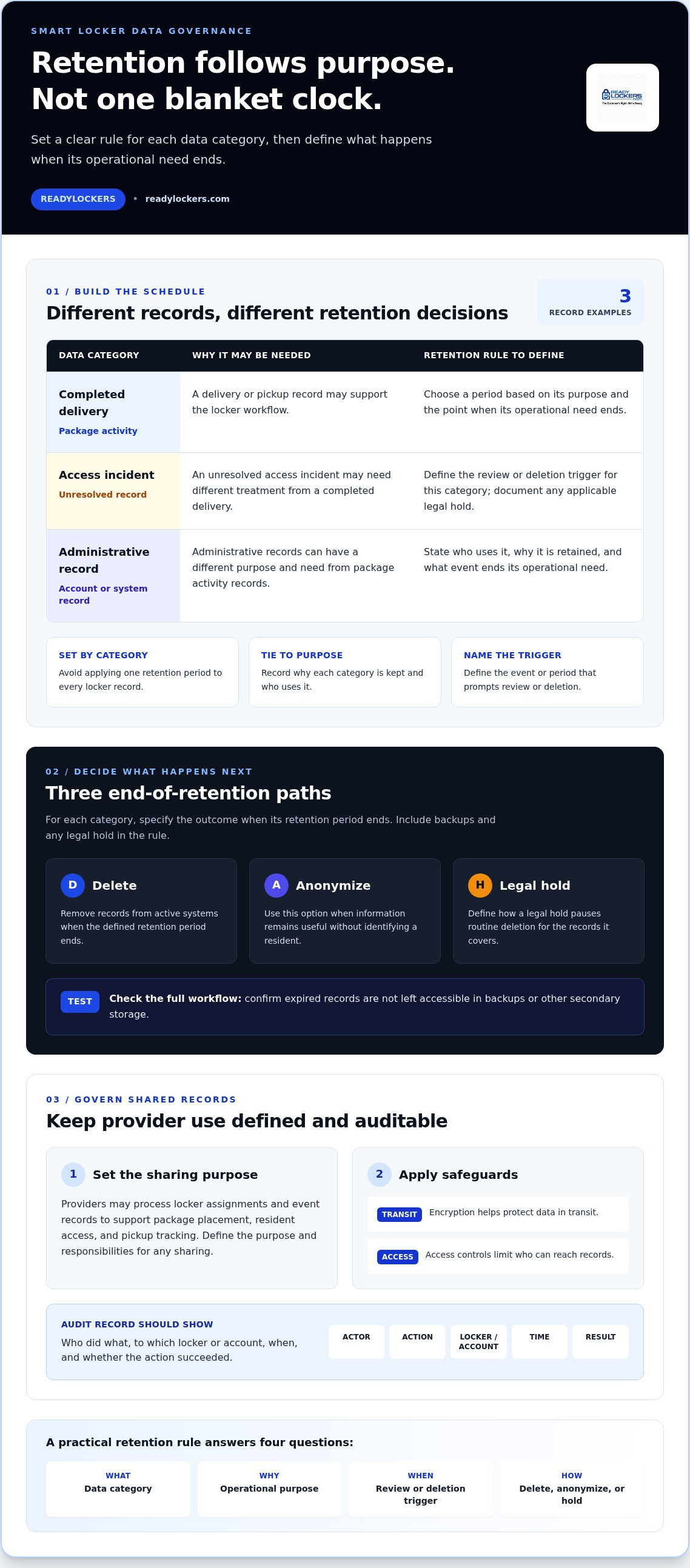
Providers may process locker assignments and event records to support package placement, resident access, and pickup tracking. Define the purpose and responsibilities for any sharing. Encryption helps protect data in transit, while access controls limit who can reach records. Audits should identify the actor, action, affected locker or account, time, and whether the action succeeded.
California Access and Deletion Rights
California residents under 18 who are registered users of online sites, services, or applications may request removal of content or information they publicly posted. This rule concerns publicly posted content, not a general right to delete every locker record. Residents who want to avoid locker-linked data can ask property management for a non-locker delivery arrangement; the operator should explain available alternatives and the data each option involves.
Data protection impact assessment screening
Screen locker processing early, then assess it further if the deployment is likely to create high risk. Base the assessment on actual data flows, integrations, and building operations.
Screening for Privacy Risks
Privacy screening identifies how residents could be exposed or their information misused. Before launch, map each collection point, record type, access role, and connected service. Assess whether locker assignments or event records can identify residents and whether biometric information is involved. Biometrics may create additional risk because many states treat them as personally identifiable information, while several states regulate their collection and use.
Consider practical breach scenarios, such as an exposed integration, a compromised administrator account, or cached credentials used beyond their intended purpose. Record how each scenario could affect residents, what information could be exposed, and which controls reduce the risk. Define incident procedures for reporting, containment, evidence preservation, and regulatory assessment.
Comparing Vendor Privacy and Security
Compare providers by reviewing data-handling practices and evidence, not policy language alone. Examine data-flow diagrams, hosting details, tenant separation, and integration paths to understand where information moves and who can access it. Clarify how security responsibilities are divided among the platform, connected services, property staff, and deployment environment.
Also examine how the system supports access restrictions, audit records, and incident response. A product feature or certification does not automatically make every customer configuration compliant. A review of Locker Management Software should therefore consider how the selected configuration fits the building’s workflow and privacy assessment.
Questions for Smart Locker Vendors
Consistent questions help property managers compare answers and identify gaps before deployment. Ask what resident and event data the system collects, what each field is for, and which parties receive or process it. Request data-flow diagrams, hosting details, the tenant separation approach, and integration paths to understand those answers.
- Which staff and provider roles can view or change resident-linked records?
- What safeguards protect information in transit, and how are privileged actions audited?
- How are deletion, backups, legal holds, and incident evidence handled?
- What happens to cached credentials and locker operations during a connection failure?
Use the responses to update the risk assessment, document unresolved risks, and establish operating controls before activation.
Data retention, deletion, and processor governance
Set retention periods by data category and purpose instead of applying one blanket period to every locker record. A completed delivery may need different treatment from an unresolved access incident or an administrative record. Document why each category is retained, who uses it, and what event ends its operational need.
For each category, define what happens when its retention period ends. Deletion should remove records from active systems; anonymization may be suitable when information remains useful without identifying a resident. Include backups in the process and define how a legal hold pauses routine deletion. Test the full workflow to ensure expired records are not left accessible in secondary storage.
A practical retention schedule can record:
- The data category and its operational purpose.
- The event or period that triggers review or deletion.
- Whether deletion, anonymization, or a legal hold applies.
- How the action is handled in backups and connected systems.
Third-party processors may store or handle locker data, so property operators need clear governance for each relationship. Document which party controls each processing activity, what information is shared, and which purposes are permitted. Contractual protections should cover handling instructions, safeguards, incident reporting, and support for deletion or anonymization. These terms help extend the operator’s retention policy beyond its own systems.
An internal policy turns the retention schedule into routine practice. Assign responsibility for reviewing data categories, handling deletion requests, and recording approved legal holds. Train staff to distinguish routine operational records from information that must be preserved for a specific reason. Regular reviews can flag categories that no longer serve their stated purpose, outdated processor arrangements, or deletion steps that fail in backups.
Clear retention rules make smart locker resident data privacy measurable in daily operations: every data category has a purpose, an owner, and a defined end-of-use process.
Lawful basis, transparency, and data minimisation
Before collecting locker data, identify its purpose, the responsible parties, and how the information is protected. A delivery workflow may need a resident identifier and pickup event, but not unrelated personal details. Define the reason for each field and explain it in a resident notice. Ensure the notice reflects the actual system configuration.
Transparency means residents can understand what the system collects and how the information is used. Explain whether records include locker assignments, access events, or administrator actions. Identify the parties responsible for processing and describe any sharing with service providers. Assess whether notice or consent is required for the deployment rather than assuming one approach suits every building.
Data minimization keeps collection tied to the workflow. For example, a pickup process may need an identifier to match a parcel with its recipient, plus an event showing collection. Avoid gathering extra details without a defined purpose. Apply the same test to biometric access: assess whether biometrics are necessary and proportionate, where templates are processed, and what alternative access method residents can use.
Local rules may impose specific duties. New York City’s Tenant Data Privacy Act imposes data privacy and security obligations on owners of smart access buildings. For a United States deployment, identify the state and local rules relevant to the information collected and the building’s location. Compliance depends on how personal data is processed in that specific deployment.
Turn these principles into operating controls. Link each data field to a stated purpose, a notice, an authorized use, and a retention rule. Review the controls when integrations or access methods change. If biometric access is proposed, document why it is needed and how a non-biometric alternative works. Keep resident-facing explanations consistent with actual system settings.
Align your locker workflow with clear privacy practices by reviewing smart locker data requirements for your property.
ReadyLockers: Smart Package Lockers
ReadyLockers provides Smart Package Lockers supported by Locker Management Software, a Contactless Pickup System, and a Courier Access Interface. Couriers place packages in lockers, and recipients receive instant notifications with a pickup code. Property teams can align this workflow with their privacy rules by defining permitted data use, access roles, retention periods, and deletion procedures for the deployment.
This approach suits buildings seeking a centralized package pickup process with clear operational responsibilities. The technology supports delivery and collection; property policies govern how resident-linked records are handled. Contact ReadyLockers to discuss smart locker options for your property.
Make privacy part of the operating plan
Build smart locker resident data privacy into the way your property manages technology, rather than leaving it as a policy on file. Assign a responsible team member to oversee privacy reviews, and revisit the operating plan when building workflows or system integrations change. This keeps resident-facing explanations aligned with how the locker process works.
ReadyLockers combines Smart Package Lockers, Locker Management Software, and a Contactless Pickup System for package workflows. Property teams can consider how these components fit their procedures for resident information and daily operations.
Contact ReadyLockers about resident privacy to discuss smart locker options for your property. A clear, resident-focused plan gives your team a practical foundation for moving forward with confidence.
Frequently Asked Questions
What resident data do smart locker systems collect and store?
Smart locker records can include a resident identifier, locker assignment, delivery or pickup event, and event time. The system may also use contact details to send package notifications, while administrator records can show changes to accounts or locker settings. If a deployment uses biometric access, biometric information may also be involved. The data collected depends on the features and workflow enabled.
What privacy and data security laws apply to smart lockers in the United States?
Applicable rules depend on the property’s location and the information processed. California, Illinois, New York, Texas, and Washington regulate biometric information, and many states treat biometrics as personally identifiable information under breach-notification or safeguard laws. New York City’s Tenant Data Privacy Act imposes privacy and security obligations on owners of smart access buildings. Portland, Oregon, and Baltimore County have passed facial-recognition bans.
How long do smart locker systems retain resident data, and can residents request deletion?
There is no single retention period that fits every locker record. Operators should set periods by data category and purpose, then define how deletion, anonymization, backups, and legal holds are handled. A resident’s deletion rights depend on the applicable law and the record involved. For example, California residents under 18 may request removal of information they publicly posted on covered online services, not every locker record.
Do smart locker cameras, access logs, or notifications collect sensitive resident information?
Access logs and notifications can become personal information when they link a resident to a delivery, locker, or pickup time. If cameras are part of the building’s setup, footage may capture identifiable people, so its purpose and access should be addressed in the privacy notice. Biometric identifiers require particular care: several states regulate their collection and use, and many states treat them as personally identifiable information.

Frequently Asked Questions
What resident data do smart locker systems collect and store?+
Smart locker records can include a resident identifier, locker assignment, delivery or pickup event, and event time. The system may also use contact details to send package notifications, while administrator records can show changes to accounts or locker settings. If a deployment uses biometric access, biometric information may also be involved. The data collected depends on the features and workflow enabled.
What privacy and data security laws apply to smart lockers in the United States?+
Applicable rules depend on the property’s location and the information processed. California, Illinois, New York, Texas, and Washington regulate biometric information, and many states treat biometrics as personally identifiable information under breach-notification or safeguard laws. New York City’s Tenant Data Privacy Act imposes privacy and security obligations on owners of smart access buildings. Portland, Oregon, and Baltimore County have passed facial-recognition bans.
How long do smart locker systems retain resident data, and can residents request deletion?+
There is no single retention period that fits every locker record. Operators should set periods by data category and purpose, then define how deletion, anonymization, backups, and legal holds are handled. A resident’s deletion rights depend on the applicable law and the record involved. For example, California residents under 18 may request removal of information they publicly posted on covered online services, not every locker record.
Do smart locker cameras, access logs, or notifications collect sensitive resident information?+
Access logs and notifications can become personal information when they link a resident to a delivery, locker, or pickup time. If cameras are part of the building’s setup, footage may capture identifiable people, so its purpose and access should be addressed in the privacy notice. Biometric identifiers require particular care: several states regulate their collection and use, and many states treat them as personally identifiable information.