Smart Locker Delivery Notifications and Package Tracking
Learn how smart locker delivery notifications keep recipients updated with instant SMS alerts, pickup codes, and real-time package tracking for easy retrieval.

A delivery alert should do more than say a package has arrived. Smart locker delivery notifications tell recipients when a parcel is placed in a locker and provide a pickup code or QR code for access. ReadyLockers sends instant SMS and email notifications when a package is deposited.
It’s reasonable to expect a clear update without having to wait for a handoff or search for a package. This article explains how locker systems record delivery and pickup activity, how automated email, text, and app alerts fit into the process, and what recipients need to collect a parcel.
Notification timing, access codes, and status updates work together to keep recipients informed from drop-off to pickup. For property teams, delivery records also show what has arrived and whether it has been collected.
Key Takeaways
- Understand how delivery and pickup status updates help recipients and property teams follow a parcel’s progress.
- Learn what access details an alert can provide and how text, email, and app notifications support pickup.
- See how locker access methods and reminder messages fit into the typical 24-to-72-hour parcel retention period.
- Discover how delivery activity data can help property teams spot patterns and plan for busy periods.
- Find out which smart locker components connect courier access, parcel storage, and recipient pickup.
Delivery and pickup tracking
Package tracking in a smart locker records key handoffs, not every movement of a parcel. A courier places the parcel in an available compartment and completes the locker’s delivery process. The system links that event to the recipient and compartment, giving property staff a delivery status without requiring them to sort every package by hand.
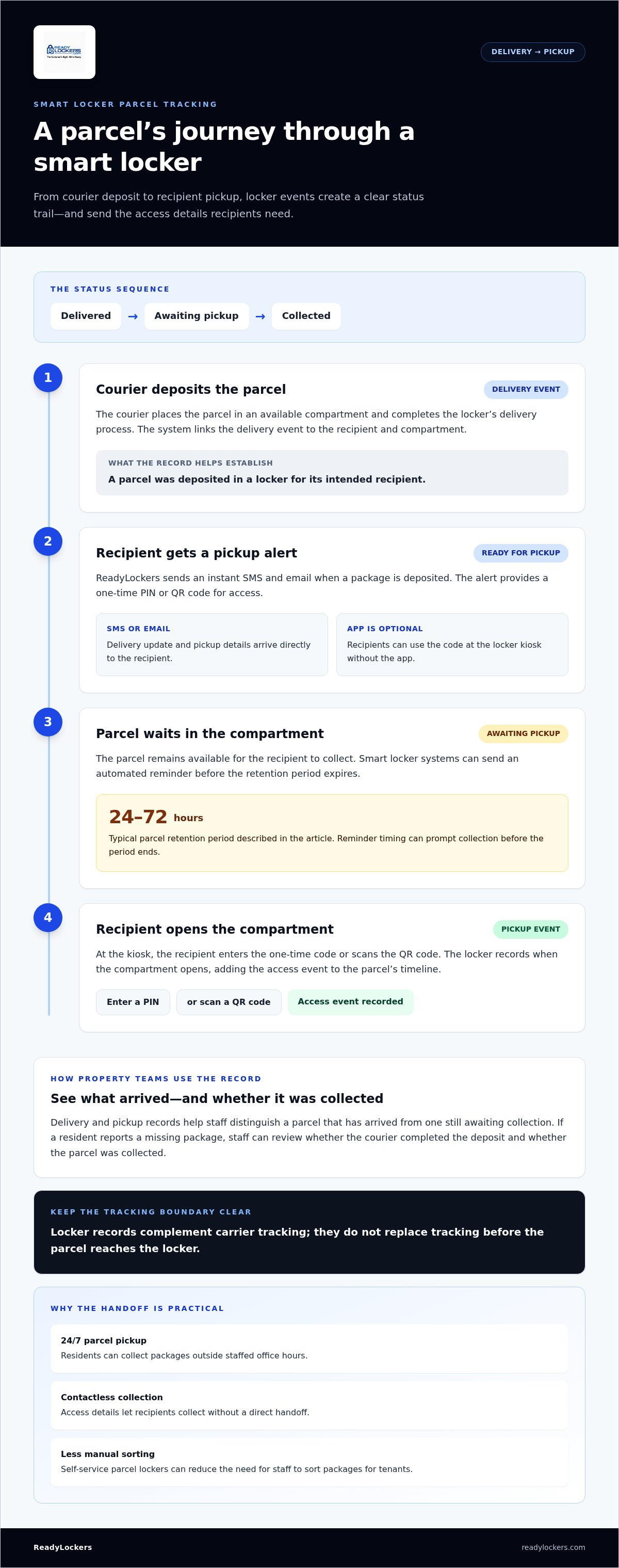
Once the parcel is secured, an alert tells the recipient it’s ready for pickup. ReadyLockers sends an instant SMS or email with a one-time PIN or QR code for access. The locker records when the compartment opens, creating a practical timeline: delivered, awaiting pickup, and collected.
For an apartment team, these statuses distinguish a parcel that has arrived from one that still needs attention. If a resident says a package hasn’t reached them, staff can review the locker’s delivery and pickup records to see whether the courier completed the deposit and whether the package was collected. Locker records complement, rather than replace, carrier tracking before the parcel reaches the locker.
Pickup reminders help address packages that remain in a compartment after the first alert. Smart locker systems can send an automated reminder before the parcel’s retention period expires. That period is typically set between 24 and 72 hours. The timing gives recipients a window to collect their delivery and gives property teams a clearer view of parcels still occupying compartments.
- At delivery: The locker records the deposit and sends a ready-for-pickup alert.
- Before collection: A reminder can prompt the recipient to retrieve a parcel nearing the end of its retention period.
- At pickup: The recipient enters a code or scans a QR code, and the locker records the access event.
In properties with 24/7 parcel pickup, residents can collect packages outside staffed office hours. A recipient returning to an apartment late can use the access details in the alert instead of waiting for a front desk handoff. Contactless pickup also limits direct exchanges between couriers, staff, and residents. Together, delivery status, reminders, and recorded access make the package’s locker journey easier to follow, while the recipient chooses a convenient pickup time.
That handoff also has operational value beyond confirming status. Self-service parcel lockers can reduce the need for receptionists or employees to sort packages for tenants. When items are ready, smart locker users can receive a unique pickup code by text or email; customers typically open a parcel locker for pickup using an access code, often by scanning a QR code. Smart lockers can provide apartment residents with a secure, contactless option for package deliveries, and parcel lockers can reduce failed delivery attempts when recipients are away from home. For properties coordinating access across tools, modern smart lockers can integrate seamlessly with mobile device applications and existing software systems.
Delivery-ready email, text, and app notifications
Smart locker delivery notifications can arrive by SMS or email. ReadyLockers sends both when a package is deposited, with a one-time PIN or QR code for pickup. Recipients don’t need the app: they can use the code at the locker kiosk. The free iOS and Android app is optional.
Email and Text Alerts
An email or text alert tells the recipient when a courier has placed a parcel in a locker and it’s ready for pickup. The message includes a one-time pickup code, giving the recipient both a status update and the information needed to access the compartment. For example, an SMS lets a resident check the alert while away from the apartment.
Email leaves recipients with a message they can find later, while SMS puts the alert alongside their other phone messages. Both channels can reduce reliance on a reception desk to pass along delivery details. ReadyLockers sends instant SMS and email notifications when a package is deposited.
App Delivery Notifications
An app delivery notification is an in-app alert that tells a recipient a parcel is ready to collect. Where a locker system supports app notifications, the message can sit within the same mobile interface recipients use for locker-related updates. That can make it convenient to locate delivery information without searching an email inbox or text thread.
The ReadyLockers cloud management platform links locker events with delivery records, helping property teams manage package activity. For instance, an apartment operator can review delivery records as part of its property processes. The app offers another way to access updates, while a PIN or QR code at the kiosk enables pickup without a phone app.
Notification Setup
Notification setup links a recipient’s contact details to the delivery record, so the alert reaches the intended person. Recipients should provide an email address or phone number they can access during a normal pickup. A code sent to an old number won’t help at the locker.
Property teams can use locker management software to configure the system’s notification workflow. The practical setup sequence is to register recipients, connect their contact details to delivery records, then activate the supported alert channels. Clear instructions at registration help residents understand where alerts arrive and how to use the access details.
For property managers evaluating this process, smart locker notification systems bring delivery records and recipient alerts into a connected workflow. The right channel makes the update visible; the pickup code or QR code then gives the recipient a practical way to collect the parcel.
How smart parcel lockers work
Smart locker delivery notifications link a courier’s locker deposit to the recipient’s contact details. After the parcel is placed in a compartment, the system sends an alert with pickup information, such as a PIN or QR code.
The process connects physical storage with a digital record. A courier uses the locker system to complete a delivery, and the recipient uses an access method to retrieve it. Depending on the system, access can use a QR code, employee badge, or another encrypted method. That link helps separate each customer’s parcel from other deliveries in shared parcel lockers.
For pickup, the recipient enters a PIN or scans a QR code at the locker kiosk. The system identifies the assigned compartment and grants access. After the parcel is collected, the locker records the pickup status, clarifying for an apartment manager whether a package is awaiting collection or has left the locker.
Retention periods shape what happens after delivery. Smart locker parcel retention is typically set between 24 and 72 hours. If a customer hasn’t collected the parcel, locker systems can send an automated reminder before the period expires. The reminder gives recipients another prompt and helps property teams understand which compartments remain occupied.
Parcel lockers can also support reverse logistics, meaning the movement of a returned item back into the delivery network. Some systems let customers initiate a return by scanning a return code and placing the item inside a locker, creating a drop-off point without a staffed counter. The specific return steps depend on the return code and the system’s process.
Access options affect how locker systems serve different groups. A resident can use a QR code from a phone, while an employee may use a badge at a workplace locker. ReadyLockers supports PIN and QR-code access at the kiosk, as well as optional HID badge integration. These options help manage access for couriers, customers, and authorized personnel.
Adoption figures show how parcel lockers operate at scale. Germany had approximately 13,000 Packstations, or parcel lockers. Globally, the smart parcel locker market was valued at US$800 million in 2022 and is expected to exceed US$2 billion by 2030. These figures provide context for a delivery model built around automated storage and self-service collection.
For property teams, the key is the connected sequence: courier deposit, recipient alert, secure access, and recorded collection or return. Each stage gives the next participant useful information, allowing a parcel to move through delivery without a staff handoff at every step.
Parcel Pending smart lockers capture usage data in real time to help businesses monitor trends and plan for peak delivery periods. DHL reports that deliveries to parcel lockers reduce last-mile carbon emissions by 30%.
Smart locker technology and package notifications
A smart locker connects electronic compartments, access credentials, and delivery records. When a courier deposits a package, the system links the compartment to a recipient and sends a ready-for-pickup notification. The recipient can use a PIN or QR code at the kiosk to retrieve it.
If an alert or access code is missing, first check the email address or phone number registered for locker messages, including spam or filtered texts. Then use the locker system’s resend option, if available, or contact the property team to review the delivery record and access instructions.
If a notification names someone else, don’t use its code or open the compartment. Check the recipient details and report the misdirected message to property staff, who can compare it with the locker’s delivery record and help route it correctly.
A package room offers a different arrangement: couriers leave parcels in a shared room, while smart package lockers assign deliveries to individual compartments. In a package room, staff may need to sort incoming items or residents may have to search for their parcels. Lockers assign storage and recipient-specific access instead. The better fit depends on the building’s layout, delivery flow, and how much staff involvement the property wants.
That distinction changes daily handling for building staff. With a package room, an employee may receive a delivery, organize items, and help residents locate them. With package lockers, the courier deposits the parcel directly into a compartment, and the alert directs the recipient to pickup. This reduces the need for staff to sort each delivery, while locker records show whether a package remains stored or has been collected.
Access control supports package security by limiting compartment entry to the person with the relevant credential. A recipient uses a PIN or scans a QR code rather than searching a shared pile. ReadyLockers can also integrate with Genetec video surveillance. Controlled pickup and recorded activity help protect deliveries, but recipients should still keep access codes private.
Package notifications also give recipients a timely signal to act. A delivery-ready message identifies a parcel as available, while a pickup reminder can prompt collection before the retention period ends. Property teams can use the related status information to spot packages that remain in storage and respond to a missing or misdirected delivery report.
Retail operations can use the same core process for customer collections: staff or couriers place an order in a compartment, and the customer receives access details. In an apartment building, the recipient is a resident; at a retail site, it may be a shopper collecting a purchase. In both cases, the locker connects a physical package with a specific recipient and a recorded pickup event.
Automated delivery notifications
Automation connects a locker event to a message without requiring staff to notify each recipient manually. A completed courier deposit can trigger a delivery-ready alert, while a recorded pickup updates the parcel’s status. This sequence gives recipients timely information and helps property teams maintain consistent delivery records across apartments or offices.
Notification records can also help teams understand package volume. A property manager can review delivery activity to identify busy periods, such as a weekday afternoon when several couriers arrive. These patterns can inform decisions about staffing, compartment allocation, and resident communications. The value comes from using recorded activity to plan operations, not simply sending more alerts.
Clear message design matters when delivery volume rises. A useful alert says the parcel is ready, identifies where to collect it, and provides the pickup PIN or QR code. Separating the locker location from the access details makes the message easier to scan on a phone. Consistent wording also helps residents distinguish delivery notices from general property updates.
Automated reminders can prompt recipients to collect parcels before a retention period expires. Property teams can use reminders to reduce manual follow-up for packages still in compartments. The message should make the next action clear. Set the timing and channel to match how residents receive their initial alerts.
Offices can use delivery alerts to keep package handling separate from reception tasks. When a courier completes a locker deposit, an automated message directs the employee to collect the item. Reception staff can focus on visitors and other duties instead of contacting each recipient. Locker records also make it easier to see whether a parcel remains stored or has been picked up.
Automation needs a clear exception process, too. If a recipient reports a missing message, staff can use the delivery record to locate the parcel’s status and provide access instructions. Correcting contact details helps future alerts reach the right person. A defined process reduces confusion without requiring staff to track every routine delivery manually.
To connect notification workflows with property operations, plan an automated locker notification workflow around delivery events, recipient channels, and package volume. This approach helps teams align alerts with the steps couriers and recipients already take.
ReadyLockers: Smart Package Lockers
ReadyLockers connects smart package storage with recipient alerts and contactless collection. Its Smart Package Lockers work with Locker Management Software and a Courier Access Interface to support the delivery and pickup process. Recipients receive instant SMS or QR code notifications, then collect parcels through contactless pickup, available 24/7.
Smart lockers suit properties that need a structured way to handle deliveries without relying on staff to sort every package. ReadyLockers combines smart locker hardware, cloud management software, and courier access to connect key delivery steps. Recipients receive an alert when packages are ready, while property teams gain a clearer view of delivery activity.
Contact ReadyLockers to discuss smart locker delivery notifications for your property.
Make Package Handling Work for Your Property
Start by identifying where delivery coordination creates the most work in your building. Consider how residents learn about incoming parcels, how staff handle questions, and which handoffs could be clearer. These priorities can help shape a notification workflow around your property’s needs.
For property managers, smart locker delivery notifications are most useful when they support a defined operating routine. Decide how delivery records, recipient messages, and staff responsibilities should connect. ReadyLockers’ cloud management platform helps teams manage package activity, while a clear workflow gives residents a consistent experience.
ReadyLockers can help you explore a locker setup aligned with your property’s delivery needs. Contact ReadyLockers about smart lockers and take the next step toward a more organized package process.
Frequently Asked Questions
What alerts do smart locker services send by SMS, email, or app?
Smart locker delivery notifications confirm that a package is ready and provide instructions for collection. ReadyLockers sends an instant SMS and email with a pickup PIN or QR code. Check the locker location and recipient name before heading over. For example, an office employee can use those details to find the correct pickup point without asking reception to locate the parcel.
How do I retrieve a package using a smart locker notification or access code?
Use the PIN or QR code from your notification at the locker kiosk, then follow the on-screen prompts to open the assigned compartment. Check that the recipient and delivery details match your package before collecting it. ReadyLockers supports kiosk access with a PIN or QR code, so a mobile app isn’t required. If the code doesn’t work, avoid repeated guesses and contact your property team to review the delivery record.
How long do packages stay in smart lockers before being returned?
Parcel retention is typically set between 24 and 72 hours, but the exact collection window depends on the locker system’s settings. Read the delivery message for any stated deadline, and act on reminders before the parcel’s storage period ends. If the deadline has passed, contact the property team promptly. They can explain the next step for that building and help determine whether the package remains accessible or needs separate retrieval arrangements.
How secure are smart locker notification links and access codes?
Security depends on how the locker system controls access and records activity. Some systems use encrypted access methods, while ReadyLockers uses electronically locked compartments and one-time PIN or QR credentials. Its cloud software records time-stamped door events, creating an audit trail for property teams. Treat a pickup code as private: don’t forward it or use a notification addressed to another person, and report a misdirected alert to building staff.

Frequently Asked Questions
What alerts do smart locker services send by SMS, email, or app?+
Smart locker delivery notifications confirm that a package is ready and provide instructions for collection. ReadyLockers sends an instant SMS and email with a pickup PIN or QR code. Check the locker location and recipient name before heading over. For example, an office employee can use those details to find the correct pickup point without asking reception to locate the parcel.
How do I retrieve a package using a smart locker notification or access code?+
Use the PIN or QR code from your notification at the locker kiosk, then follow the on-screen prompts to open the assigned compartment. Check that the recipient and delivery details match your package before collecting it. ReadyLockers supports kiosk access with a PIN or QR code, so a mobile app isn’t required. If the code doesn’t work, avoid repeated guesses and contact your property team to review the delivery record.
How long do packages stay in smart lockers before being returned?+
Parcel retention is typically set between 24 and 72 hours, but the exact collection window depends on the locker system’s settings. Read the delivery message for any stated deadline, and act on reminders before the parcel’s storage period ends. If the deadline has passed, contact the property team promptly. They can explain the next step for that building and help determine whether the package remains accessible or needs separate retrieval arrangements.
How secure are smart locker notification links and access codes?+
Security depends on how the locker system controls access and records activity. Some systems use encrypted access methods, while ReadyLockers uses electronically locked compartments and one-time PIN or QR credentials. Its cloud software records time-stamped door events, creating an audit trail for property teams. Treat a pickup code as private: don’t forward it or use a notification addressed to another person, and report a misdirected alert to building staff.