Package Workflow Automation for Properties: A 2026 Guide
Master package workflow automation for properties in 2026. Streamline courier delivery, smart locker storage, and resident pickup with our practical guide.

Package handling doesn’t become easier just because a property adds more staff processes. Package workflow automation for properties works best when delivery, secure storage, recipient notification, and pickup connect as one clear handoff. The goal is to reduce repetitive coordination without adding unnecessary steps for couriers or recipients.
It’s a familiar challenge: staff receive and sort deliveries, recipients miss messages or can’t collect packages during office hours, and managers have limited visibility into what’s waiting. A predictable workflow addresses these friction points by giving couriers a defined way to deposit packages and recipients clear instructions for retrieving them.
This guide lays out a practical framework for automating package handling across apartments, offices, and other property types. You’ll learn how to map the workflow from courier access through pickup, assess your property’s needs, and identify where smart package lockers and management software can help. ReadyLockers connects delivery completion to contactless pickup with secure lockers, courier access management, and SMS or QR code notifications. Pickup is available 24/7.
Key Takeaways
- Package workflow automation for properties connects courier access, package placement, recipient notification, and pickup into one coordinated process.
- Map each handoff and define what event triggers the next step, so couriers, staff, and recipients know their roles.
- Compare manual and locker-supported workflows to identify where communication, pickup access, and operational visibility can improve.
- Plan around your property’s delivery points, notification needs, pickup expectations, and exceptions before selecting an automated approach.
- Smart lockers and cloud software can support secure package handoffs, SMS or QR notifications, courier access management, and usage analytics.
What package workflow automation means for property teams
Package workflow automation for properties is a coordinated process that moves a delivery from courier arrival through secure placement, recipient notification, and collection, with a clear status and next step at each handoff. It focuses on the package’s path and the people responsible for it, rather than automating every property operation. For a broader foundation, see What is Workflow Automation?
A digital log can record that a package arrived, and an alert can tell someone to collect it. Neither action alone creates an end-to-end workflow. Automation connects the events: the courier completes a handoff, the delivery is recorded, the recipient receives a notification, and collection closes the loop. If one step doesn’t trigger or inform the next, staff may still need to bridge the gap manually.
That gap often shows up as interruptions and uncertainty. Staff may pause other work to answer whether a delivery arrived, search for a package with incomplete details, or work out who should notify its recipient. Recipients may not know where to collect an item or whether it’s ready. The result can be delayed pickup, repeated questions, and unclear responsibility, whether the property is an apartment building, office, hotel, or school.
Which package handoffs create the most manual work?
Each handoff transfers responsibility or information. When the courier arrives, someone needs to know where deliveries should go. At acceptance and placement, the package needs to reach its designated handoff point. The delivery record then needs to connect the item to the right recipient, who needs clear pickup instructions. Finally, collection closes the loop. If ownership is vague at any point, a hotel front desk, school office, or property team may field repeated status questions without knowing who should act next.
What should an automated package workflow accomplish?
The goal is a dependable sequence of status changes, with relevant information reaching the right participant. Responsibilities can be separated without assuming every property has the same staffing model:
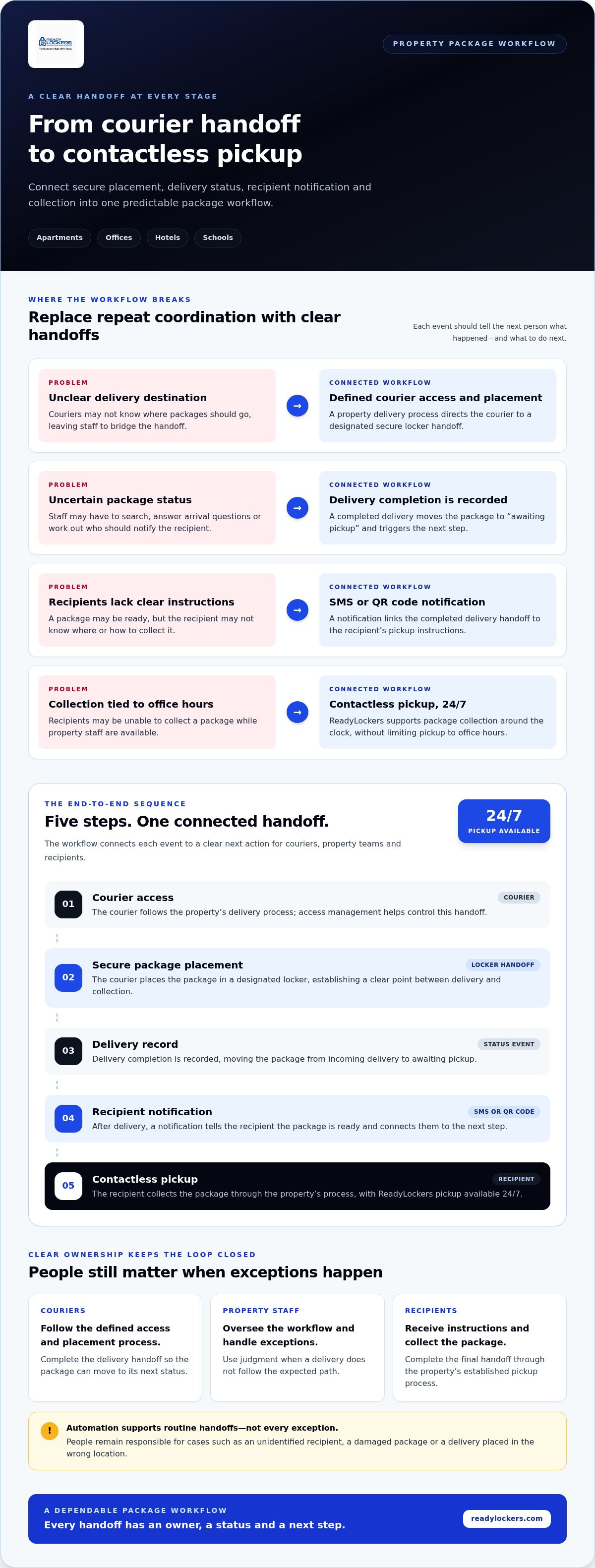
- Couriers follow a defined access and placement process, then complete the delivery handoff.
- Property staff oversee the workflow, handle exceptions, and use judgment when a delivery doesn’t follow the expected path.
- Recipients receive clear instructions and collect the package through the property’s established process.
Automation should reduce repetitive coordination, not remove necessary human judgment. A system can make routine handoffs more consistent, while people remain responsible for resolving exceptions such as an unidentified recipient, a damaged package, or a delivery placed in the wrong location. Use a simple test: after each event, does the next participant know what happened and what to do? If not, the workflow still depends on someone noticing the gap and chasing an answer.
How an automated package workflow moves from delivery to pickup
A useful workflow makes each transition explicit: who acts, what event marks the handoff, and what needs to happen next. A secure smart locker gives the courier a physical place to leave a package, while management software connects delivery with recipient communication. The steps can reflect the property’s delivery arrangements, but each handoff should have a clear owner and outcome.
In a typical automated package workflow, courier access begins the handoff, package placement establishes secure storage, delivery completion triggers a record and recipient notification, and the recipient collects the package through contactless pickup. This event-to-action sequence gives couriers, property teams, and recipients a clear view of their part in the process.
- Courier access: The courier follows the property’s delivery process. Courier access management supports control of this handoff within the platform.
- Package placement: The courier places the package in a designated secure locker, creating a physical handoff point between delivery and collection.
- Delivery record: Delivery completion is recorded as the workflow event that moves the package from incoming delivery to awaiting pickup.
- Recipient notification: After delivery, the recipient receives an SMS or QR code notification, connecting the completed handoff with the next action.
- Pickup: The recipient collects the package contactlessly. ReadyLockers supports pickup 24/7, so collection isn’t limited to property office hours.
What happens when a courier delivers a package?
The courier arrives and follows the property’s established process, using the designated locker handoff to place the package. A secure locker keeps the package at a defined collection point rather than leaving its destination unclear. Courier access management helps control this step within the platform. The property team can set the process around its needs, including who oversees deliveries and how exceptions are handled.
How do notifications connect delivery with recipient pickup?
Once delivery is complete, the recipient receives an SMS or QR code notification. That message connects the completed courier handoff with the recipient’s next step: collecting the package through contactless pickup. Pickup is available 24/7. This is useful in apartments, offices, hotels, and schools, where recipients may be away from the delivery point when a package arrives.
The sequence is only useful if each event leads to a clear next action. If a package has been placed but the recipient hasn’t been notified, the workflow has stopped before pickup. If the recipient has collected it, the delivery journey has reached its intended endpoint. Defining those transitions helps teams identify where manual follow-up may still be needed, without assuming every exception can be automated. For a broader business perspective on how connected steps support workflow efficiency, see IBM’s Benefits of Workflow Automation.
Properties looking to make these handoffs more structured can explore how ReadyLockers smart package lockers provide a secure delivery point and connect it with recipient notifications and contactless pickup.
Manual versus automated package workflows: what changes for a property?
The difference is not simply paper versus software. It’s where responsibility sits, how recipients learn a package is ready, and whether staff must coordinate each step themselves. Package workflow automation for properties can bring routine handoffs together, while leaving people in control of exceptions and decisions that need judgment.
| Workflow | Responsibility | Recipient communication | Pickup access | Operational visibility |
|---|---|---|---|---|
| Manual logging | Staff receive, record, and organize deliveries. | Staff notify recipients through the property’s chosen process. | Often depends on the property’s staff and pickup arrangements. | Records depend on consistent manual updates. |
| Staff-mediated handoffs | Staff coordinate delivery, storage, and collection. | Staff relay package availability and answer follow-up questions. | Collection follows the property’s handoff process. | Status is shared through staff-maintained records and communication. |
| Locker-supported automated workflow | Couriers use a defined locker handoff; staff oversee the process and exceptions. | Recipients receive SMS or QR code notifications after delivery. | Contactless pickup can be available 24/7. | Locker management software can provide usage analytics. |
Automation can sound like another system to manage. Its practical role is to bring routine steps together: courier access management, secure package placement, recipient notification, and pickup. A shared platform gives teams a common view of locker activity rather than requiring staff to reconcile separate messages and manual notes. It doesn’t eliminate oversight. Staff may still need to respond when a delivery is unusual, information is unclear, or a package needs individual attention. For a broader look at how businesses apply connected workflows, Workflow Automation in Practice offers useful context.
When does a manual process become difficult to manage?
Look for recurring interruptions, records that vary by staff member or shift, and uncertainty about who currently owns a package. The pressure also depends on delivery volume, operating hours, and the property’s service model. There’s no universal package count that dictates when to automate. A more useful signal is whether the existing process creates repeated coordination or makes package status hard to establish.
Which property types can use a shared package workflow?
Apartments coordinate deliveries for residents, while offices handle packages for employees and departments. Hotels may route deliveries through guest-facing operations; hospitals and schools serve distinct recipients and internal teams. Retail locations and warehouses may receive deliveries tied to business operations, while HOAs coordinate around community needs. Participants and delivery patterns differ, so the workflow should reflect each property’s handoff points. For hardware considerations, explore the smart package lockers buyer's guide.
A consistent workflow doesn’t require identical procedures everywhere. It gives each property a way to define who handles routine steps, where the package handoff occurs, and when staff should step in.
How to plan package workflow automation for your property
Start with the package journey your property actually handles, not with a technology feature list. Package workflow automation for properties is easier to plan when teams identify where handoffs slow down, where information gets lost, and which steps need human oversight. Use this sequence to turn those observations into a practical workflow.
- Map the current process. Follow a package from courier arrival to recipient collection. Record where it is received, where it waits, how its recipient is identified, and how pickup is communicated.
- Name the participants. Include the courier, property team, recipient, and workflow system. Define who is responsible at each handoff, while allowing responsibilities to reflect your staffing model.
- Mark events and next steps. Treat package arrival, secure placement, notification, and collection as observable events. Decide what action follows each one and who needs the information.
- Review space and delivery patterns. Consider where a secure handoff point can fit, how people move through the property, and how package volume changes across typical and busier periods. These factors inform locker placement and configuration without relying on a one-size-fits-all capacity assumption.
- Define notification and pickup expectations. Decide how recipients should learn that a package is ready, where they should collect it, and what pickup process fits the property. Make instructions clear for both regular and occasional users.
- Write exception paths and review measures. Set out how staff should respond to unusual deliveries, unclear recipient details, or other cases that don’t follow the routine process. Then identify what you’ll review to understand whether the workflow is being used as intended.
Map roles, triggers, and exception paths
Keep the role map simple: couriers complete the delivery handoff, recipients collect their packages, property teams oversee the process and address exceptions, and the system supports recorded activity and communication. For each event, define who needs to act or be informed. A human-defined exception process matters. Automation can structure routine steps, but staff should retain judgment when a delivery needs individual attention.
Choose workflow measures and review the process
Use available usage analytics to understand locker activity and how the workflow is being adopted. Pair those observations with practical measures, such as recorded usage and recurring questions from staff, couriers, or recipients. Review the findings regularly and adjust unclear instructions, handoffs, or responsibilities. The aim is to learn where the process needs attention, not to meet an unsupported benchmark.
Property layout, defined roles, and implementation choices all shape the final workflow. The property management integration guide offers broader considerations for fitting locker management into property operations. To plan a secure, structured package handoff, explore ReadyLockers smart package lockers.
How ReadyLockers supports package workflow automation
Package workflow automation for properties needs more than a digital record. It needs a clear physical handoff point and a process that connects courier delivery with recipient collection. ReadyLockers combines smart package lockers with cloud-based management software to support that journey for residential and commercial properties.
The locker provides a secure place for couriers to leave packages. After delivery, recipients receive an SMS or QR code notification and can collect packages contactlessly, 24/7. This connects package placement to recipient pickup without requiring staff to coordinate every routine handoff. The platform also includes courier access management and usage analytics, supporting delivery access and visibility into locker activity.
How lockers and software support the package handoff
Hardware and software play distinct roles. The locker creates the physical point where a courier places a package; the management software supports the workflow around that handoff. After delivery, SMS or QR code notifications tell recipients to proceed to pickup. Contactless collection completes the recipient-facing part of the process, while courier access management and usage analytics support property operations.
This arrangement gives teams a defined process to build on, rather than relying on package storage alone. The property can identify where couriers place deliveries, how recipients are notified, and what activity to review. It doesn’t remove the need for staff judgment when a delivery falls outside the routine process, but it supports a consistent path for ordinary package handoffs.
What property teams can do next
Before choosing a setup, define which handoffs you want to streamline. Note who receives packages, where they should be placed, how recipients will learn they’re ready, and what pickup should look like. Then consider the physical layout and package-volume requirements. Locker placement should fit the available space and the way people move through the property, while the configuration should reflect expected delivery patterns. Avoid choosing based on a generic capacity assumption.
Next, identify the workflow information staff need to oversee package activity. Usage analytics can help teams review locker use, while a clear handoff process makes responsibilities easier for couriers and recipients to understand. For broader implementation considerations, the smart locker management software guide explores how platform operations fit into property workflows.
With the process defined, property teams can align locker hardware and software to the handoffs they want to manage. ReadyLockers supports secure package placement, recipient notifications, courier access management, and contactless pickup, giving teams practical components for a connected workflow.
Explore ReadyLockers package workflow solutions for your property.
Make your next package workflow step count
Make the next step a shared operating decision, not a technology project in isolation. Package workflow automation for properties is most useful when the team agrees on what a completed handoff means, who owns unresolved cases, and which details need to be visible to keep deliveries moving. That clarity gives recipients, couriers, and property staff a consistent process to follow.
Before changing the process, write down one recurring point of friction and the action that should resolve it. Use that as a practical reference as your property reviews package activity and adjusts responsibilities or instructions. Start with the handoff that creates the most uncertainty, then build outward only where a defined change can make the process clearer. A workflow should remain understandable as property needs and delivery patterns change.
ReadyLockers brings the physical package handoff and its supporting workflow together. Explore ReadyLockers package workflow solutions and take a confident next step toward a more organized package process.
Frequently Asked Questions
What is package workflow automation for properties?
Package workflow automation for properties coordinates package handoffs through a defined process supported by technology. It connects delivery activity with the information and actions needed for collection. For example, a property can establish how a courier uses a designated delivery point and how the intended recipient learns a package is ready. The aim is to make routine handling more consistent while keeping staff available for situations that need attention.
How does package workflow automation work?
It works by linking package-related events to clear next steps. A property defines how deliveries are accepted, where packages are held, how recipients are informed, and how collection is handled. The system supports the routine process, while the property team establishes responsibilities and procedures for anything outside it. A useful test is whether each participant can tell what action is expected without relying on informal messages or guesswork.
Can package workflow automation work for different property types?
Yes. The workflow can be shaped around who receives packages and how a property operates. An apartment community may focus on resident collection, while an office may need to distinguish deliveries for employees or departments. A hotel, hospital, school, retail location, warehouse, or HOA can define different participants and handoff expectations. The core process is adaptable, but its roles, delivery points, and instructions should reflect each property’s needs.
Does package workflow automation replace property staff?
No. Automation can support routine coordination, but staff remain important for oversight and exceptions. A team may need to respond if a package is damaged, its intended recipient is unclear, or the delivery doesn’t follow the property’s process. Before implementation, define which situations require staff judgment and who should handle them. This keeps the workflow practical without expecting technology to resolve every unusual delivery on its own.
How do recipients know when a package is ready for pickup?
Recipients receive an SMS or QR code notification after delivery. For a smoother experience, properties should make sure recipients know which contact information to use and where to find package pickup instructions. Clear communication can also help people recognize that a message relates to a delivery at their property. ReadyLockers supports SMS or QR code notifications as part of its package pickup process.
What should a property consider before automating package handling?
Start by reviewing delivery patterns, available space, and the people involved in receiving and collecting packages. Consider where a handoff point can fit, who will oversee unusual cases, and what pickup expectations make sense for the property. It’s also useful to identify recurring questions or interruptions in the current process. These details help teams plan a workflow around real operating needs rather than assumptions.
Can package lockers provide pickup outside office hours?
Yes. ReadyLockers supports contactless package pickup 24/7, allowing recipients to collect packages beyond property office hours. This can be useful for people whose work or daily schedules don’t align with staffed pickup times. Property teams should still communicate the pickup process clearly so recipients know where to go and what instructions apply at their location. The locker supports collection; it doesn’t replace the property’s own procedures.

Frequently Asked Questions
Which package handoffs create the most manual work?+
Each handoff transfers responsibility or information. When the courier arrives, someone needs to know where deliveries should go. At acceptance and placement, the package needs to reach its designated handoff point. The delivery record then needs to connect the item to the right recipient, who needs clear pickup instructions. Finally, collection closes the loop. If ownership is vague at any point, a hotel front desk, school office, or property team may field repeated status questions without knowing who should act next.
What should an automated package workflow accomplish?+
The goal is a dependable sequence of status changes, with relevant information reaching the right participant. Responsibilities can be separated without assuming every property has the same staffing model: Automation should reduce repetitive coordination, not remove necessary human judgment. A system can make routine handoffs more consistent, while people remain responsible for resolving exceptions such as an unidentified recipient, a damaged package, or a delivery placed in the wrong location. Use a simple test: after each event, does the next participant know what happened and what to do? If not, the workflow still depends on someone noticing the gap and chasing an answer. A useful workflow makes each transition explicit: who acts, what event marks the handoff, and what needs to happen next. A secure smart locker gives the courier a physical place to leave a package, while management software connects delivery with recipient communication. The steps can reflect the property’s delivery arrangements, but each handoff should have a clear owner and outcome. In a typical automated package workflow, courier access begins the handoff, package placement establishes secure storage, delivery completion triggers a record and recipient notification, and the recipient collects the package through contactless pickup. This event-to-action sequence gives couriers, property teams, and recipients a clear view of their part in the process.
What happens when a courier delivers a package?+
The courier arrives and follows the property’s established process, using the designated locker handoff to place the package. A secure locker keeps the package at a defined collection point rather than leaving its destination unclear. Courier access management helps control this step within the platform. The property team can set the process around its needs, including who oversees deliveries and how exceptions are handled.
How do notifications connect delivery with recipient pickup?+
Once delivery is complete, the recipient receives an SMS or QR code notification. That message connects the completed courier handoff with the recipient’s next step: collecting the package through contactless pickup. Pickup is available 24/7. This is useful in apartments, offices, hotels, and schools, where recipients may be away from the delivery point when a package arrives. The sequence is only useful if each event leads to a clear next action. If a package has been placed but the recipient hasn’t been notified, the workflow has stopped before pickup. If the recipient has collected it, the delivery journey has reached its intended endpoint. Defining those transitions helps teams identify where manual follow-up may still be needed, without assuming every exception can be automated. For a broader business perspective on how connected steps support workflow efficiency, see IBM’s Benefits of Workflow Automation. Properties looking to make these handoffs more structured can explore how ReadyLockers smart package lockers provide a secure delivery point and connect it with recipient notifications and contactless pickup. The difference is not simply paper versus software. It’s where responsibility sits, how recipients learn a package is ready, and whether staff must coordinate each step themselves. Package workflow automation for properties can bring routine handoffs together, while leaving people in control of exceptions and decisions that need judgment. Automation can sound like another system to manage. Its practical role is to bring routine steps together: courier access management, secure package placement, recipient notification, and pickup. A shared platform gives teams a common view of locker activity rather than requiring staff to reconcile separate messages and manual notes. It doesn’t eliminate oversight. Staff may still need to respond when a delivery is unusual, information is unclear, or a package needs individual attention. For a broader look at how businesses apply connected workflows, Workflow Automation in Practice offers useful context.
When does a manual process become difficult to manage?+
Look for recurring interruptions, records that vary by staff member or shift, and uncertainty about who currently owns a package. The pressure also depends on delivery volume, operating hours, and the property’s service model. There’s no universal package count that dictates when to automate. A more useful signal is whether the existing process creates repeated coordination or makes package status hard to establish.
Which property types can use a shared package workflow?+
Apartments coordinate deliveries for residents, while offices handle packages for employees and departments. Hotels may route deliveries through guest-facing operations; hospitals and schools serve distinct recipients and internal teams. Retail locations and warehouses may receive deliveries tied to business operations, while HOAs coordinate around community needs. Participants and delivery patterns differ, so the workflow should reflect each property’s handoff points. For hardware considerations, explore the smart package lockers buyer's guide. A consistent workflow doesn’t require identical procedures everywhere. It gives each property a way to define who handles routine steps, where the package handoff occurs, and when staff should step in. Start with the package journey your property actually handles, not with a technology feature list. Package workflow automation for properties is easier to plan when teams identify where handoffs slow down, where information gets lost, and which steps need human oversight. Use this sequence to turn those observations into a practical workflow.
What is package workflow automation for properties?+
Package workflow automation for properties coordinates package handoffs through a defined process supported by technology. It connects delivery activity with the information and actions needed for collection. For example, a property can establish how a courier uses a designated delivery point and how the intended recipient learns a package is ready. The aim is to make routine handling more consistent while keeping staff available for situations that need attention.
How does package workflow automation work?+
It works by linking package-related events to clear next steps. A property defines how deliveries are accepted, where packages are held, how recipients are informed, and how collection is handled. The system supports the routine process, while the property team establishes responsibilities and procedures for anything outside it. A useful test is whether each participant can tell what action is expected without relying on informal messages or guesswork.
Can package workflow automation work for different property types?+
Yes. The workflow can be shaped around who receives packages and how a property operates. An apartment community may focus on resident collection, while an office may need to distinguish deliveries for employees or departments. A hotel, hospital, school, retail location, warehouse, or HOA can define different participants and handoff expectations. The core process is adaptable, but its roles, delivery points, and instructions should reflect each property’s needs.
Does package workflow automation replace property staff?+
No. Automation can support routine coordination, but staff remain important for oversight and exceptions. A team may need to respond if a package is damaged, its intended recipient is unclear, or the delivery doesn’t follow the property’s process. Before implementation, define which situations require staff judgment and who should handle them. This keeps the workflow practical without expecting technology to resolve every unusual delivery on its own.
How do recipients know when a package is ready for pickup?+
Recipients receive an SMS or QR code notification after delivery. For a smoother experience, properties should make sure recipients know which contact information to use and where to find package pickup instructions. Clear communication can also help people recognize that a message relates to a delivery at their property. ReadyLockers supports SMS or QR code notifications as part of its package pickup process.
What should a property consider before automating package handling?+
Start by reviewing delivery patterns, available space, and the people involved in receiving and collecting packages. Consider where a handoff point can fit, who will oversee unusual cases, and what pickup expectations make sense for the property. It’s also useful to identify recurring questions or interruptions in the current process. These details help teams plan a workflow around real operating needs rather than assumptions.
Can package lockers provide pickup outside office hours?+
Yes. ReadyLockers supports contactless package pickup 24/7, allowing recipients to collect packages beyond property office hours. This can be useful for people whose work or daily schedules don’t align with staffed pickup times. Property teams should still communicate the pickup process clearly so recipients know where to go and what instructions apply at their location. The locker supports collection; it doesn’t replace the property’s own procedures.