Mailroom Audit Trail: How to Track Every Package Handoff
Build an accountable mailroom audit trail to track every package handoff. Learn how to verify custody, log events, and resolve misplaced deliveries fast.

If a package is marked delivered, can you verify every handoff that followed? A delivery alert may confirm arrival, but it doesn’t show who accepted the parcel, where it was held, or when the recipient collected it. A mailroom audit trail connects those custody events instead of treating delivery as the end of the story.
Manual logs can help, but inconsistent entries and disconnected records make misplaced packages harder to investigate. A useful record provides a clear sequence of events, with relevant timestamps and identifiers, and distinguishes confirmed activity from assumptions.
This guide covers which package events to record, how to assess digital tracking and its limits, and how locker-based handoffs, courier access management, and notifications can support a more accountable workflow. You’ll learn what to check before relying on a system’s records, so package questions are easier to resolve.
Key Takeaways
- Build a mailroom audit trail around the package events your workflow needs to verify, not just the delivery alert.
- Choose useful record fields such as a package reference, event time, location, notification, access, and final disposition.
- Compare paper logs, spreadsheets, and software for searchability, consistency, access controls, and review effort.
- Trace a package by checking available records for each handoff, while treating missing events as unverified rather than assumed.
- Use lockers, courier access management, and recipient notifications to structure handoffs, then confirm which event details the system actually records.
What Is a Mailroom Audit Trail for Incoming Packages?
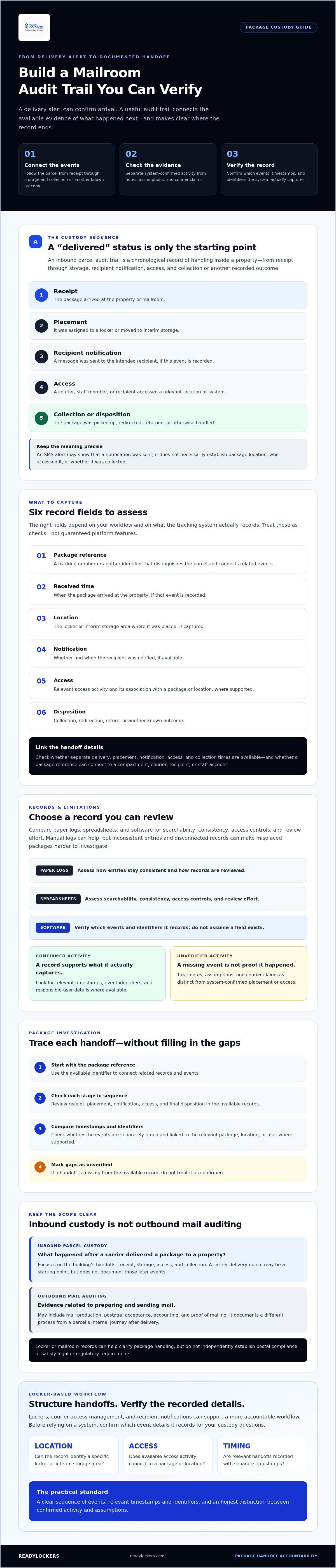
A mailroom audit trail is a chronological record of a package’s handling inside a mailroom, from receipt at the property through storage, recipient notification, access, and collection or another recorded outcome.
The sequence matters. An SMS delivery alert may show that a notification was sent, but it doesn’t necessarily establish where the package was placed, who accessed it, or whether it was collected. A useful record brings together available handoff evidence so staff can see what’s confirmed and where the record ends. This supports the broader idea of chain of custody, which documents the sequence of control and transfer of an item.
Which package events belong in the record?
Choose events that reflect your actual workflow. For an incoming parcel, useful categories include:
- Receipt: The package arrived at the property or mailroom.
- Placement: It was assigned to a locker or moved to interim storage.
- Notification: A message was sent to the intended recipient.
- Access: A courier, staff member, or recipient accessed a relevant location or system.
- Collection or disposition: The package was picked up, redirected, returned, or otherwise handled.
Separate system-confirmed events from staff notes, assumptions, and courier claims. For example, a staff note that a package was “left near reception” isn’t the same evidence as a system record confirming placement in a specific locker. When assessing a record or tracking platform, check whether it includes timestamps, event identifiers, and responsible-user details. Treat these as fields to verify, not features to assume are available.
How is package custody different from postal mail auditing?
Inbound parcel custody tracks what happens after a carrier delivers a package to a property. It focuses on the handoff within the building or organization: receipt, storage, access, and collection. The carrier’s delivery notification may be a starting point, but it doesn’t account for those later events.
Outbound mail auditing covers a different process. As described by mailing.com, it can include evidence related to mail production, postage, acceptance, accounting, and proof of mailing. Those records document the preparation and sending of mail, rather than a parcel’s internal journey after delivery. Locker or mailroom records can help clarify package handling, but they don’t independently establish postal compliance or satisfy legal or regulatory requirements. Evaluate them against the specific custody questions your workflow needs to answer.
What Should a Complete Mailroom Audit Trail Record?
A useful record should let staff connect a package to each relevant stage of its handling, while distinguishing confirmed details from context added by staff. Start by assessing six categories: package reference, received time, storage location, recipient notification, access, and final disposition. The right fields depend on your workflow and on what your tracking system actually records.
- Package reference: A tracking number or another identifier that distinguishes the parcel and connects related events.
- Received time: When the package arrived at the property, if that event is recorded.
- Location: The locker or interim storage area where it was placed, if captured.
- Notification: Whether and when the recipient was notified, if available.
- Access: Relevant access activity and its association with a package or location, where supported.
- Disposition: Collection, redirection, return, or another known outcome.
These categories help teams assess whether their records can support securing chain of custody for physical assets. They don’t prove that every event is captured or that a record meets a particular security or compliance standard.
Which timestamps and identifiers help reconstruct a handoff?
Check whether the record separates delivery, locker placement, recipient notification, access, and collection times instead of grouping them under a single “delivered” status. Then check how events are linked. For example, can a package reference connect to a compartment, courier, recipient, or staff account? These are assessment criteria, not guaranteed features. Before relying on ReadyLockers for a specific field, confirm whether the platform records that event, timestamp, and identifier.
How should exceptions and corrections appear in the record?
Normal handoffs aren’t the only events worth documenting. A failed delivery, wrong compartment, unclaimed package, manual release, or reported damage may need an exception note explaining what happened and what action followed. Where the system supports it, check whether a note identifies who entered it and when. Don’t assume notes are immutable, tamper-proof, or legally admissible. Confirm the system’s edit history and record controls before relying on those properties.
For example, if a parcel is moved from an incorrect compartment, the record is more useful when it shows the original placement and the corrective action rather than silently replacing the first entry. Keep observations factual: label a recipient’s statement as a report, not as independently verified damage.
Use this checklist to compare your current workflow with the records a mailroom audit trail can actually provide. If structured storage is part of your process, you can also review smart package locker options and confirm which events and fields are documented before including them in your audit procedure.
Paper Logs vs. Digital Mailroom Audit Trails: What Can You Verify?
Paper, spreadsheets, and software can all support package tracking, but they differ in how easily a team can find and review information. The best fit depends on package volume, staff responsibilities, and the handoff events you need to confirm. Don’t judge a digital system by its notification feature alone. Verify what its event log records, how entries are linked, and which details still depend on staff input.
| Operational criterion | Paper log | Spreadsheet | Software |
|---|---|---|---|
| Searchability | Often requires scanning pages or folders. | Can be searched and filtered if entries follow consistent formats. | Check whether package and event histories are searchable. |
| Consistency | Depends on staff following the same entry process. | Templates can standardize fields, but entries may still be skipped or formatted differently. | Ask which events are captured automatically and which require manual entry. |
| Access control | Physical access depends on where records are stored and who can reach them. | Permissions depend on the file location and sharing settings. | Verify user roles and who can view, add, or change records. |
| Review effort | Can take time to locate and compare separate entries. | Filtering may help, but staff need to maintain a usable structure. | Check whether related events appear together and can be exported for review. |
Digitization can make records easier to organize, but it doesn’t prove they’re complete or accurate. It also doesn’t establish regulatory compliance by itself. A message confirming that a recipient was notified isn’t necessarily evidence of package placement, access, or collection. Check whether the system records each event, not just whether it sends alerts.
When can a manual package log be sufficient?
A manual log may work for a lower-volume workflow if a designated owner records each handoff consistently and reviews the entries. Set standards for required fields, timestamps, corrections, and access to the log. Paper and spreadsheet records can become difficult to reconcile when entries are missed, times are recorded inconsistently, or responsibility changes across shifts. Define how the next staff member checks open packages and adds corrections without obscuring the original entry.
What should you verify before relying on locker software?
Ask the provider which events are recorded automatically, including package placement, notification, access, and pickup, and which require staff input. Confirm how users are identified, whether histories are searchable and exportable, how permissions work, and how long records are retained. ReadyLockers’ stated capabilities include courier access management, notifications, and usage analytics, but confirm specific audit-log fields before relying on them. For related evaluation questions, see the smart locker management software guide.
How to Audit a Package from Courier Handoff to Pickup
Start with a specific question, such as whether the package reached the mailroom, was placed in a locker, or was collected. A focused review keeps the investigation tied to evidence rather than assumptions. Follow this sequence:
- Define the issue. Record the reported problem, the package reference, and the delivery date or time range under review.
- Locate the package record. Search by tracking number or the reference your workflow uses. If there’s no matching entry, note which systems and logs you checked.
- Review receipt and placement. Compare available carrier details with any mailroom or locker record. Treat a courier claim as a claim unless another record confirms the handoff.
- Check notification and access. Look for notification status and relevant access events, if the platform or manual log makes them available. A notification doesn’t confirm that the recipient accessed the storage location.
- Check collection and exceptions. Look for a pickup record, a staff note, or an exception such as redirection or failed delivery. Don’t infer collection simply because a notification was sent.
- Document the outcome. Summarize what the records confirm, what conflicts, and what remains unknown. Follow the property’s established escalation procedure for unresolved issues.
How do you investigate a reported missing package?
Use the delivery reference as your starting point, then compare recorded receipt or placement details with the recipient’s report. Review notification and access history only if those records are available. Distinguish an event that’s absent from one that was confirmed not to occur. If records are incomplete, inconsistent, or unavailable, note the gap and the source you checked. Don’t fill missing steps with assumptions.
How can teams make reviews consistent across shifts?
Assign responsibility for recording exceptions, reviewing open cases, and handing unresolved questions to the next staff member. Use the same package reference and event sequence in paper, spreadsheet, or digital workflows. Include the review status and next action in handoff notes so staff don’t repeat checks or mistake an open question for a resolved one. For broader property-management considerations, see this package liability guide for property managers.
A structured mailroom audit trail review makes the evidence easier to follow without overstating what any single notification or access record proves. To explore how locker-based handoffs fit into the wider process, read this contactless delivery locker technology guide. If you’re assessing a locker-based workflow, explore smart package locker options.
How Smart Package Lockers Can Support Mailroom Accountability
A smart package locker can provide a defined handoff point between courier delivery and recipient pickup. Instead of leaving each parcel in an open mailroom area, couriers can place packages in secure lockers. Courier access management and recipient notifications can help structure the workflow. ReadyLockers offers SMS or QR-code notifications, access management, and usage analytics. These capabilities can support visibility, but they don’t by themselves confirm that every custody event is recorded.
Where do lockers fit in a package audit workflow?
Think of the locker as one step in the property’s broader package process, not as a complete audit trail on its own. A courier’s access and package placement, a recipient notification, and contactless pickup are distinct activities. Before relying on a platform to document them, verify which activities it records and how they’re connected to a package. For help assessing system options, see the smart package lockers buyer’s guide.
Usage analytics can help teams review patterns in locker activity, but analytics shouldn’t be treated as proof of a specific package handoff unless the underlying records support that conclusion. Check the event details behind any report. An alert showing that a message was sent, for example, doesn’t establish that a recipient collected the parcel.
What should teams ask a locker provider before implementation?
Get clear answers before building a mailroom audit trail around locker software. Ask:
- Which events, such as deposit, notification, access, pickup, or exceptions, are recorded?
- Can each event be associated with a package, user, courier, or compartment?
- Are records searchable and exportable, and what timestamps or identifiers do they include?
- How long are records retained, and which users can view or change them?
- Does the system preserve correction history, and what process should staff follow during an outage?
Confirm these details with the provider instead of assuming they’re included. ReadyLockers’ stated capabilities include secure smart lockers, courier access management, SMS or QR-code notifications, and usage analytics. Confirm specific audit-log fields, timestamps, exports, permissions, and retention before making product claims.
A careful evaluation can show where locker-based handoffs fit your process and which records you may need to capture separately. Explore ReadyLockers and ask how the platform supports your package-handling workflow.
Make Every Package Handoff Easier to Review
A reliable mailroom audit trail connects the package events your team can verify, from receipt and storage to notification, access, and collection. Choose record fields that fit your workflow, and distinguish confirmed system activity from staff notes or missing information. Digital tools can make records easier to search, but confirm which events and details they actually capture before relying on them.
Smart package lockers can create a structured handoff point. ReadyLockers provides secure lockers with contactless pickup available 24/7, alongside a cloud platform with courier access management, SMS or QR-code notifications, and usage analytics. These capabilities can support package workflows, but confirm directly whether specific event records, timestamps, exports, and retention meet your needs.
Ready to assess a locker-based process for your property? Explore ReadyLockers and discuss your package workflow. With clear procedures and verified records, your team can make package questions easier to investigate and handoffs easier to review.
Frequently Asked Questions
What is a mailroom audit trail?
A mailroom audit trail is a chronological record of a package’s handling within a property, from receipt through storage, recipient notification, access, and collection or another recorded outcome. It helps staff trace which events are documented and identify gaps when a package is misplaced or disputed. A delivery alert alone may confirm that a message was sent, but it doesn’t necessarily show every handoff or establish who collected the package.
What should a package mailroom audit trail include?
A package mailroom audit trail should connect a package reference to the handling details your workflow needs to verify. Assess whether records include receipt time, storage location, notification status, access activity, collection or disposition, and relevant exceptions. Also check whether events can be linked to a user, courier, or compartment. These fields aren’t guaranteed in every log or platform, so confirm which are recorded and distinguish confirmed entries from staff notes.
How do I create an audit trail for packages in an office mailroom?
Choose a consistent package reference and define which handling events staff must record, such as receipt, placement, notification, pickup, and exceptions. Assign responsibility for entering information and reviewing unresolved packages across shifts. Use a paper log, spreadsheet, or software that supports your process, then document how staff correct errors and record missing details. Before relying on digital tracking, verify which events are captured automatically and which require manual entry.
Can smart lockers provide a mailroom audit trail?
Smart lockers can create a structured handoff point, and related software may support courier access management, recipient notifications, and usage analytics. Those capabilities don’t automatically confirm that a platform records every package event. Ask the provider whether deposits, notifications, access, pickups, and exceptions are logged, and whether records include timestamps, identifiers, searchable histories, and exports. Confirm these details before treating locker activity as a complete audit trail.
How is a package audit trail different from proof of mailing?
A package audit trail documents handling after a parcel reaches a property, such as where it was stored and whether a pickup event was recorded. Proof of mailing relates to outbound mail and evidence of its preparation, postage, acceptance, or dispatch. These records answer different questions: one traces internal custody after delivery, while the other supports an account of mailing activity. Neither should be assumed to establish the other.
How long should a mailroom audit trail be retained?
There isn’t one retention period that fits every mailroom. Set a documented schedule based on the purpose of the records, operational needs, applicable obligations, and your organization’s privacy practices. Retain information only as long as it’s reasonably needed for those purposes, and confirm how long any software provider keeps event histories and backups. Review access permissions and deletion procedures as part of the policy, rather than assuming records are stored indefinitely.
What happens if a package audit trail has missing information?
A missing entry means that event is unverified in the available record, not that it did or didn’t happen. Note the gap, identify which logs or systems were checked, and compare other available evidence, such as delivery details or staff notes. Label reports and assumptions clearly, avoid filling gaps with guesses, and follow the property’s escalation process. If the record is inconsistent, preserve the conflicting details for review instead of silently replacing an entry.

Frequently Asked Questions
Which package events belong in the record?+
Choose events that reflect your actual workflow. For an incoming parcel, useful categories include: Separate system-confirmed events from staff notes, assumptions, and courier claims. For example, a staff note that a package was “left near reception” isn’t the same evidence as a system record confirming placement in a specific locker. When assessing a record or tracking platform, check whether it includes timestamps, event identifiers, and responsible-user details. Treat these as fields to verify, not features to assume are available.
How is package custody different from postal mail auditing?+
Inbound parcel custody tracks what happens after a carrier delivers a package to a property. It focuses on the handoff within the building or organization: receipt, storage, access, and collection. The carrier’s delivery notification may be a starting point, but it doesn’t account for those later events. Outbound mail auditing covers a different process. As described by mailing.com, it can include evidence related to mail production, postage, acceptance, accounting, and proof of mailing. Those records document the preparation and sending of mail, rather than a parcel’s internal journey after delivery. Locker or mailroom records can help clarify package handling, but they don’t independently establish postal compliance or satisfy legal or regulatory requirements. Evaluate them against the specific custody questions your workflow needs to answer. A useful record should let staff connect a package to each relevant stage of its handling, while distinguishing confirmed details from context added by staff. Start by assessing six categories: package reference, received time, storage location, recipient notification, access, and final disposition. The right fields depend on your workflow and on what your tracking system actually records. These categories help teams assess whether their records can support securing chain of custody for physical assets. They don’t prove that every event is captured or that a record meets a particular security or compliance standard.
Which timestamps and identifiers help reconstruct a handoff?+
Check whether the record separates delivery, locker placement, recipient notification, access, and collection times instead of grouping them under a single “delivered” status. Then check how events are linked. For example, can a package reference connect to a compartment, courier, recipient, or staff account? These are assessment criteria, not guaranteed features. Before relying on ReadyLockers for a specific field, confirm whether the platform records that event, timestamp, and identifier.
How should exceptions and corrections appear in the record?+
Normal handoffs aren’t the only events worth documenting. A failed delivery, wrong compartment, unclaimed package, manual release, or reported damage may need an exception note explaining what happened and what action followed. Where the system supports it, check whether a note identifies who entered it and when. Don’t assume notes are immutable, tamper-proof, or legally admissible. Confirm the system’s edit history and record controls before relying on those properties. For example, if a parcel is moved from an incorrect compartment, the record is more useful when it shows the original placement and the corrective action rather than silently replacing the first entry. Keep observations factual: label a recipient’s statement as a report, not as independently verified damage. Use this checklist to compare your current workflow with the records a mailroom audit trail can actually provide. If structured storage is part of your process, you can also review smart package locker options and confirm which events and fields are documented before including them in your audit procedure. Paper, spreadsheets, and software can all support package tracking, but they differ in how easily a team can find and review information. The best fit depends on package volume, staff responsibilities, and the handoff events you need to confirm. Don’t judge a digital system by its notification feature alone. Verify what its event log records, how entries are linked, and which details still depend on staff input. Digitization can make records easier to organize, but it doesn’t prove they’re complete or accurate. It also doesn’t establish regulatory compliance by itself. A message confirming that a recipient was notified isn’t necessarily evidence of package placement, access, or collection. Check whether the system records each event, not just whether it sends alerts.
When can a manual package log be sufficient?+
A manual log may work for a lower-volume workflow if a designated owner records each handoff consistently and reviews the entries. Set standards for required fields, timestamps, corrections, and access to the log. Paper and spreadsheet records can become difficult to reconcile when entries are missed, times are recorded inconsistently, or responsibility changes across shifts. Define how the next staff member checks open packages and adds corrections without obscuring the original entry.
What should you verify before relying on locker software?+
Ask the provider which events are recorded automatically, including package placement, notification, access, and pickup, and which require staff input. Confirm how users are identified, whether histories are searchable and exportable, how permissions work, and how long records are retained. ReadyLockers’ stated capabilities include courier access management, notifications, and usage analytics, but confirm specific audit-log fields before relying on them. For related evaluation questions, see the smart locker management software guide. Start with a specific question, such as whether the package reached the mailroom, was placed in a locker, or was collected. A focused review keeps the investigation tied to evidence rather than assumptions. Follow this sequence:
How do you investigate a reported missing package?+
Use the delivery reference as your starting point, then compare recorded receipt or placement details with the recipient’s report. Review notification and access history only if those records are available. Distinguish an event that’s absent from one that was confirmed not to occur. If records are incomplete, inconsistent, or unavailable, note the gap and the source you checked. Don’t fill missing steps with assumptions.
How can teams make reviews consistent across shifts?+
Assign responsibility for recording exceptions, reviewing open cases, and handing unresolved questions to the next staff member. Use the same package reference and event sequence in paper, spreadsheet, or digital workflows. Include the review status and next action in handoff notes so staff don’t repeat checks or mistake an open question for a resolved one. For broader property-management considerations, see this package liability guide for property managers. A structured mailroom audit trail review makes the evidence easier to follow without overstating what any single notification or access record proves. To explore how locker-based handoffs fit into the wider process, read this contactless delivery locker technology guide. If you’re assessing a locker-based workflow, explore smart package locker options. A smart package locker can provide a defined handoff point between courier delivery and recipient pickup. Instead of leaving each parcel in an open mailroom area, couriers can place packages in secure lockers. Courier access management and recipient notifications can help structure the workflow. ReadyLockers offers SMS or QR-code notifications, access management, and usage analytics. These capabilities can support visibility, but they don’t by themselves confirm that every custody event is recorded.
Where do lockers fit in a package audit workflow?+
Think of the locker as one step in the property’s broader package process, not as a complete audit trail on its own. A courier’s access and package placement, a recipient notification, and contactless pickup are distinct activities. Before relying on a platform to document them, verify which activities it records and how they’re connected to a package. For help assessing system options, see the smart package lockers buyer’s guide. Usage analytics can help teams review patterns in locker activity, but analytics shouldn’t be treated as proof of a specific package handoff unless the underlying records support that conclusion. Check the event details behind any report. An alert showing that a message was sent, for example, doesn’t establish that a recipient collected the parcel.
What should teams ask a locker provider before implementation?+
Get clear answers before building a mailroom audit trail around locker software. Ask: Confirm these details with the provider instead of assuming they’re included. ReadyLockers’ stated capabilities include secure smart lockers, courier access management, SMS or QR-code notifications, and usage analytics. Confirm specific audit-log fields, timestamps, exports, permissions, and retention before making product claims. A careful evaluation can show where locker-based handoffs fit your process and which records you may need to capture separately. Explore ReadyLockers and ask how the platform supports your package-handling workflow. A reliable mailroom audit trail connects the package events your team can verify, from receipt and storage to notification, access, and collection. Choose record fields that fit your workflow, and distinguish confirmed system activity from staff notes or missing information. Digital tools can make records easier to search, but confirm which events and details they actually capture before relying on them. Smart package lockers can create a structured handoff point. ReadyLockers provides secure lockers with contactless pickup available 24/7, alongside a cloud platform with courier access management, SMS or QR-code notifications, and usage analytics. These capabilities can support package workflows, but confirm directly whether specific event records, timestamps, exports, and retention meet your needs. Ready to assess a locker-based process for your property? Explore ReadyLockers and discuss your package workflow. With clear procedures and verified records, your team can make package questions easier to investigate and handoffs easier to review.
What is a mailroom audit trail?+
A mailroom audit trail is a chronological record of a package’s handling within a property, from receipt through storage, recipient notification, access, and collection or another recorded outcome. It helps staff trace which events are documented and identify gaps when a package is misplaced or disputed. A delivery alert alone may confirm that a message was sent, but it doesn’t necessarily show every handoff or establish who collected the package.
What should a package mailroom audit trail include?+
A package mailroom audit trail should connect a package reference to the handling details your workflow needs to verify. Assess whether records include receipt time, storage location, notification status, access activity, collection or disposition, and relevant exceptions. Also check whether events can be linked to a user, courier, or compartment. These fields aren’t guaranteed in every log or platform, so confirm which are recorded and distinguish confirmed entries from staff notes.
How do I create an audit trail for packages in an office mailroom?+
Choose a consistent package reference and define which handling events staff must record, such as receipt, placement, notification, pickup, and exceptions. Assign responsibility for entering information and reviewing unresolved packages across shifts. Use a paper log, spreadsheet, or software that supports your process, then document how staff correct errors and record missing details. Before relying on digital tracking, verify which events are captured automatically and which require manual entry.
Can smart lockers provide a mailroom audit trail?+
Smart lockers can create a structured handoff point, and related software may support courier access management, recipient notifications, and usage analytics. Those capabilities don’t automatically confirm that a platform records every package event. Ask the provider whether deposits, notifications, access, pickups, and exceptions are logged, and whether records include timestamps, identifiers, searchable histories, and exports. Confirm these details before treating locker activity as a complete audit trail.
How is a package audit trail different from proof of mailing?+
A package audit trail documents handling after a parcel reaches a property, such as where it was stored and whether a pickup event was recorded. Proof of mailing relates to outbound mail and evidence of its preparation, postage, acceptance, or dispatch. These records answer different questions: one traces internal custody after delivery, while the other supports an account of mailing activity. Neither should be assumed to establish the other.
How long should a mailroom audit trail be retained?+
There isn’t one retention period that fits every mailroom. Set a documented schedule based on the purpose of the records, operational needs, applicable obligations, and your organization’s privacy practices. Retain information only as long as it’s reasonably needed for those purposes, and confirm how long any software provider keeps event histories and backups. Review access permissions and deletion procedures as part of the policy, rather than assuming records are stored indefinitely.
What happens if a package audit trail has missing information?+
A missing entry means that event is unverified in the available record, not that it did or didn’t happen. Note the gap, identify which logs or systems were checked, and compare other available evidence, such as delivery details or staff notes. Label reports and assumptions clearly, avoid filling gaps with guesses, and follow the property’s escalation process. If the record is inconsistent, preserve the conflicting details for review instead of silently replacing an entry.