Training Residents to Use Smart Lockers: A Guide
Learn how to train residents to use smart lockers with ease. Discover step-by-step pickup methods, clear notifications, and staff tips for smooth adoption.

What if the most effective resident training happens at the locker, not in an announcement? A notice can explain the basics, but residents also need to recognize a pickup notification, understand the access instructions, and complete the steps themselves. That’s the practical foundation of how to train residents to use smart lockers: make the pickup journey clear, then give residents a chance to practice it.
A one-time message can be overlooked, and an unfamiliar process can leave residents unsure what to do next. Smart lockers can send notifications by SMS or QR code, but clear instructions help residents turn a notification into a successful pickup. A short, repeatable demonstration also gives staff a consistent way to answer common access questions.
This guide explains how to teach the pickup process step by step, reinforce instructions through resident communications, and equip staff to answer frequent questions. A repeatable approach helps residents build confidence and gives property teams a way to improve training over time.
Key Takeaways
- Build resident confidence by teaching the pickup steps instead of relying on a one-time announcement.
- Use the property's actual locker instructions to show residents how to read SMS or QR code notifications and find pickup details.
- Combine orientations, demonstrations, messages, signage, and reference guides to reach residents in different ways.
- Plan staff preparation, resident instruction, and ongoing reminders so guidance stays consistent.
- Learn how to train residents to use smart lockers with a repeatable approach supported by ReadyLockers' SMS or QR notifications and contactless pickup process.
Why Smart Locker Training Matters for Resident Adoption
The practical goal is simple: a resident recognizes that a package is ready, follows the access instructions, and completes pickup independently. Knowing lockers are available is only awareness. Residents also need to know what to do when a notification arrives, where to go, and how to use the property's pickup process. A launch announcement can introduce the system, but it cannot demonstrate those steps to each resident.
That distinction matters to residents and onsite teams. If instructions are vague or hard to find, residents may be unsure where to collect a package or how to use their pickup information. Staff then have to answer the same questions repeatedly, sometimes while residents are waiting. A clear, repeatable explanation helps residents understand the process and gives staff a consistent basis for answering routine access questions.
Training should cover how residents learn a delivery is ready and what information they need to retrieve it. A What is a Smart Locker? overview can provide general context, but residents still need instructions for their property's locker location and access method. Confidence comes from knowing the steps, not simply recognizing the technology.
What residents need to know before their first pickup
Start with the essentials: identify the designated locker area, explain that residents receive an SMS or QR code notification when a package is ready, and point out where pickup information appears. Then describe the property's access method and the next action, such as using the provided code as instructed. Keep the language consistent with the on-screen prompts and posted directions.
Before a resident's first pickup, make sure they can answer these basic questions:
- Where are package deliveries received, and where are the lockers?
- How will the resident know a package is ready?
- What pickup information should they look for in the SMS or QR notification?
- What should they do at the locker to access the package?
These points give residents a mental map of the pickup journey. They also help staff identify gaps in the instructions before those gaps become recurring questions.
Why a single launch announcement is not enough
Residents may miss move-in materials, email, posted notices, or a launch event. Others may see a message but forget it by the time a package arrives. Prior experience also varies, so don't assume everyone has used a smart locker before. Pair initial awareness with timely reminders and an easy-to-find reference residents can return to when they need it.
The goal isn't to send more messages without a plan. Use each reminder to reinforce a specific point, such as where the lockers are or how to find pickup details in a notification. Keep the wording and steps aligned across staff explanations, signage, and resident communications. This consistency reduces guesswork and supports a dependable pickup experience. A useful starting point for how to train residents to use smart lockers is to make the first pickup understandable before a resident reaches the locker.
How to Teach the Smart Locker Pickup Process Step by Step
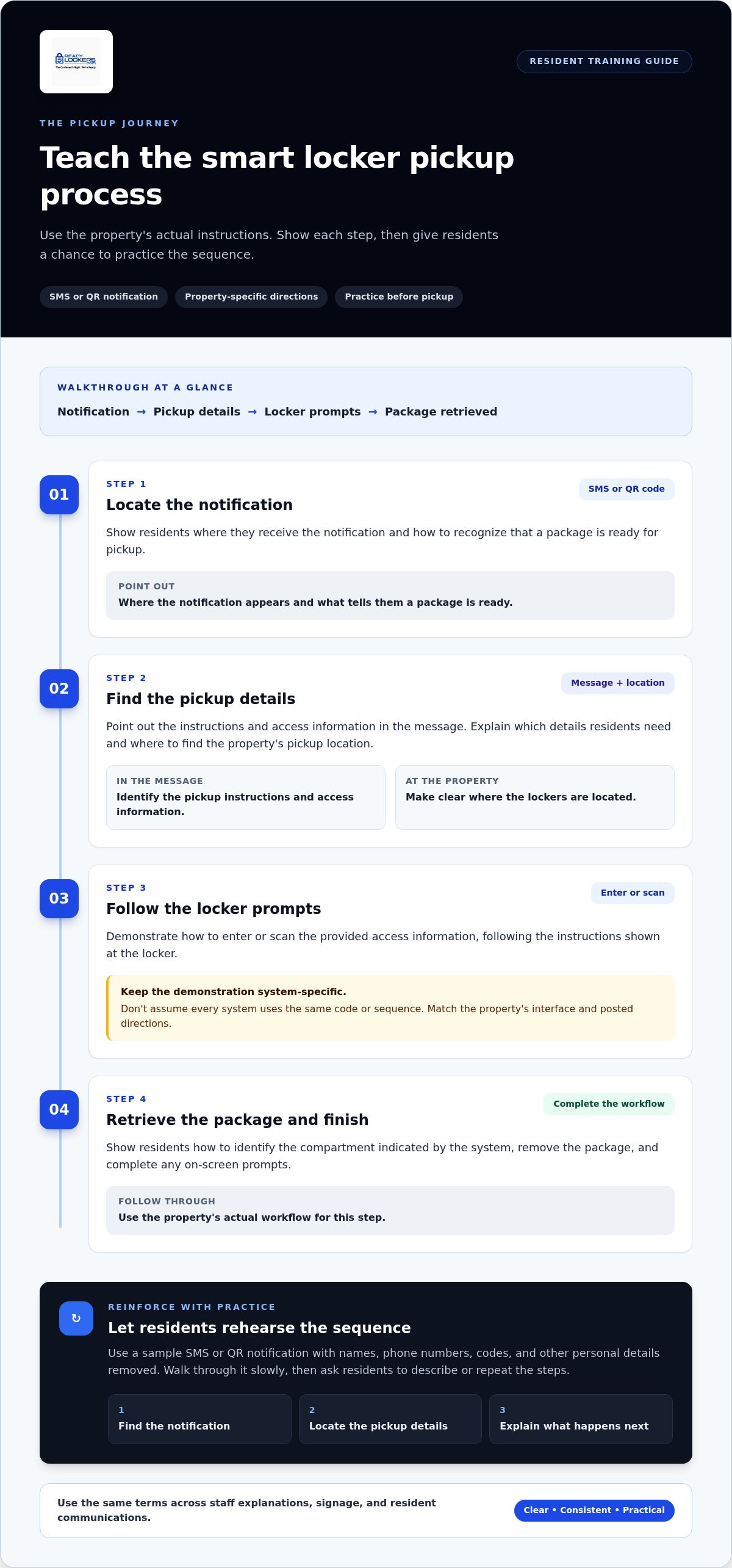
Teach the pickup journey using the property's actual instructions, not a generic example that might describe a different system. Show the notification, explain which information matters, and demonstrate the access step at the locker. Then give residents a chance to practice the sequence. This turns general awareness into a routine they can follow when a package is ready.
Use this ordered walkthrough, adapting each step to the property's interface and posted directions:
- Locate the notification. Show where the resident receives the SMS or QR code notification and how to recognize that a package is ready for pickup.
- Find the pickup details. Point out the instructions and access information in the message. Explain which details residents need and where to find the property's pickup location.
- Follow the locker prompts. Demonstrate how to enter or scan the provided access information, following the instructions shown at the locker. Don't assume every system uses the same code or sequence.
- Retrieve the package and finish. Show how to identify the compartment indicated by the system, remove the package, and complete any on-screen prompts. Follow the property's actual workflow for this step.
Demonstrate the notification and access steps
Use a sample SMS or QR notification with names, phone numbers, codes, and other personal details removed. Walk through it slowly: point out where the pickup instructions appear, which access information to locate, and how the message connects to the locker's directions. Then ask each resident to describe or repeat the steps. Watching once does not show whether someone can follow the process independently.
Keep the demonstration consistent. Staff should use the same terms for the notification, pickup information, locker location, and access action. If residents hear different labels in a message, on signage, and from staff, they may wonder whether the instructions refer to the same step. A shared explanation makes the sequence easier to follow.
Close the lesson with a successful practice run
Give residents a chance to rehearse without using anyone's real delivery or pickup information. A staff-led demonstration or supervised practice scenario lets learners follow the sequence in a low-pressure setting. Ask them to explain what they would do next at each point, from locating the notification to retrieving the package. Their answers reveal which steps need more explanation.
Finish with a short take-home guide that matches the property's actual locker workflow. Make it easy to scan, with the pickup location, notification details to look for, access instructions, and the property's procedure for questions. If a notification is missing, unclear, or doesn't work, residents should follow that procedure rather than guess or repeatedly try different steps. This practical sequence is central to how to train residents to use smart lockers. Properties looking for a consistent SMS or QR-based pickup experience can explore ReadyLockers’ smart locker platform.
Which Resident Training Methods Work Best for Smart Lockers?
No single message reaches every resident at the moment they need it. Move-in orientation can build early awareness, while a demonstration lets residents see the pickup sequence. Email, SMS, signage, and short guides make instructions easier to revisit. Combining formats helps residents learn in advance and find a reminder when a package is ready.
Compare each option by reach, accessibility, opportunity to practice, and how consistently staff can repeat it:
- Move-in orientation: Introduces the locker location and basic process early, but residents may forget details before their first delivery. Include a simple explanation and point to a reference they can access later.
- Live demonstrations: Let residents watch the pickup sequence and ask questions in context. They take staff time to organize, so use the same short walkthrough each time.
- Email or SMS instructions: Reach residents through familiar communication channels and can be reviewed later. Keep the steps concise, and don't make a digital message the only way to learn.
- Posted signage: Puts guidance near the locker, where residents can consult it during pickup. Use readable text and direct wording so the essential steps are easy to scan.
- Short reference guides: Give residents a portable reminder they can keep or access through resident communications. Keep the guide aligned with the current property workflow so it doesn't conflict with signage or staff guidance.
Match the training format to the resident moment
Use move-in materials to introduce the locker before the first package arrives. Offer a demonstration at an orientation or resident event for people who learn by watching the steps. Then keep a concise guide available near the locker and in resident communications. This layered plan supports awareness, practice, and recall without expecting any single channel to do every job.
For a practical approach to how to train residents to use smart lockers, assign each format a clear role. Orientation explains what the lockers are for. A demonstration shows how the process works. Signage and guides help residents recall a step during pickup. Staff can use the same core instructions across each format to avoid mismatched explanations.
Make instructions usable for different residents
Use plain language, readable type, and numbered steps that follow the actual pickup sequence. Add clear images when they help residents identify the locker interface or location. Pair email or SMS instructions with a non-digital explanation, such as signage or a printed guide, so residents aren't required to rely on a single communication channel.
Make it easy for residents to ask questions. People have different levels of familiarity with digital tools, and a calm, consistent explanation can make an unfamiliar process feel manageable. Staff can ask which step is unclear, then point residents to the matching instruction. Short directions and a chance to practice are more useful than assuming that introducing the technology alone will build confidence.
How to Roll Out and Reinforce Smart Locker Training
A reliable rollout treats training as an ongoing property process, not a single launch message. Set a clear sequence: prepare staff and materials, introduce the lockers before residents need them, teach the pickup workflow, then use resident questions and relevant usage information to refine the instructions. Assign a person or team to maintain the approved guidance so residents hear the same steps in conversations, signage, and digital messages.
Prepare staff and materials before resident onboarding
Before introducing the process to residents, have staff follow one approved walkthrough using the installed system. Prepare concise answers to routine questions, including where packages are collected, how residents receive pickup details, and what to do when instructions are unclear. Base responses on the property's actual process rather than assumptions about other locker systems.
Check every sign, guide, and message against the live workflow. A guide that uses different terms or describes an outdated step can create uncertainty at pickup. Plan alternatives for residents who don't attend a live demonstration, such as a printed reference or accessible digital instructions. For broader operational context, the smart locker management software guide discusses how management tools support locker operations.
Reinforce the process and learn from questions
Schedule short reminders around useful moments, such as move-in and system launch. Each reminder can direct residents to the same concise instructions instead of introducing new wording or extra steps. Keep a shared record of recurring questions so staff can identify whether a particular instruction, term, or part of the pickup journey needs clarification.
Use feedback to make targeted updates. If residents repeatedly ask where to find pickup details, make that part of the guide easier to spot. If they misunderstand a term, replace it with the plain-language wording used in the notification or locker instructions. Then update all versions together and brief staff on the change.
Usage information can provide another operational signal, but it shouldn't be treated as proof that residents are confused. Review relevant information from the locker management platform alongside resident questions and staff observations. Look for points that may need closer attention, then confirm the issue through direct feedback before changing training materials. This keeps revisions grounded in what residents and staff report.
Building a repeatable process is central to how to train residents to use smart lockers. ReadyLockers provides smart package lockers and cloud-based management software for residential properties. Explore ReadyLockers’ smart locker solutions to see how a consistent pickup platform can support clear resident instructions.
How ReadyLockers Supports a Clear Resident Pickup Experience
Resident training works best when it reflects the system people will actually use. ReadyLockers provides smart package lockers and cloud-based management software for residential properties. Residents receive SMS or QR code notifications and can retrieve packages through a contactless pickup process. That gives property teams a clear starting point for explaining how residents move from notification to pickup, while keeping the lesson focused on residents' steps.
Connect resident training to the ReadyLockers pickup journey
Use the SMS or QR code notification as the anchor for a practical walkthrough. Show residents where to find their pickup information, where the lockers are located, and how to follow the access instructions for their property. Keep the explanation centered on receiving a notification and retrieving a package, not on how couriers make deliveries. For more residential context, explore the smart package lockers for apartments guide.
ReadyLockers supports contactless pickup, available 24/7. That availability gives residents flexibility in when they collect a package, but it doesn't replace clear onboarding. Residents still need to know where to go, what to look for in the notification, and how to follow the locker's pickup instructions. Training should make those actions clear before a resident needs to complete them independently.
For property teams, a consistent digital pickup journey also gives staff a shared reference point. The same notification and access steps can inform staff explanations, resident guides, and signage. If the property's instructions change, update those materials together so residents aren't left comparing conflicting versions. Keep guidance focused on what residents can see and do during pickup.
Move from training plan to locker solution
ReadyLockers brings smart locker hardware and cloud-based management software together as a locker platform. Modular locker configurations are designed around property layouts and package volume requirements, helping property teams consider how the setup fits the building and its package needs. Resident-facing instructions can then reflect the pickup location and workflow established for the property.
As teams plan a resident-ready operation, consider how the locker setup, management platform, notifications, and training materials work together. A straightforward resident journey depends on more than introducing hardware: residents need usable instructions, and staff need a consistent process to explain them. This connection between platform and education is central to how to train residents to use smart lockers effectively.
ReadyLockers serves residential properties with smart package lockers and cloud-based management software. Explore ReadyLockers smart locker solutions as a next step in planning a clear, contactless pickup experience for residents.
Make Resident Confidence Part of Your Locker Plan
Treat resident readiness as part of the locker decision, not a task to postpone until installation. Consider how the pickup journey fits your property's layout, how residents will encounter instructions, and who will keep those instructions current. Bringing these decisions together early helps teams prepare a practical onboarding plan alongside locker operations.
As you evaluate how to train residents to use smart lockers, focus on a process that can adapt as resident questions and property needs change. Clear training supports a more confident first experience and gives staff a consistent foundation to build on.
Ready to plan the locker setup behind that experience? Explore ReadyLockers smart locker solutions and take the next step toward resident-ready package operations.
Frequently Asked Questions
How do you explain smart locker pickup to residents who have never used one?
Explain it as a shared package pickup point with a simple sequence: a package is placed in a locker, the resident receives a notification, and they follow the property's access instructions to collect it. Use a sample message and describe what residents will see at the locker. When teaching residents to use smart lockers, focus on what they need to do at each step, not technical details they don't need for pickup.
What should residents do if they do not receive a smart locker notification?
Residents should follow the property's stated process for a missing notification rather than try to access a locker without the correct information. They can tell onsite staff their name, unit, and the delivery they're expecting, then follow the property's instructions while staff review the situation. Don't share or use another resident's access details. Clear guidance on whom to notify and what information to provide helps staff respond consistently.
Can residents use a smart locker without a smartphone?
ReadyLockers sends SMS or QR code notifications. Explain the notification and pickup method used at the property in resident materials, and make sure residents know where to find guidance on the pickup process. Include a way to get help with the instructions if a resident needs it.
How often should property managers remind residents how to use smart lockers?
There's no single reminder schedule for every property. Share information when residents can use it, such as before the locker process begins or when someone joins the community, and repeat key guidance if staff hear the same question often. Avoid sending reminders so frequently that residents tune them out. Review messages whenever the property's instructions or locker workflow changes.
What should a smart locker resident training guide include?
Include the locker location, how residents are notified, the information they'll need for access, and the property's steps for collecting a package. Add a clear way to get help if instructions are missing or confusing. Use the same terms residents see on locker prompts and notifications. Date or label the guide when it's updated so staff can identify outdated copies and replace them across resident channels.
How can property managers tell whether residents understand the locker pickup process?
Ask residents to explain the next step in a sample pickup scenario without prompting. Check whether they can identify where to go, which access information to use, and what to do if something doesn't work. Staff can also note recurring questions and review whether they point to a confusing instruction. Usage information can add context, but it shouldn't be treated alone as proof of understanding.
Should staff receive smart locker training before residents?
Yes. Staff should understand the resident-facing workflow first so they can give consistent directions and recognize when a question needs follow-up. Have each team member walk through the process and practice explaining it in plain language. Agree on a shared response for common questions and a clear internal escalation path for issues staff can't resolve. This preparation helps prevent residents from receiving conflicting instructions from different team members.

Frequently Asked Questions
How do you explain smart locker pickup to residents who have never used one?+
Explain it as a shared package pickup point with a simple sequence: a package is placed in a locker, the resident receives a notification, and they follow the property's access instructions to collect it. Use a sample message and describe what residents will see at the locker. When teaching residents to use smart lockers, focus on what they need to do at each step, not technical details they don't need for pickup.
What should residents do if they do not receive a smart locker notification?+
Residents should follow the property's stated process for a missing notification rather than try to access a locker without the correct information. They can tell onsite staff their name, unit, and the delivery they're expecting, then follow the property's instructions while staff review the situation. Don't share or use another resident's access details. Clear guidance on whom to notify and what information to provide helps staff respond consistently.
Can residents use a smart locker without a smartphone?+
ReadyLockers sends SMS or QR code notifications. Explain the notification and pickup method used at the property in resident materials, and make sure residents know where to find guidance on the pickup process. Include a way to get help with the instructions if a resident needs it.
How often should property managers remind residents how to use smart lockers?+
There's no single reminder schedule for every property. Share information when residents can use it, such as before the locker process begins or when someone joins the community, and repeat key guidance if staff hear the same question often. Avoid sending reminders so frequently that residents tune them out. Review messages whenever the property's instructions or locker workflow changes.
What should a smart locker resident training guide include?+
Include the locker location, how residents are notified, the information they'll need for access, and the property's steps for collecting a package. Add a clear way to get help if instructions are missing or confusing. Use the same terms residents see on locker prompts and notifications. Date or label the guide when it's updated so staff can identify outdated copies and replace them across resident channels.
How can property managers tell whether residents understand the locker pickup process?+
Ask residents to explain the next step in a sample pickup scenario without prompting. Check whether they can identify where to go, which access information to use, and what to do if something doesn't work. Staff can also note recurring questions and review whether they point to a confusing instruction. Usage information can add context, but it shouldn't be treated alone as proof of understanding.
Should staff receive smart locker training before residents?+
Yes. Staff should understand the resident-facing workflow first so they can give consistent directions and recognize when a question needs follow-up. Have each team member walk through the process and practice explaining it in plain language. Agree on a shared response for common questions and a clear internal escalation path for issues staff can't resolve. This preparation helps prevent residents from receiving conflicting instructions from different team members.