Smart Locker Software for Property Owners: A 2026 Guide
Discover how smart locker software for property owners streamlines deliveries, manages courier access, and automates pickup workflows in this complete guide.

What if package handoffs could move forward without interrupting your staff? Smart locker software for property owners connects courier access, locker deposits, and recipient pickup in one managed workflow. It helps reduce manual coordination while giving owners a clearer view of locker activity.
As package volume grows, each delivery can add work: staff receive parcels, notify recipients, answer pickup questions, and track what is still waiting. A connected locker system pairs physical compartments with cloud-based management software to organize those steps. After a courier deposits a package, the recipient receives an SMS or QR code notification and can collect it through contactless pickup.
This guide explains the process from courier deposit to recipient pickup and the capabilities to consider for your property. You’ll learn how to assess delivery patterns, courier access management, notifications, usage analytics, and modular locker configurations. You’ll also find practical steps for moving from staff-managed handling to a more structured process, whether you oversee apartments, offices, schools, or another property type.
Key Takeaways
- Smart locker software for property owners links courier access and recipient pickup in a managed package workflow.
- Map the delivery journey from courier arrival to recipient collection to identify where software can reduce manual coordination.
- Compare package volume, delivery patterns, property type, and staff involvement before defining system requirements.
- Document current package activity, space needs, and stakeholder priorities to prepare for a smoother transition.
- ReadyLockers connects smart package lockers with courier access management, SMS or QR code notifications, and usage analytics.
Why Smart Locker Software Matters to Property Owners
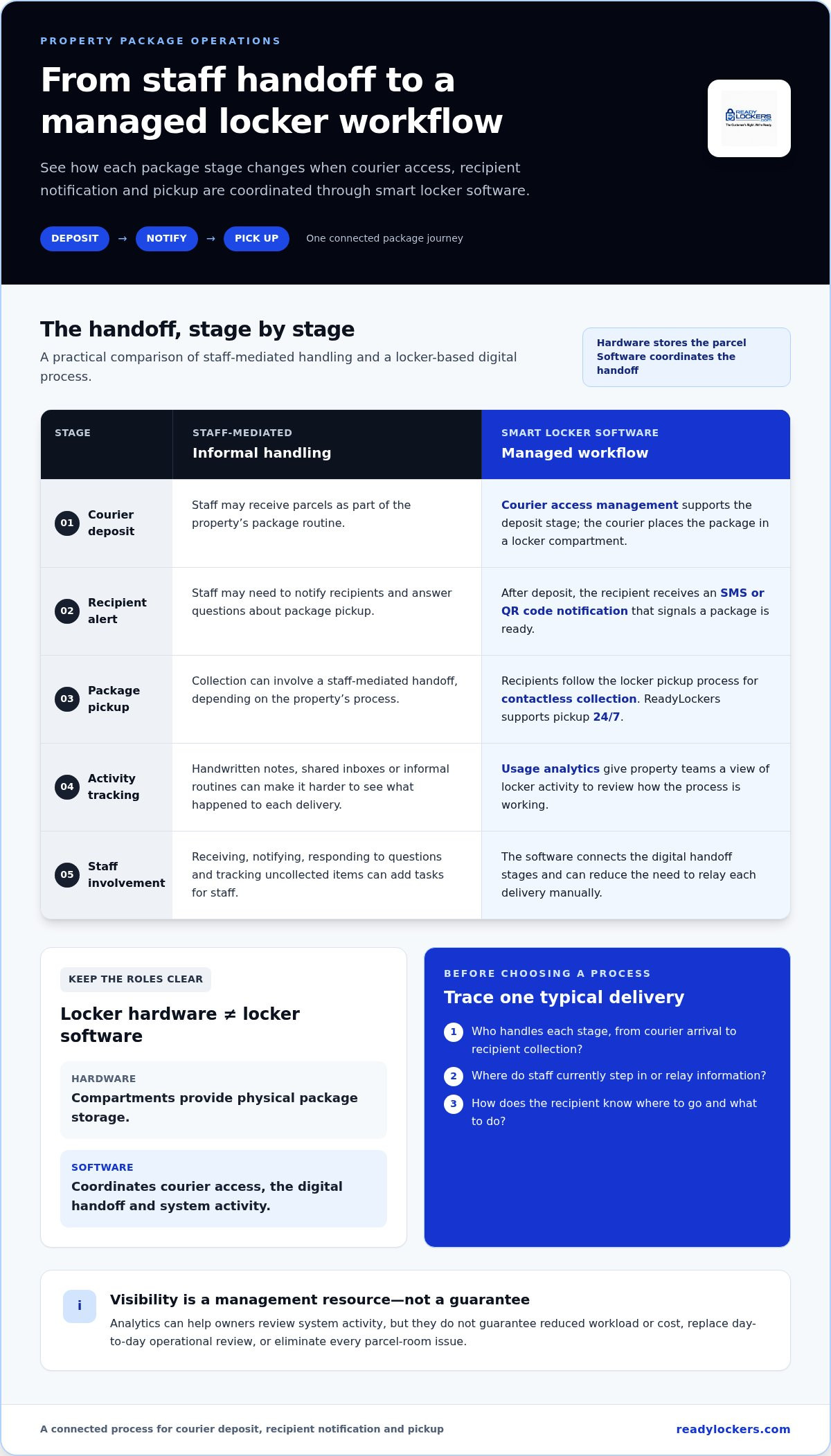
Package volume creates more than a need for storage. Each delivery can add tasks for staff: receiving parcels, notifying recipients, answering questions, and tracking what remains uncollected. When these steps depend on handwritten notes, shared inboxes, or informal package-room routines, staff may have to interrupt other work, and it can be harder to see what has happened to each delivery.
Smart locker software for property owners is the digital management layer that coordinates courier access, package deposits, and recipient pickup through locker hardware. The compartments hold packages; the software organizes the handoff and records system use. A parcel locker provides a self-service place for packages to be deposited and collected. Smart locker software adds a managed digital workflow around those steps.
Software for smart door locks and package locker software address different access needs. Door-lock software manages access through building entrances, while package locker software manages parcel handoffs at the lockers. The latter can help create a consistent process across properties with different staffing structures and delivery routines, without assuming every site operates in the same way.
What Does Smart Locker Software Manage?
The workflow connects a courier’s deposit with the intended recipient’s collection. Courier access management supports the deposit stage. Once a package is placed in a locker, the recipient receives an SMS or QR code notification and follows the pickup process to collect it. Contactless pickup lets recipients retrieve packages without a staff-mediated handoff, while usage analytics give property teams a clearer view of system activity.
Hardware and software have complementary roles: locker compartments provide physical storage, while the software manages the digital handoff. This can replace ad hoc logging and individual follow-ups with a more consistent process. It does not eliminate every parcel-room issue or guarantee that packages cannot be lost or stolen. It gives staff a defined workflow to manage and a way to review how the lockers are being used.
Which Property Challenges Can Locker Software Address?
Priorities depend on how a property receives packages and who handles them. Apartments may need to organize resident pickups alongside daily building operations. Offices may want a more structured process for employee deliveries. Hotels can consider how package handling fits front-desk routines, while schools may need a repeatable approach for deliveries to shared spaces. Warehouses, hospitals, and retail locations also have distinct layouts and delivery patterns.
Start by identifying where package handling takes staff time: accepting deliveries, notifying recipients, answering pickup questions, or tracking uncollected items. Then decide which steps need more structure and what information managers need to review. Smart locker software can provide visibility into courier access and usage, helping owners understand how the process is working. That information can inform operational decisions without implying a guaranteed reduction in workload or cost.
Treat package handling as an operating process, not just a storage problem. A consistent digital workflow gives staff, couriers, and recipients clearer steps, while leaving room to adapt procedures to each property’s day-to-day needs.
How Smart Locker Software Coordinates Delivery and Pickup
A managed locker workflow gives each package a clear path from courier deposit to recipient collection. The software connects the handoff stages, while the locker compartments provide the physical space. For property teams, that means overseeing a defined process instead of relying on a series of informal steps that depend on staff availability.
From Courier Deposit to Recipient Notification
The workflow begins when a courier arrives and uses the locker system to deposit a package in a compartment. ReadyLockers includes courier access management to support this stage of the handoff. The courier deposits the delivery, while the property’s package process defines where deliveries go and how recipients are informed.
After the deposit, the recipient receives an SMS or QR code notification. That message connects the delivery with the next step: pickup by the intended recipient. Notifications can reduce the need for staff to relay each delivery manually and give recipients a direct signal that a package is ready. Make sure the property’s instructions explain where recipients should go and what to do when they receive a notification.
From Contactless Pickup to Operational Visibility
At collection, the recipient follows the locker system’s pickup process to retrieve the package without a staff-mediated handoff. ReadyLockers supports contactless pickup available 24/7, so recipients can collect packages beyond the hours when property staff may be focused on package handling. The system connects deposit, notification, and collection in one workflow.
Usage analytics add an operational view of how the locker system is being used. Owners can review activity and consider whether the package process fits the property’s needs. Treat analytics as a management resource, not a guarantee of reduced workload or a substitute for reviewing day-to-day operations.
To assess a workflow, trace one typical delivery from arrival through collection. Identify who handles each stage, where staff currently step in, and how recipients learn that a package is ready. This walkthrough can reveal unclear instructions or handoffs for couriers, recipients, and property teams. For a broader overview of the software’s role in package operations, explore the locker management software guide.
Public properties may also have procurement considerations beyond the parcel handoff itself. The U.S. General Services Administration (GSA) manages federal property and procurement services, a separate context from the day-to-day functions of locker software.
Smart locker software for property owners works best when courier deposit, recipient notification, and pickup fit the property’s routine. ReadyLockers brings smart package lockers and management software together to support those stages. Learn more about ReadyLockers smart package lockers and software.
How to Evaluate Smart Locker Software for Your Property
Start with the package process your property actually runs, not a feature checklist built on assumptions. Record delivery patterns, the types of packages handled, where staff get involved, and what you need the system to help manage. This gives you a practical basis for comparing software and choosing a locker configuration suited to the property’s layout and package volume.
Match Software Capabilities to Property Operations
Property type helps clarify priorities, but daily routines matter just as much. Apartments may prioritize resident pickup and package-room coordination. Offices may focus on employee deliveries and interruptions to staff. Hotels, schools, hospitals, retail locations, and HOAs serve different user groups and have different delivery patterns. Modular locker configurations can be tailored to property layouts and package volumes, so evaluate the physical setup alongside the software workflow.
| Property need | Capability or evaluation focus |
|---|---|
| Managing courier deposits | Courier access management that fits the property’s delivery-handling process |
| Notifying recipients | SMS or QR code notifications that suit how recipients will be informed |
| Supporting recipient collection | Contactless pickup as part of the planned locker workflow |
| Understanding system use | Usage analytics that help answer operational questions about locker activity |
| Fitting the property | Modular locker configurations tailored to available space and package volume |
Use the table to separate requirements from assumptions. For each requirement, write down the operational question you need to answer, such as how couriers will use the locker process or how recipients will learn that a package is ready. Then connect it to a relevant capability. This keeps the evaluation focused on the actual workflow rather than assumed integrations, reports, alerts, or automation that may not be part of your needs.
Compare Workflow Control, Notifications, and Analytics
Review how courier access management fits your delivery process, which notification option works for recipients, and whether usage analytics provide useful visibility into locker activity. Contactless pickup may also matter if reducing staff-mediated handoffs is a priority. Compare these capabilities against your documented needs rather than assuming that a longer feature list means a better fit. A smart locker management software guide can provide broader context for evaluating the operational workflow.
Include recurring software fees in your evaluation alongside the work the software is intended to manage. Identify the staff steps involved today, the coordination that could become more structured, and the visibility you need into locker use. This is not a promise of particular savings or payback. It is a practical way to judge whether the software supports meaningful operational needs.
Smart locker software for property owners is a stronger fit when its capabilities address documented delivery and pickup requirements. Keep the comparison focused on workflow, communication, analytics, and configuration, then use those priorities to guide your planning.
How to Prepare Your Property for Smart Locker Software
A successful transition starts with the package process you have now. Before defining requirements or selecting a locker configuration, document delivery volume, where packages are left, who handles them, and what routinely slows pickup. This baseline helps you plan around actual property operations instead of assumptions about how the system will be used.
Map the Existing Package Workflow
Trace a typical delivery from courier arrival to recipient collection. Note the usual drop-off points, which staff members get involved, how recipients learn about packages, and when parcels tend to remain uncollected. Include the people closest to the process, such as property managers, front-desk or facilities staff, and representatives of the groups receiving packages.
Use a simple record to capture the patterns that matter:
- Approximate delivery volume and how it changes across busy and quiet periods.
- Common package drop-off locations and any space or access constraints.
- Staff tasks, interruptions, and recurring questions from recipients.
- Recipient collection habits and the points where handoffs become unclear.
These observations help stakeholders agree on a consistent process before introducing technology. They also help distinguish a software requirement from a broader operational issue, such as unclear responsibility for receiving packages. For example, if staff cannot tell who should notify recipients, define that responsibility as part of the workflow rather than treating it as a locker feature.
Plan Configuration, Communication, and Adoption
Next, consider where lockers could fit and how the available space relates to delivery volume. A configuration should reflect the property layout and expected package activity. Modular locker configurations can be tailored to these factors, helping owners plan a setup around the site instead of treating every building as identical.
Then prepare concise instructions for couriers and recipients. Explain where deliveries should go, how recipients will be notified, and how they can collect packages. Keep the guidance aligned with the locker workflow, including SMS or QR code notifications. Clear instructions give each user group a consistent reference and help staff explain the process without relying on informal, person-by-person explanations.
After the system is in use, platform usage analytics can help owners review locker activity over time. Compare what the system shows with the needs recorded during planning: does the process provide useful visibility, and do the configuration and instructions fit the way the property handles deliveries? Use those observations to guide operational adjustments without assuming a specific savings outcome.
For additional planning detail, the smart locker installation guide covers implementation considerations. Smart locker software for property owners is most useful when it supports a clearly mapped process, fits the physical site, and gives staff and recipients straightforward steps. You can also explore ReadyLockers solutions as you plan the locker and software setup around your property’s layout and package volume.
How ReadyLockers Connect Locker Hardware and Management Software
ReadyLockers brings smart package lockers and cloud-based management software together as connected parts of a package-handling process. The lockers provide compartments for package deposits and pickup. The software supports courier access management, recipient notifications, and usage analytics, linking the physical handoff with a digital workflow.
This combination helps property owners plan beyond storage alone. Modular locker configurations can be tailored to the property’s layout and package volume, while the management software supports a consistent delivery process. The right setup depends on who receives packages, how deliveries move through the property, and how staff participate in handling them.
A Platform for Different Property Types
The package-handling goal is similar across settings: organize deliveries and provide a clear path for collection. The users and operating routines differ. An apartment community may focus on resident pickup, while an office may organize employee deliveries. A hotel may consider guest packages and front-desk routines; a school or hospital may plan around its community and site operations. Retail locations, warehouses, and HOAs also have distinct package flows.
One locker configuration or procedure will not suit every property. Layout, expected package volume, available space, and recipient groups all shape the fit. Owners can use these factors to plan a modular configuration that supports the site’s workflow instead of forcing the same arrangement across different environments.
Explore a ReadyLockers Solution
The process connects courier deposit, recipient notification, and pickup. Courier access management supports the delivery stage, and recipients receive SMS or QR code notifications after a courier deposits a package. Usage analytics give owners a way to understand how the locker system is being used. Together, these capabilities support a managed approach that can reduce the need for manual coordination while accommodating different property routines.
Contactless pickup is available 24/7, giving recipients a self-service option for collection. The hardware and software work together: compartments hold packages, while the platform supports access management and communication around the handoff. This gives owners a practical foundation for defining a package process that fits their property and users.
Smart locker software for property owners is most useful when the system reflects the site’s delivery patterns, physical layout, and recipient needs. ReadyLockers serves apartments, offices, warehouses, hotels, hospitals, schools, retail locations, and HOAs with smart package lockers and cloud-based management software. Consider how a configuration can support your property’s package workflow and layout.
Explore smart locker solutions for your property.
Turn Your Package-Handling Priorities Into a Plan
Turn what you’ve learned about your property into a short decision brief: where packages arrive, which handoffs create friction, who uses the process, and what managers need to understand about daily activity. Share it with the people who will operate and use the system. A clear starting point keeps planning focused on practical needs rather than technology for its own sake.
Use the brief to set priorities, assign process ownership, and decide how you’ll review whether the approach still fits as delivery patterns change. Include perspectives from staff and package recipients so the plan reflects the people who rely on it. Smart locker software for property owners is an operational decision, and a plan grounded in real workflows can make the transition more deliberate.
Keep the next step manageable: define the property’s key requirements, align stakeholders, and use those priorities to shape a solution around your site. A thoughtful plan gives your team a practical foundation for moving forward.
Explore smart locker solutions for your property and plan a package workflow that fits your needs.
Frequently Asked Questions
What is smart locker software for property owners?
Smart locker software for property owners manages the digital steps involved in receiving and collecting packages through smart locker hardware. It supports courier access management, recipient notifications, and visibility into locker use. Unlike smart door-lock software, which manages entry to a building or room, package locker software is designed around parcel handoffs. Owners can use it to structure package handling for residents, employees, guests, or other groups.
How does smart locker software work for package deliveries?
A courier uses the locker system to deposit a package, and the recipient is notified so they can collect it. The software coordinates the digital handoff, while the locker compartments hold the packages. For example, a property team can define where couriers should make deposits and how recipients will be directed to pick up their deliveries. Clear procedures help keep the process consistent as staff or delivery patterns change.
Can smart locker software notify residents or employees when a package arrives?
Yes. ReadyLockers supports SMS or QR code notifications after courier delivery, giving recipients a way to learn that a package is ready for pickup. Property owners can choose the communication approach that best fits their users and explain it in the property’s package instructions. Resident guidance might describe where the lockers are located and what to do after receiving a notification, while workplace instructions can address employee pickup routines.
What should property owners look for in smart locker software?
Focus on needs you can identify in your current package process. Consider whether courier access management fits delivery procedures, whether SMS or QR code notifications suit recipients, and whether usage analytics provide useful insight into locker activity. Also account for package volume, available space, delivery patterns, and staff involvement. Separate essential capabilities from assumed features, such as integrations or specific reporting tools, and base decisions on the requirements your property has defined.
Is smart locker software suitable for both apartments and commercial properties?
Yes. Smart locker systems can support apartments as well as offices, warehouses, hotels, hospitals, schools, retail locations, and HOAs. Operating needs vary: apartments may serve residents, while offices handle employee packages and hotels may coordinate deliveries for guests. The same configuration will not suit every site. Consider who receives packages, how deliveries arrive, and how the property’s layout and package volume shape the locker setup.
How can property owners prepare for a smart locker system?
Start by recording how packages are handled today. Note delivery volume, drop-off locations, staff tasks, recurring interruptions, and how recipients collect parcels. Then involve the people who manage deliveries and the groups who will use the lockers. Use these observations to define requirements, consider available space, and plan clear instructions for couriers and recipients. This preparation gives the project a practical foundation and helps align the system with actual property routines.
Does smart locker software replace a property manager or delivery company?
No. Locker software manages parts of the package handoff, but it does not replace property management responsibilities or transport packages. Couriers remain responsible for delivery, while property teams continue to oversee site package procedures and user communication. The software can help organize deposits, notifications, and pickup, giving staff a structured process to work with. Owners should define who handles questions or exceptions as part of their property’s operating procedures.

Frequently Asked Questions
What Does Smart Locker Software Manage?+
The workflow connects a courier’s deposit with the intended recipient’s collection. Courier access management supports the deposit stage. Once a package is placed in a locker, the recipient receives an SMS or QR code notification and follows the pickup process to collect it. Contactless pickup lets recipients retrieve packages without a staff-mediated handoff, while usage analytics give property teams a clearer view of system activity. Hardware and software have complementary roles: locker compartments provide physical storage, while the software manages the digital handoff. This can replace ad hoc logging and individual follow-ups with a more consistent process. It does not eliminate every parcel-room issue or guarantee that packages cannot be lost or stolen. It gives staff a defined workflow to manage and a way to review how the lockers are being used.
Which Property Challenges Can Locker Software Address?+
Priorities depend on how a property receives packages and who handles them. Apartments may need to organize resident pickups alongside daily building operations. Offices may want a more structured process for employee deliveries. Hotels can consider how package handling fits front-desk routines, while schools may need a repeatable approach for deliveries to shared spaces. Warehouses, hospitals, and retail locations also have distinct layouts and delivery patterns. Start by identifying where package handling takes staff time: accepting deliveries, notifying recipients, answering pickup questions, or tracking uncollected items. Then decide which steps need more structure and what information managers need to review. Smart locker software can provide visibility into courier access and usage, helping owners understand how the process is working. That information can inform operational decisions without implying a guaranteed reduction in workload or cost. Treat package handling as an operating process, not just a storage problem. A consistent digital workflow gives staff, couriers, and recipients clearer steps, while leaving room to adapt procedures to each property’s day-to-day needs. A managed locker workflow gives each package a clear path from courier deposit to recipient collection. The software connects the handoff stages, while the locker compartments provide the physical space. For property teams, that means overseeing a defined process instead of relying on a series of informal steps that depend on staff availability.
What is smart locker software for property owners?+
Smart locker software for property owners manages the digital steps involved in receiving and collecting packages through smart locker hardware. It supports courier access management, recipient notifications, and visibility into locker use. Unlike smart door-lock software, which manages entry to a building or room, package locker software is designed around parcel handoffs. Owners can use it to structure package handling for residents, employees, guests, or other groups.
How does smart locker software work for package deliveries?+
A courier uses the locker system to deposit a package, and the recipient is notified so they can collect it. The software coordinates the digital handoff, while the locker compartments hold the packages. For example, a property team can define where couriers should make deposits and how recipients will be directed to pick up their deliveries. Clear procedures help keep the process consistent as staff or delivery patterns change.
Can smart locker software notify residents or employees when a package arrives?+
Yes. ReadyLockers supports SMS or QR code notifications after courier delivery, giving recipients a way to learn that a package is ready for pickup. Property owners can choose the communication approach that best fits their users and explain it in the property’s package instructions. Resident guidance might describe where the lockers are located and what to do after receiving a notification, while workplace instructions can address employee pickup routines.
What should property owners look for in smart locker software?+
Focus on needs you can identify in your current package process. Consider whether courier access management fits delivery procedures, whether SMS or QR code notifications suit recipients, and whether usage analytics provide useful insight into locker activity. Also account for package volume, available space, delivery patterns, and staff involvement. Separate essential capabilities from assumed features, such as integrations or specific reporting tools, and base decisions on the requirements your property has defined.
Is smart locker software suitable for both apartments and commercial properties?+
Yes. Smart locker systems can support apartments as well as offices, warehouses, hotels, hospitals, schools, retail locations, and HOAs. Operating needs vary: apartments may serve residents, while offices handle employee packages and hotels may coordinate deliveries for guests. The same configuration will not suit every site. Consider who receives packages, how deliveries arrive, and how the property’s layout and package volume shape the locker setup.
How can property owners prepare for a smart locker system?+
Start by recording how packages are handled today. Note delivery volume, drop-off locations, staff tasks, recurring interruptions, and how recipients collect parcels. Then involve the people who manage deliveries and the groups who will use the lockers. Use these observations to define requirements, consider available space, and plan clear instructions for couriers and recipients. This preparation gives the project a practical foundation and helps align the system with actual property routines.
Does smart locker software replace a property manager or delivery company?+
No. Locker software manages parts of the package handoff, but it does not replace property management responsibilities or transport packages. Couriers remain responsible for delivery, while property teams continue to oversee site package procedures and user communication. The software can help organize deposits, notifications, and pickup, giving staff a structured process to work with. Owners should define who handles questions or exceptions as part of their property’s operating procedures.