Modular Smart Locker Configurations: The 2026 Guide to Scalable Package Management
Future-proof your property with modular smart locker configurations. This 2026 guide shows how to scale your system, calculate door ratios, and maximize space.

Most property managers design their mailrooms for current package volumes, only to find their infrastructure obsolete within eighteen months. It's a common frustration to watch a brand-new lobby become cluttered with overflow because door-size ratios were calculated on outdated delivery data. You shouldn't have to choose between a cramped floor plan and a failing delivery system. By utilizing modular smart locker configurations, you can build a system that grows with your property rather than one that limits it.
This guide provides the technical framework to design and scale the perfect smart locker layout. You'll learn how to maximize package volume while minimizing your square footage footprint. We will analyze the specific logic of master versus add-on units, explain how to calculate accurate door ratios for 2026, and provide a roadmap for a future-proof delivery solution. Whether you're managing a high-rise apartment or a corporate campus, these insights ensure your logistics remain frictionless and secure. You'll gain a clear understanding of how to maintain a perfectly sized locker bank that adapts to evolving e-commerce demands without requiring a total system replacement.
Key Takeaways
- Understand how modular smart locker configurations utilize interchangeable hardware and a central controller to eliminate the limitations of static, fixed-size systems.
- Explore the Master and Add-on logic and internal wiring that enables seamless plug-and-play expansion as your package volume increases.
- Apply the 1:3 ratio rule and delivery data analysis to determine the precise mix of small and large doors for your specific resident or employee population.
- Identify critical space planning requirements, including floor load-bearing capacities and ADA-compliant clearance zones for safe, accessible installations.
- Protect your long-term capital expenditure by integrating scalable hardware with cloud-based management software that adapts to evolving e-commerce demands.
What are Modular Smart Locker Configurations?
Modular smart locker configurations are defined by their adaptability. Instead of a single, unchangeable piece of furniture, these systems consist of interchangeable hardware units linked to a central controller. This design allows property managers to build a storage solution that fits their specific square footage while maintaining the ability to scale as delivery volumes shift. Modern Smart Lockers have evolved into high-tech hubs that manage the entire chain of custody for a package, from courier drop-off to resident pickup. This modularity ensures that your investment remains relevant as delivery trends change.
The Problem with Fixed-Size Locker Banks
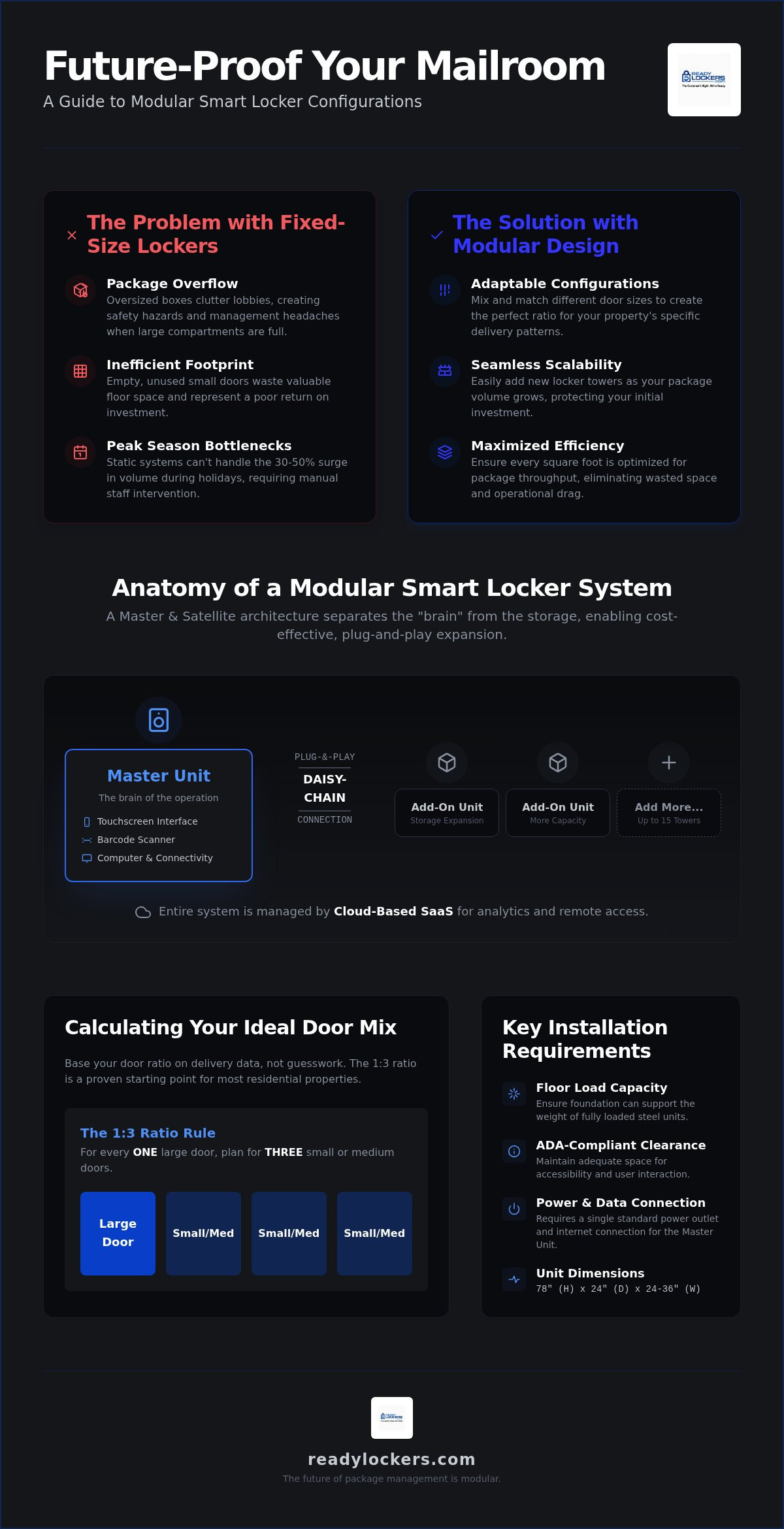
Static locker banks are inherently rigid. They're designed for a snapshot in time, often based on delivery habits that are already outdated. When package sizes increase or a property reaches full occupancy, these systems fail. They don't adapt. This leads to several operational hurdles that frustrate both staff and residents.
- Package Overflow: Fixed configurations often lack enough large compartments. This forces couriers to leave oversized boxes in common areas or lobbies, creating safety hazards and management headaches.
- Inefficient Footprint: In low-density environments, a fixed bank might have too many small doors that sit empty. You're essentially paying for air while wasting expensive floor space.
- Peak Season Bottlenecks: During holidays or sales events, static systems can't handle the temporary 30% to 50% surge in volume. This creates a delivery crisis that requires manual intervention from your team.
Core Components of a Modular Setup
The efficiency of modular smart locker configurations stems from a Master and Satellite architecture. This setup separates the high-tech computing hardware from the physical storage columns. It's a smarter way to manage your initial capital expenditure.
The Master Unit serves as the primary interface. It contains the touchscreen, barcode scanner, and integrated computer. It's the only unit that requires a primary power and data connection. Think of it as the brain of the entire operation.
Add-on or Satellite Units are the storage columns that plug into the Master. They don't have their own screens, which makes them more cost-effective. You can mix and match units with different door sizes to create the ideal ratio for your residents. Scalability is built in. If you need more space next year, you simply plug in another Satellite unit.
The SaaS Link acts as the connective tissue. Cloud-based software synchronizes every modular unit, allowing property managers to monitor usage analytics and manage access from a single dashboard. This software ensures that as you add more units, the system recognizes them instantly without requiring complex onsite reprogramming.
The Anatomy of a Modular Smart Locker Unit
Understanding the physical build of modular smart locker configurations is essential for effective space planning. These units are engineered as vertical columns, typically standing 78 inches tall with a standard depth of 24 inches to accommodate various parcel volumes. The width of each module usually ranges between 24 and 36 inches, allowing them to pass through standard commercial doorways during installation. High-traffic environments like apartment lobbies require frames constructed from heavy-gauge, powder-coated steel to prevent dents and ensure long-term security. The exterior finish is usually textured to resist fingerprints and maintain a professional appearance over years of constant use.
The true efficiency of these systems lies in their internal architecture. Each unit features pre-configured internal wiring that allows for a plug-and-play setup. This design mirrors the principles found in modular logistics networks, where standardized components interact to create a cohesive, scalable system. This internal tethering ensures that power and data flow seamlessly from the central interface to every electronic lock in the bank without requiring complex onsite electrical work for every added column.
Master Controller Units vs. Expansion Towers
The Master Unit acts as the gateway for both couriers and recipients. It houses the industrial-grade touchscreen, the barcode scanner, and the primary computer hardware. A single Master Unit is highly efficient, often capable of supporting up to 15 expansion towers through a secure daisy-chain connection. These expansion towers are essentially storage shells that rely on the Master for their "intelligence." They connect via secure data cables, which eliminates the need for separate internet drops or dedicated power outlets for every column in the bank. This centralized control reduces initial installation costs and simplifies long-term maintenance by housing all critical electronics in a single, accessible location.
Door Sizing Options and Flexibility
Modularity allows property managers to tailor their door mix to actual delivery data. Standard configurations include small lockers for padded envelopes, medium units for typical e-commerce boxes, and large compartments for oversized items. Some properties even opt for specialized tall lockers designed for hanging garments or long tools. It is a technical necessity that smart parcel locker hardware must balance door count with structural integrity to ensure the frame remains stable under heavy loads.
The courier access interface on the Master Unit simplifies the drop-off process by guiding delivery drivers through a rapid, multi-package workflow. This interface is the critical link that turns a physical box into a secure digital asset. It uses high-speed scanners to log tracking numbers in seconds, ensuring that couriers spend less time in your lobby and more time on their routes. If you're ready to optimize your mailroom, you can view our hardware configurations to see which layout fits your space.
Calculating Your Ideal Locker Door Mix
Determining the correct door mix is a data-driven process that prevents both wasted space and package overflow. A reliable starting point for most properties is the 1:3 rule, which allocates one locker door for every three residents or employees. This ratio provides a baseline capacity that handles typical daily volumes without over-extending your initial budget. However, modular smart locker configurations allow you to fine-tune this baseline by analyzing your specific delivery profile. If your property receives a high volume of oversized consumer goods, you can prioritize large-compartment modules over standard envelope units.
Turnover speed is a critical factor in these calculations. Because these systems offer 24/7 contactless pickup, residents aren't restricted by office hours to retrieve their items. This constant availability increases the "velocity" of each door, meaning a single locker can often serve multiple users within a 24-hour window. By optimizing parcel delivery performance through faster retrievals, you can maintain a smaller physical footprint while still managing high package volumes. Usage analytics from your first few months of operation will reveal exactly which door sizes are in highest demand, allowing you to add specific expansion units as needed.
Residential vs. Commercial Configuration Needs
Property types dictate different hardware priorities. In residential apartment buildings, the door mix should lean heavily toward medium and large compartments to accommodate e-commerce boxes and household supplies. Conversely, office environments often require a higher density of small doors. These are ideal for secure document transfers and high-frequency internal mail between departments. For retail "Click and Collect" scenarios, the configuration must prioritize high-speed turnover and ease of access for customers who expect a pickup process that takes less than thirty seconds.
The Impact of SaaS on Capacity Management
Software is the engine that drives locker efficiency. When a courier logs a package, the system sends an immediate SMS or email notification with a unique QR code. These automated alerts are proven to speed up retrieval times, which directly frees up doors for the next delivery cycle. You can effectively use smart locker usage analytics to identify peak hours and bottlenecks. If the data shows that large doors are consistently 100% occupied while small doors remain empty, you can swap out a modular column to rebalance the system. This proactive management ensures that your courier access interface remains open and ready for incoming shipments, even during the busiest holiday seasons.
Space Planning and Installation Requirements
Designing modular smart locker configurations involves more than just selecting door sizes. You must evaluate the structural capacity of your chosen site before the hardware arrives. A fully loaded bank of steel lockers exerts significant pressure on flooring, especially in older buildings where joists might not be reinforced for industrial-grade hardware. Standard installations require a level, hard-surface floor capable of supporting the dead weight of the units plus the live load of maximum package volume. If you're installing on a subfloor or a raised platform, a structural assessment is a necessary first step.
Accessibility is a non-negotiable requirement for modern property management. According to the 2010 ADA Standards for Accessible Design, you must maintain a clear floor space of at least 30 by 48 inches in front of the units to allow for a forward or parallel approach by a wheelchair. Additionally, all operable parts, including the touchscreen and locker handles, must be located between 15 and 48 inches from the floor. You also need to account for the door swing radius. If a large locker door opens into a narrow high-traffic corridor, it creates a temporary obstruction that can violate local fire codes. Utilizing smart locker installation services ensures that your layout remains compliant with both federal and local building regulations from day one.
Lobby vs. Dedicated Parcel Room Layouts
The physical arrangement of your modular towers depends entirely on your available square footage. Linear configurations are the standard choice for long hallways or lobby corridors because they maintain a shallow profile that doesn't impede foot traffic. If you have a dedicated parcel room, L-shaped or U-shaped configurations allow you to maximize wall space while keeping the Master Unit centrally located for easy access. Some high-end properties prefer a recessed installation. This involves building the modular towers into a wall cavity to create a flush, high-tech aesthetic that blends seamlessly with the building's architecture.
Power and Connectivity Infrastructure
Reliable operation depends on two primary utilities: power and data. The Master Unit requires a standard 110V dedicated circuit to prevent accidental trips from other lobby appliances. While many systems support Wi-Fi, a hardwired Ethernet connection is the professional standard for security and stability. This ensures that the cloud-based management software stays synchronized without the signal interference common in crowded residential Wi-Fi environments. Your setup should also include local redundancy. This allows the lockers to function in an offline mode if the internet connection is temporarily interrupted, ensuring residents can always access their deliveries. Ready to map out your floor plan? Speak with a configuration expert to finalize your layout.
Future-Proofing Your Property with ReadyLockers
Investing in property technology shouldn't be a gamble on current package volumes. Traditional, one-piece lockers often become fixed liabilities as soon as they're bolted to the floor. ReadyLockers uses modular smart locker configurations to ensure your hardware remains a scalable asset. This approach allows you to protect your initial capital expenditure by starting with a configuration that meets your current needs while leaving the door open for future growth. You're no longer forced to over-purchase capacity or risk outgrowing your system within a year.
The long-term value of this system extends beyond physical storage. Implementing smart locker integration for property management is a strategic move that increases the overall market value of your building. It signals to high-value tenants that your property is equipped for the logistical demands of 2026 and beyond. Because the system relies on a cloud-based SaaS model, your lockers receive regular software updates that introduce new features and security protocols. This ensures your interface remains modern and compatible with new courier technologies without requiring expensive hardware replacements.
Scaling from 20 to 200+ Doors
Expanding your capacity is a streamlined mechanical process that doesn't require a total system overhaul. You simply add Satellite towers to your existing Master Unit. These expansion modules plug directly into the central controller, and the software automatically recognizes the new hardware. This plug-and-play logic allows property managers to manage multi-unit clusters through a single, unified dashboard. Whether you need to grow from 20 doors to 200, the transition is frictionless. You can add columns one at a time as your building occupancy increases, ensuring your mailroom footprint always matches your actual demand.
Reducing Liability and Enhancing Security
Secure configurations are the most effective way to eliminate the liability of package theft in your lobby. By moving deliveries from open floors into monitored, steel compartments, you create a secure environment that residents trust. The system reinforces this security through automated SMS and QR code pickup notifications, which provide a clear, digital chain of custody for every item. This transparency reduces the administrative burden on your leasing staff and provides peace of mind for your residents. You can stop managing boxes and start managing your property. Configure your custom locker system with ReadyLockers today.
Optimizing Your Property for the Future of Delivery
Managing package volume is a dynamic challenge that requires a flexible physical infrastructure. By implementing modular smart locker configurations, you transition from a static mailroom to a scalable logistical hub. This approach ensures your property remains compliant with ADA standards while providing the 24/7 contactless pickup residents expect. Automated SMS and QR notifications streamline the retrieval process, which increases the velocity of every door in your bank. You don't have to worry about outgrowing your hardware when you utilize scalable modular hardware that expands alongside your occupancy rates.
Ready to eliminate lobby clutter and enhance resident security? Design your custom modular locker configuration with ReadyLockers to secure a future-proof delivery solution today. Building a more efficient property starts with a layout that adapts to your specific needs. It's time to provide the frictionless experience your tenants deserve.
Frequently Asked Questions
How do I know if I need a master or an add-on locker unit?
Every system requires exactly one Master Unit to act as the central brain and touchscreen interface. Add-on or Satellite units are then tethered to this Master to increase storage capacity. If you're starting a new installation, your first purchase must be a Master Unit. Subsequent expansions only require Add-on towers, which are more cost-effective since they don't include the primary computer or scanner.
What is the standard door ratio for a 100-unit apartment building?
A standard starting point is the 1:3 ratio, which suggests approximately 33 to 35 doors for a 100-unit building. This baseline ensures adequate coverage for daily deliveries while maintaining a manageable footprint. However, you should evaluate your specific resident demographics; properties with high e-commerce activity may benefit from 40 doors or a higher percentage of large compartments within their modular smart locker configurations.
Can I add more lockers to my configuration later?
Yes, scalability is the core benefit of a modular system. You can add more Satellite towers to your existing Master Unit at any time as your package volume or building occupancy grows. The management software automatically detects the new hardware modules once they're tethered. This allows you to expand from a small 20-door setup to a comprehensive 200-door system without replacing your initial investment.
Do modular smart lockers require special electrical wiring?
The Master Unit requires a standard 110V dedicated power outlet and a hardwired Ethernet connection for optimal security and reliability. Satellite units don't require separate electrical drops; they receive power and data through a secure daisy-chain tether connected to the Master. This simplified wiring architecture reduces installation costs and makes it easier to rearrange or expand your locker bank as your property needs evolve.
How much floor space does a standard 20-door modular unit require?
A standard modular tower typically requires a footprint of approximately 24 inches in depth and 24 to 36 inches in width. For a 20-door configuration, which usually spans two to three towers, you should budget for roughly six to nine linear feet of wall space. Remember to include a 30 by 48 inch clear floor area in front of the units to ensure ADA compliance and adequate door swing clearance.
Can different locker sizes be mixed within a single modular tower?
Yes, modular towers are highly customizable and can include a variety of door sizes within a single frame. You can mix small compartments for envelopes, medium doors for standard boxes, and large lockers for oversized items in the same tower. This flexibility allows you to tailor your modular smart locker configurations to the specific delivery data of your property, ensuring that no space is wasted on underutilized door sizes.
What happens if a courier delivers a package that is too large for the configured doors?
If a package exceeds the dimensions of your largest available locker, the courier interface prompts the driver to contact the property manager or use an alternative delivery method. Some systems allow for an overflow notification to be sent to the recipient, indicating that the item is being held in a secure mailroom or lobby area. Analyzing these occurrences through your usage analytics helps you determine if you need to add a dedicated oversized-item module.
Is the locker management software included with the hardware purchase?
The hardware and software are separate components of the ReadyLockers platform. The physical locker units are a one-time equipment purchase, while the cloud-based management software requires a recurring SaaS subscription fee. This subscription covers automated SMS and QR code notifications, real-time usage analytics, courier access management, and continuous security updates. This model ensures your system remains technologically current without requiring additional hardware upgrades.

Frequently Asked Questions
How do I know if I need a master or an add-on locker unit?+
Every system requires exactly one Master Unit to act as the central brain and touchscreen interface. Add-on or Satellite units are then tethered to this Master to increase storage capacity. If you're starting a new installation, your first purchase must be a Master Unit. Subsequent expansions only require Add-on towers, which are more cost-effective since they don't include the primary computer or scanner.
What is the standard door ratio for a 100-unit apartment building?+
A standard starting point is the 1:3 ratio, which suggests approximately 33 to 35 doors for a 100-unit building. This baseline ensures adequate coverage for daily deliveries while maintaining a manageable footprint. However, you should evaluate your specific resident demographics; properties with high e-commerce activity may benefit from 40 doors or a higher percentage of large compartments within their modular smart locker configurations.
Can I add more lockers to my configuration later?+
Yes, scalability is the core benefit of a modular system. You can add more Satellite towers to your existing Master Unit at any time as your package volume or building occupancy grows. The management software automatically detects the new hardware modules once they're tethered. This allows you to expand from a small 20-door setup to a comprehensive 200-door system without replacing your initial investment.
Do modular smart lockers require special electrical wiring?+
The Master Unit requires a standard 110V dedicated power outlet and a hardwired Ethernet connection for optimal security and reliability. Satellite units don't require separate electrical drops; they receive power and data through a secure daisy-chain tether connected to the Master. This simplified wiring architecture reduces installation costs and makes it easier to rearrange or expand your locker bank as your property needs evolve.
How much floor space does a standard 20-door modular unit require?+
A standard modular tower typically requires a footprint of approximately 24 inches in depth and 24 to 36 inches in width. For a 20-door configuration, which usually spans two to three towers, you should budget for roughly six to nine linear feet of wall space. Remember to include a 30 by 48 inch clear floor area in front of the units to ensure ADA compliance and adequate door swing clearance.
Can different locker sizes be mixed within a single modular tower?+
Yes, modular towers are highly customizable and can include a variety of door sizes within a single frame. You can mix small compartments for envelopes, medium doors for standard boxes, and large lockers for oversized items in the same tower. This flexibility allows you to tailor your modular smart locker configurations to the specific delivery data of your property, ensuring that no space is wasted on underutilized door sizes.
What happens if a courier delivers a package that is too large for the configured doors?+
If a package exceeds the dimensions of your largest available locker, the courier interface prompts the driver to contact the property manager or use an alternative delivery method. Some systems allow for an overflow notification to be sent to the recipient, indicating that the item is being held in a secure mailroom or lobby area. Analyzing these occurrences through your usage analytics helps you determine if you need to add a dedicated oversized-item module.
Is the locker management software included with the hardware purchase?+
The hardware and software are separate components of the ReadyLockers platform. The physical locker units are a one-time equipment purchase, while the cloud-based management software requires a recurring SaaS subscription fee. This subscription covers automated SMS and QR code notifications, real-time usage analytics, courier access management, and continuous security updates. This model ensures your system remains technologically current without requiring additional hardware upgrades.