Locker Integration for Existing Platforms: 2026 Guide
Master locker system integration for existing platforms. Map package workflows, secure courier access, and ensure smooth delivery handoffs with our guide.

What if the smoothest locker integration starts with the handoff, not the software? Locker system integration for existing platforms can feel like adding another disconnected workflow, especially when teams aren’t sure which systems, information, or people need to be involved. Start with the exchange itself: who deposits an item, who collects it, and what information each step requires.
It’s reasonable to want a connected process without creating extra work for staff or weakening security. A locker workflow should fit the way your organization already manages deliveries, access, and daily operations. Define the scope before implementation, and separate essential requirements from features that don’t improve the handoff.
This guide explains how to map delivery, access, notifications, and management into a practical integration plan. You’ll learn what to establish before choosing a platform, how to assess workflow fit without assuming specific third-party compatibility, and where security and usability belong in the decision. ReadyLockers provides smart locker hardware and management software, with SMS or QR code pickup notifications, courier access management, and usage analytics to support defined operational needs.
Key Takeaways
- Locker system integration for existing platforms works best when you define the handoff first, then map the systems and teams around it.
- Trace each package journey by identifying its trigger, required information, access assignment, and resulting status.
- Compare locker approaches by trigger ownership, information flow, access control, reporting, and operational responsibility, not feature claims alone.
- Assign clear ownership for courier access, recipient communication, locker operations, and issue escalation before launch.
- Test deposits, notifications, pickups, and status visibility end to end to assess whether the workflow fits daily operations.
Why Locker System Integration for Existing Platforms Starts with the Handoff
A package arrives. A courier places it in a locker. The recipient receives a pickup notification, opens the assigned compartment, and collects the item. That sequence is the operational core of locker system integration for existing platforms. Before considering software connections, define what must happen at each step, who owns it, and what record shows that the handoff is complete.
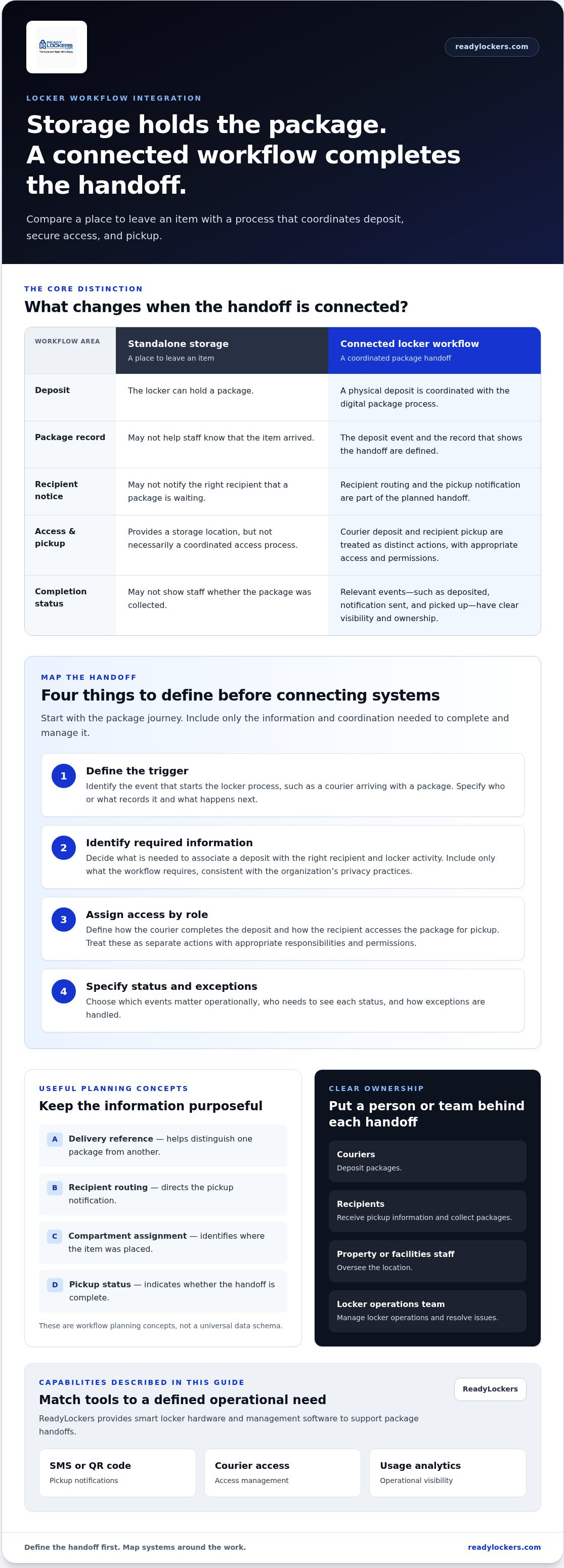
A connected locker workflow coordinates a digital package process with physical deposit, secure access, and pickup, while standalone storage simply provides a place to leave an item. The distinction matters: a locker can hold a package without helping staff know it arrived, notifying the right recipient, or showing whether it was collected. A parcel locker becomes part of a wider workflow when its events and responsibilities are clearly defined.
Integration scope depends on the handoff and the systems already involved. One property may need a consistent way to record deposits and notify recipients; another may need to coordinate package status with existing identity, access, or property-management processes. Don’t assume a particular platform connection is required. Start with the outcome, then determine what information and coordination the process needs.
Which operational problem should the integration solve?
Identify friction in the current process before selecting technology or features. Staff might manually log each package, contact recipients more than once, or lack a clear view of whether an item is waiting for pickup. These are different problems and may call for different workflow changes. Define the desired result in operational terms, such as clearer deposit records or fewer manual follow-ups, rather than starting with a preferred integration method.
Priorities also vary by property type. Apartments may focus on resident notifications and package collection; offices may need to coordinate employee access and facilities responsibilities. Campuses, hotels, hospitals, and retail locations can have different recipient groups, package volumes, and staff roles. Use questions like these to establish scope:
- What currently causes delay, uncertainty, or repeated staff work?
- Who needs package status, and at what point in the handoff?
- Which outcome would make the process easier to manage?
Which teams and systems touch a package handoff?
Map the people first. Couriers deposit packages, recipients collect them, property or facilities staff oversee the location, and designated teams manage locker operations or resolve issues. Then identify only the systems that support a necessary step. Depending on the workflow, these might include package records, identity or access processes, or property-management software. A system belongs in scope only when it has a defined role in the handoff.
For example, a building may handle courier access and pickup notifications within its locker operation while staff continue to use a separate property system for other resident tasks. That is still a workflow to design, even without data exchange between platforms. ReadyLockers supports package handoffs with modular locker hardware and cloud-based management software, including SMS or QR code notifications, courier access management, and usage analytics. For more on day-to-day platform operations, see the smart locker management software guide.
Map Locker Data, Triggers, and Access into the Existing Workflow
Once the package journey is clear, map the information and actions that carry it from courier deposit to recipient pickup. Locker system integration for existing platforms doesn’t require every system to share every detail. It does require a defined trigger, only the information needed to route and manage the package, appropriate access, and a clear way to record the outcome.
- Define the trigger. Identify the event that starts the locker process, such as a courier arriving with a package. Specify who or what records that event and what must happen next.
- Identify required information. Decide what is needed to associate the deposit with the right recipient and locker activity. A package reference and recipient routing information may be useful workflow concepts, but the exact fields depend on the organization’s process.
- Assign access. Define how the courier completes the deposit and how the recipient accesses the package for pickup. Treat these as distinct actions, with responsibilities and permissions appropriate to each role.
- Specify the resulting status. Decide which events matter operationally, such as deposited, notification sent, and picked up. Clarify who needs to see each status and how exceptions are handled.
What information does each handoff need?
Use a minimal field list. A delivery reference can help distinguish one package from another; recipient routing directs the pickup notification; compartment assignment identifies where the item was placed; and pickup status indicates whether the handoff is complete. These are planning concepts, not a universal data schema. Include only information required to complete and manage the process, in line with the organization’s privacy practices.
Separate transaction records from analytics. A deposit or pickup event supports the immediate handoff. Aggregated usage information can help teams review locker utilization and operational patterns. Don’t collect additional personal or package details simply because a system can store them. Integration challenges such as incompatible data and security gaps make careful planning important, as discussed in Common System Integration Challenges.
How do courier access and recipient pickup fit together?
Consider a package journey: the courier uses the defined access process to deposit an item and associate it with its intended recipient. Locker management records the relevant activity, and the recipient receives an SMS or QR code notification with pickup information. The recipient then completes a separate access step to collect the package. Courier access management supports the deposit workflow; it doesn’t mean the locker provider supplies courier or delivery services.
ReadyLockers supports SMS or QR code pickup notifications and courier access management. The SMS and QR locker notification guide explains notification options. Before implementation, have the responsible technical and operational teams define protocols, field definitions, permissions, and the requirements for any proposed system connections. You can also review ReadyLockers’ smart package locker and management platform as you shape the handoff workflow.
Compare Locker Integration Approaches by Workflow Fit, Not Buzzwords
Locker system integration for existing platforms can mean anything from running locker operations in a dedicated workflow to connecting package events with other business systems. These approaches are not a maturity ladder. The right scope depends on package volume, current processes, and whether another team or platform needs the same information. Compare operational responsibilities before assuming that deeper connectivity will improve the handoff.
| Approach | Trigger ownership | Data exchanged | Access control | Reporting and responsibility |
|---|---|---|---|---|
| Standalone locker operations | Locker workflow starts when staff or a courier initiates a deposit. | Information needed to route and manage the package within the locker process. | Managed within the locker workflow. | Locker activity is reviewed there; designated staff oversee day-to-day operations. |
| Workflow coordination | Teams agree which operational event starts each step. | Only the details needed to coordinate package handling and recipient communication. | Responsibilities are defined across courier, recipient, and locker operations. | Teams review relevant handoff statuses and agree who resolves exceptions. |
| Deeper system-to-system connection | A defined event in one system may initiate or update a step in another. | Fields and status changes are determined by the intended process. | Permissions and ownership must be established across connected systems. | Reporting may span systems; teams define support and data responsibilities. |
This comparison describes possible operating models, not specific technical capabilities. Protocols, data fields, system permissions, and named platform compatibility are project-specific. Treat claims about APIs or existing integrations as unverified until technical evidence supports them. A workflow can be well coordinated without separate platforms exchanging data.
When is a focused locker workflow enough?
A focused approach can suit a property whose priority is controlled deposits, recipient pickup notifications, and visibility into locker use. If staff don’t need the same package status in another platform, clear locker procedures may be more valuable than unnecessary connectivity. ReadyLockers supports SMS or QR code notifications and usage analytics, which align with recipient communication and reviewing locker utilization.
When might broader platform coordination matter?
Coordination may matter when multiple teams or locations share package responsibilities, or when an established package-management process needs specific handoff information. First document the business requirement, such as which team needs a status and when. Then assess the technical connection as a separate question. Property teams can use this property management locker integration guide for additional context on property-level workflows.
Choose the least complex approach that meets the operational need. A single location with a clear locker process may need a different scope than a multi-site organization coordinating several teams. In either case, base the decision on who initiates the workflow, what information must move, who controls access, and who acts on the resulting status.
Plan Integration Testing, Ownership, and Exception Handling
A workflow isn’t ready for day-to-day use just because each individual step appears to work. Before launch, test the full package journey and decide who owns each part. Assign responsibility for courier access, recipient communication, locker operations, and issue escalation. If those roles are unclear, a delayed pickup or incorrect detail can leave staff unsure who should act next.
Every integration test should verify a user action and its resulting operational status. For a package deposit, check that the courier can complete the assigned step and that the expected status is visible to the staff responsible for oversight. Then test the recipient’s notification and pickup separately. Record the expected result, what actually happened, and who handles a failure. This gives operational and technical teams a useful test record without assuming a particular connection between platforms.
What should a pilot test prove?
A pilot should confirm that each participant understands their task and that the handoff follows the intended sequence. Test a successful deposit, notification receipt, recipient access, and pickup, then confirm the resulting status appears where the responsible team expects it. Review notification clarity, access instructions, and staff responses to exceptions. Examine available usage analytics for practical value, such as whether they help teams understand locker use, without imposing an unsupported performance benchmark.
Include exceptions in the test plan, not just the ideal journey. For example, use a deliberately incorrect recipient detail to verify how staff identify and correct a routing problem. Simulate a delayed pickup and confirm who monitors the package and what happens next. If a suitable compartment isn’t available, establish how the courier or operations team should proceed. Document the expected response and escalation owner for each case.
How should teams prepare for day-to-day operations?
Assign a role for routine locker oversight and a clear route for reporting access, notification, or operational issues. Provide concise instructions tailored to each participant: couriers need deposit guidance, recipients need clear pickup steps, and property or facilities teams need procedures for oversight and escalation. Keep instructions consistent with the tested workflow, and make ownership visible to the people who use it.
After launch, set a regular process for reviewing usage data and deciding whether the workflow needs adjustment. Focus on actionable questions: Are staff seeing the information they need? Are recurring exceptions pointing to unclear instructions or ownership? Does the process still fit package volume and site operations? Usage analytics can inform this review, but teams should interpret them alongside staff feedback and documented issues.
ReadyLockers combines smart package locker hardware with cloud-based management software, including courier access management, SMS or QR code notifications, and usage analytics. The ReadyLockers platform brings these elements together for package operations.
Bring Existing Package Operations Together with ReadyLockers
A practical locker project follows a clear sequence: define the package handoff, map the people and information involved, then test whether the proposed workflow fits daily operations. This keeps the decision focused on what staff, couriers, and recipients need to do, rather than on feature claims or assumptions about connections to other platforms.
How ReadyLockers supports a defined package workflow
ReadyLockers combines modular smart package locker hardware with a cloud-based management platform. Courier access management supports the deposit stage, while SMS or QR code notifications give recipients pickup information. Contactless pickup is available around the clock. Usage analytics provide information teams can review to understand locker activity and inform operational decisions, without promising a particular outcome.
The hardware configuration can be considered alongside property layout and package volume, so the physical setup reflects the environment where packages are handled. The management workflow can then be planned around the roles responsible for deposits, recipient communication, and locker oversight. This provides a clear operational foundation without assuming compatibility with a named third-party platform, API, or system.
What to bring into a ReadyLockers project discussion
A focused project discussion starts with the conditions packages move through today. Bring practical details that help define the required handoff and property fit:
- Package volume and patterns: Describe typical package activity and any periods when demand changes.
- Property layout: Identify where a locker installation would fit within the site’s physical operations.
- User groups: Note who deposits and collects packages, and which teams oversee locker operations.
- Current handoff steps: Outline how packages are received, recorded, communicated to recipients, and collected.
- Operational priorities: Explain which friction points matter most, such as manual follow-up or unclear package status.
Bring technical and operational requirements as separate items. For example, a team may need staff to see whether a package has been collected; that is a business need. Whether another platform must receive that status, and how a connection would work, are technical questions that require project-specific definition. Keeping the distinction clear helps teams define the desired result without treating a particular integration method as a given.
Use this information to assess whether the locker workflow supports the property’s layout, user groups, and package handling process. Then review how deposits, notifications, pickup, and management responsibilities fit together. That gives the organization a grounded basis for evaluating the solution and planning its next steps.
ReadyLockers smart locker solutions bring package workflow requirements into a practical locker plan.
Turn Your Integration Goals into a Clear Next Step
Turn your locker plans into a short project brief that teams can use to make decisions. Record the operational change you want, the people responsible for the handoff, and the open questions that need technical review. This gives property, facilities, and technology stakeholders a shared starting point, while keeping the project focused on practical outcomes rather than assumptions about what a platform can connect to.
Use that brief to assess whether Locker system integration for existing platforms fits your current package process and the way your property operates. A well-defined scope makes it easier to discuss requirements, align responsibilities, and plan a rollout that works for the people who will use and manage it.
Explore ReadyLockers smart locker solutions and take the next step toward a package workflow designed around your organization’s needs.
Frequently Asked Questions
Can a locker system integrate with our existing property management platform?
Compatibility depends on the specific platforms and project requirements. First identify what your property system already records, such as resident details or package notices, and where the locker process begins. Then specify which information or actions need to pass between systems. For Locker system integration for existing platforms, separate the operational need from the technical method and validate the proposed connection before implementation.
What does locker system integration mean?
Locker system integration means coordinating the digital instructions and records around a package with its physical storage and collection. For example, a site may need to associate a deposited item with the right recipient, communicate pickup instructions, and make the completed collection visible to the team responsible for operations. The scope can stay within locker operations or involve other platforms, depending on the organization’s process.
Which data should a locker system share with other platforms?
Share only information that serves a defined operational purpose. A delivery reference may help staff identify an item, while recipient routing information supports communication and a pickup status can indicate that the handoff is complete. Decide which roles need access to each field and who maintains it. For example, a facilities team may need a status update without needing unrelated recipient or package details.
How do smart lockers notify recipients after a delivery?
A locker workflow can notify a recipient when a package is ready for collection. ReadyLockers supports SMS or QR code notifications. Keep the message aligned with the pickup process: recipients should understand where to go and what action to take, while staff should know how to help if someone doesn’t receive or understand the notice. Review the wording with users before launch to catch confusing instructions.
Can a locker system work without a full software integration?
Yes, a project can use a focused locker workflow without connecting every business platform. This may suit a site that needs to manage deposits and pickups in the locker process while leaving other records in their current systems. Start by defining what staff must see to perform their roles. If a team later needs package status in another platform, treat that as a separate requirement to assess.
How should we test a locker integration before launch?
Test with the people who will use the process, not only those who planned it. Have a courier complete a deposit, then ask a recipient to follow the pickup instructions without coaching. Confirm that staff can identify the resulting status and know what to do if a detail is wrong or a compartment is unavailable. Record unclear steps, revise the instructions, and repeat the relevant test before expanding use.

Frequently Asked Questions
Which operational problem should the integration solve?+
Identify friction in the current process before selecting technology or features. Staff might manually log each package, contact recipients more than once, or lack a clear view of whether an item is waiting for pickup. These are different problems and may call for different workflow changes. Define the desired result in operational terms, such as clearer deposit records or fewer manual follow-ups, rather than starting with a preferred integration method. Priorities also vary by property type. Apartments may focus on resident notifications and package collection; offices may need to coordinate employee access and facilities responsibilities. Campuses, hotels, hospitals, and retail locations can have different recipient groups, package volumes, and staff roles. Use questions like these to establish scope:
Which teams and systems touch a package handoff?+
Map the people first. Couriers deposit packages, recipients collect them, property or facilities staff oversee the location, and designated teams manage locker operations or resolve issues. Then identify only the systems that support a necessary step. Depending on the workflow, these might include package records, identity or access processes, or property-management software. A system belongs in scope only when it has a defined role in the handoff. For example, a building may handle courier access and pickup notifications within its locker operation while staff continue to use a separate property system for other resident tasks. That is still a workflow to design, even without data exchange between platforms. ReadyLockers supports package handoffs with modular locker hardware and cloud-based management software, including SMS or QR code notifications, courier access management, and usage analytics. For more on day-to-day platform operations, see the smart locker management software guide. Once the package journey is clear, map the information and actions that carry it from courier deposit to recipient pickup. Locker system integration for existing platforms doesn’t require every system to share every detail. It does require a defined trigger, only the information needed to route and manage the package, appropriate access, and a clear way to record the outcome.
What information does each handoff need?+
Use a minimal field list. A delivery reference can help distinguish one package from another; recipient routing directs the pickup notification; compartment assignment identifies where the item was placed; and pickup status indicates whether the handoff is complete. These are planning concepts, not a universal data schema. Include only information required to complete and manage the process, in line with the organization’s privacy practices. Separate transaction records from analytics. A deposit or pickup event supports the immediate handoff. Aggregated usage information can help teams review locker utilization and operational patterns. Don’t collect additional personal or package details simply because a system can store them. Integration challenges such as incompatible data and security gaps make careful planning important, as discussed in Common System Integration Challenges.
How do courier access and recipient pickup fit together?+
Consider a package journey: the courier uses the defined access process to deposit an item and associate it with its intended recipient. Locker management records the relevant activity, and the recipient receives an SMS or QR code notification with pickup information. The recipient then completes a separate access step to collect the package. Courier access management supports the deposit workflow; it doesn’t mean the locker provider supplies courier or delivery services. ReadyLockers supports SMS or QR code pickup notifications and courier access management. The SMS and QR locker notification guide explains notification options. Before implementation, have the responsible technical and operational teams define protocols, field definitions, permissions, and the requirements for any proposed system connections. You can also review ReadyLockers’ smart package locker and management platform as you shape the handoff workflow. Locker system integration for existing platforms can mean anything from running locker operations in a dedicated workflow to connecting package events with other business systems. These approaches are not a maturity ladder. The right scope depends on package volume, current processes, and whether another team or platform needs the same information. Compare operational responsibilities before assuming that deeper connectivity will improve the handoff. This comparison describes possible operating models, not specific technical capabilities. Protocols, data fields, system permissions, and named platform compatibility are project-specific. Treat claims about APIs or existing integrations as unverified until technical evidence supports them. A workflow can be well coordinated without separate platforms exchanging data.
When is a focused locker workflow enough?+
A focused approach can suit a property whose priority is controlled deposits, recipient pickup notifications, and visibility into locker use. If staff don’t need the same package status in another platform, clear locker procedures may be more valuable than unnecessary connectivity. ReadyLockers supports SMS or QR code notifications and usage analytics, which align with recipient communication and reviewing locker utilization.
When might broader platform coordination matter?+
Coordination may matter when multiple teams or locations share package responsibilities, or when an established package-management process needs specific handoff information. First document the business requirement, such as which team needs a status and when. Then assess the technical connection as a separate question. Property teams can use this property management locker integration guide for additional context on property-level workflows. Choose the least complex approach that meets the operational need. A single location with a clear locker process may need a different scope than a multi-site organization coordinating several teams. In either case, base the decision on who initiates the workflow, what information must move, who controls access, and who acts on the resulting status. A workflow isn’t ready for day-to-day use just because each individual step appears to work. Before launch, test the full package journey and decide who owns each part. Assign responsibility for courier access, recipient communication, locker operations, and issue escalation. If those roles are unclear, a delayed pickup or incorrect detail can leave staff unsure who should act next. Every integration test should verify a user action and its resulting operational status. For a package deposit, check that the courier can complete the assigned step and that the expected status is visible to the staff responsible for oversight. Then test the recipient’s notification and pickup separately. Record the expected result, what actually happened, and who handles a failure. This gives operational and technical teams a useful test record without assuming a particular connection between platforms.
What should a pilot test prove?+
A pilot should confirm that each participant understands their task and that the handoff follows the intended sequence. Test a successful deposit, notification receipt, recipient access, and pickup, then confirm the resulting status appears where the responsible team expects it. Review notification clarity, access instructions, and staff responses to exceptions. Examine available usage analytics for practical value, such as whether they help teams understand locker use, without imposing an unsupported performance benchmark. Include exceptions in the test plan, not just the ideal journey. For example, use a deliberately incorrect recipient detail to verify how staff identify and correct a routing problem. Simulate a delayed pickup and confirm who monitors the package and what happens next. If a suitable compartment isn’t available, establish how the courier or operations team should proceed. Document the expected response and escalation owner for each case.
How should teams prepare for day-to-day operations?+
Assign a role for routine locker oversight and a clear route for reporting access, notification, or operational issues. Provide concise instructions tailored to each participant: couriers need deposit guidance, recipients need clear pickup steps, and property or facilities teams need procedures for oversight and escalation. Keep instructions consistent with the tested workflow, and make ownership visible to the people who use it. After launch, set a regular process for reviewing usage data and deciding whether the workflow needs adjustment. Focus on actionable questions: Are staff seeing the information they need? Are recurring exceptions pointing to unclear instructions or ownership? Does the process still fit package volume and site operations? Usage analytics can inform this review, but teams should interpret them alongside staff feedback and documented issues. ReadyLockers combines smart package locker hardware with cloud-based management software, including courier access management, SMS or QR code notifications, and usage analytics. The ReadyLockers platform brings these elements together for package operations. A practical locker project follows a clear sequence: define the package handoff, map the people and information involved, then test whether the proposed workflow fits daily operations. This keeps the decision focused on what staff, couriers, and recipients need to do, rather than on feature claims or assumptions about connections to other platforms.
Can a locker system integrate with our existing property management platform?+
Compatibility depends on the specific platforms and project requirements. First identify what your property system already records, such as resident details or package notices, and where the locker process begins. Then specify which information or actions need to pass between systems. For Locker system integration for existing platforms, separate the operational need from the technical method and validate the proposed connection before implementation.
What does locker system integration mean?+
Locker system integration means coordinating the digital instructions and records around a package with its physical storage and collection. For example, a site may need to associate a deposited item with the right recipient, communicate pickup instructions, and make the completed collection visible to the team responsible for operations. The scope can stay within locker operations or involve other platforms, depending on the organization’s process.
Which data should a locker system share with other platforms?+
Share only information that serves a defined operational purpose. A delivery reference may help staff identify an item, while recipient routing information supports communication and a pickup status can indicate that the handoff is complete. Decide which roles need access to each field and who maintains it. For example, a facilities team may need a status update without needing unrelated recipient or package details.
How do smart lockers notify recipients after a delivery?+
A locker workflow can notify a recipient when a package is ready for collection. ReadyLockers supports SMS or QR code notifications. Keep the message aligned with the pickup process: recipients should understand where to go and what action to take, while staff should know how to help if someone doesn’t receive or understand the notice. Review the wording with users before launch to catch confusing instructions.
Can a locker system work without a full software integration?+
Yes, a project can use a focused locker workflow without connecting every business platform. This may suit a site that needs to manage deposits and pickups in the locker process while leaving other records in their current systems. Start by defining what staff must see to perform their roles. If a team later needs package status in another platform, treat that as a separate requirement to assess.
How should we test a locker integration before launch?+
Test with the people who will use the process, not only those who planned it. Have a courier complete a deposit, then ask a recipient to follow the pickup instructions without coaching. Confirm that staff can identify the resulting status and know what to do if a detail is wrong or a compartment is unavailable. Record unclear steps, revise the instructions, and repeat the relevant test before expanding use.