Smart Locker Technology for Campus Security: A 2026 Guide
Explore how smart locker technology for campus security prevents package theft, streamlines courier drop-offs, and ensures safe, contactless student pickups.

What if a package could move from courier to recipient without sitting unattended in a shared campus space or creating another task for staff? Smart locker technology for campus security creates a designated, controlled handoff while keeping pickup straightforward. Campuses need reliable delivery processes, but adding security shouldn’t add friction for students, staff, or couriers.
Smart package lockers provide a secure place for deliveries. Courier access management and SMS or QR code notifications help coordinate deposit and pickup, while contactless self-service gives recipients a clear next step. Cloud-based management supports day-to-day oversight. Lockers add a practical layer to delivery security, not a replacement for campus-wide security systems.
This guide explains which delivery risks lockers can address and how access, notifications, and management capabilities differ. It also covers how to assess package volume, placement, and delivery workflows so you can plan a setup that fits your campus layout and operations.
Key Takeaways
- Smart locker technology for campus security can add a controlled package handoff point without replacing campus-wide security systems.
- Map each delivery step, from courier deposit to recipient collection, to clarify responsibilities and identify workflow gaps.
- Compare locker options by access controls, notification methods, management tools, and configuration before weighing optional features.
- Plan placement and capacity around campus layout, delivery volume, user groups, and existing mailroom procedures.
- ReadyLockers combines modular lockers with cloud-based management, courier access management, and SMS or QR notifications to support campus delivery workflows.
What Smart Locker Technology Means for Campus Security
Campus deliveries may pass through shared mailrooms, building lobbies, reception areas, or staffed service desks before reaching their recipients. When a package is left in an open or busy space, it may be exposed to casual handling, mistaken pickup, or confusion about who collected it. Smart package lockers create a designated handoff point: a courier places a parcel in a controlled compartment, and the recipient retrieves it through the locker’s access process.
Campus package-locker security means controlling the deposit and collection of deliveries through compartments designed to limit casual access and organize handoffs. Smart locker technology for campus security addresses this specific part of the delivery process. It doesn’t secure every building, protect every person or asset, or replace campus access control, emergency response, or other security measures.
Which campus delivery risks can lockers address?
Unattended packages in shared areas can be difficult to monitor and manage. A controlled compartment gives a parcel a defined location and limits access to people outside its handoff process. This can help reduce exposure and make collection more orderly.
The distinction matters: package lockers manage deliveries, not general movement across campus. They aren’t a substitute for building entry controls, security personnel, surveillance, or emergency procedures. Their role is to provide a practical layer focused on parcel custody between courier deposit and recipient pickup.
Who uses campus package lockers?
Students, faculty, and staff may collect deliveries. Couriers use the deposit process, while campus mailroom teams coordinate the workflow. Each group has different needs: recipients need clear pickup instructions, couriers need a workable deposit step, and operations staff need visibility into how deliveries are handled.
Campus layout shapes the details. A residential campus may serve people receiving parcels near residence halls, while a commuter campus may concentrate deliveries around a central mailroom or service area. Neither setup has a universal delivery volume or staffing model. Before deciding where lockers fit, map where packages arrive, who handles them, and where recipients can conveniently collect them.
This workflow review also helps campuses define what “secure” means for their package process. Consider who can access a compartment, how recipients learn that a delivery is ready, and how staff will handle an uncollected or misdirected parcel. Clear steps reduce ambiguity without suggesting that a locker eliminates every risk.
With the scope defined, compare locker capabilities against actual campus needs. In particular, examine how courier access, recipient notifications, pickup, and management tools work together to make each handoff easier to manage.
How Smart Locker Technology Secures a Campus Package Handoff
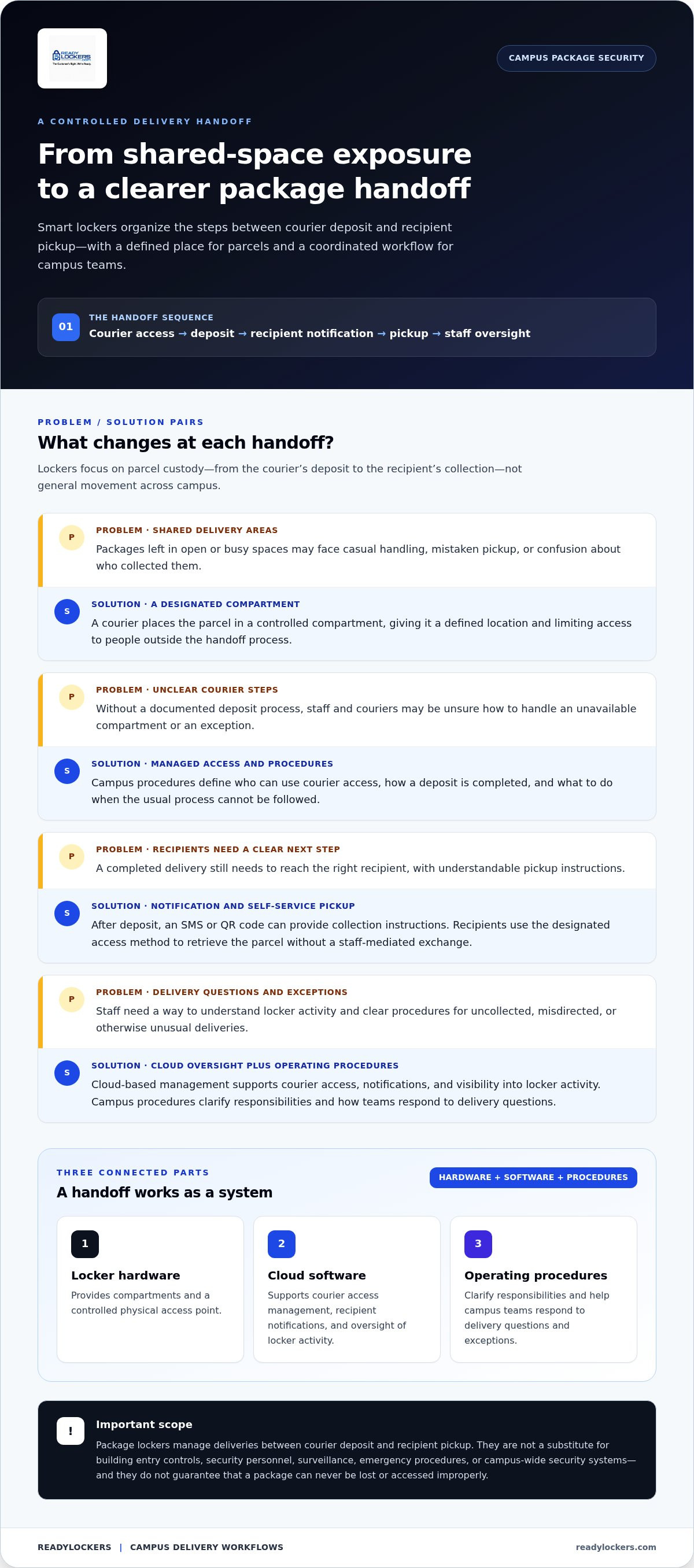
A controlled handoff connects several steps: courier access, package deposit, recipient notification, pickup, and oversight of the delivery workflow. Smart locker technology for campus security brings together physical compartments and cloud-based software to coordinate these steps. The locker controls access to the package, while the software supports the handoff and gives campus teams a clearer view of locker activity.
A controlled deposit-to-pickup workflow makes each handoff easier to manage and review. It doesn’t guarantee that a package can never be lost or accessed improperly. Clear permissions, usable procedures, and accurate recipient details still matter.
How courier access and package deposit work
Campus procedures define who can use the courier access process and how exceptions are handled. An authorized courier follows the designated steps, places a package in an available compartment, and completes the deposit. The locker hardware secures the compartment, while connected management software supports access management and the delivery workflow.
Before launch, document how couriers use the access process, what to do if no suitable compartment is available, and whom to contact when a delivery can’t follow the usual procedure. Clear instructions help maintain a consistent workflow across couriers without assuming that every campus handles deliveries the same way.
How recipients retrieve packages
After a deposit, the recipient can receive an SMS or QR code notification with collection instructions. The recipient uses the designated access method to retrieve the parcel without a staff-mediated exchange. Authentication details can vary by system and campus policy, so explain how to use the notification and where to get help if it doesn’t work.
Management tools can give staff useful visibility into locker activity when responding to delivery questions. That visibility supports operations, but it doesn’t replace clear package labeling or procedures for resolving exceptions.
The workflow depends on three connected parts:
- Locker hardware: Provides compartments and a controlled physical access point.
- Cloud software: Supports courier access management, recipient notifications, and oversight of locker activity.
- Operating procedures: Clarify responsibilities and help campus teams respond to delivery questions.
The same controlled-access principle appears in other campus security applications, though the use case differs. For example, Southwest Solutions Group’s Smart Lockers in Campus Safety Operations describes lockers used to manage police evidence and assets. Package lockers apply the broader idea to courier-to-recipient handoffs, with delivery-specific access and notification steps.
To make the process work on campus, define courier permissions, recipient instructions, exception handling, and staff responsibilities before deployment. Explore campus smart package locker workflows and see how access management and notifications can support a coordinated handoff.
How to Compare Smart Locker Options for Campus Security
Compare systems against the delivery workflow your campus needs, not simply the length of a feature list. Smart locker technology for campus security should make courier deposits, recipient pickup, and staff oversight work together. Start with essential package-handling capabilities, then consider analytics or other features that support broader operational goals.
| Capability | Essential package workflow | Additional consideration |
|---|---|---|
| Access controls | Defined courier access and a clear recipient pickup process. | Consider whether permissions can be managed to fit campus procedures. |
| Notifications | A reliable way to tell recipients a package is ready, such as SMS or a QR code. | Assess which notification method suits different user groups. |
| Management tools | Staff can review relevant delivery and locker activity. | Usage analytics may help teams understand patterns and plan operations. |
| Configuration | Locker placement and capacity support the intended delivery process. | Modular layouts can help accommodate campus spaces and package volumes. |
Which access and accountability capabilities matter?
Trace the courier’s steps from arrival to deposit, then follow the recipient’s path from notification to collection. The process should be understandable for both groups, with campus procedures defining courier permissions and how staff handle exceptions. Contactless pickup can support collection outside staffed service periods when the campus workflow calls for it.
Review what activity the management software makes visible and how staff can use that information to respond to questions. Greater visibility can help teams manage package handling, but it doesn’t mean every campus security risk has been addressed.
How should campus teams assess software and configuration?
Base the configuration on delivery volume, likely peak periods, site layout, and user groups. A central location may suit one campus, while another may benefit from lockers near the communities they serve. Consider whether cloud-based management gives the responsible team useful oversight and whether notification options are practical for students, faculty, and staff.
Separate core delivery needs from enhancements. Access management and recipient notifications support the handoff; analytics can help teams review usage and adjust operations. For a broader system evaluation, use the Smart Package Lockers: 2026 Buyer’s Guide. Teams assessing day-to-day software workflows can also consult the smart locker management software guide.
List must-have functions first, then weigh additional capabilities against campus needs. This keeps the decision grounded in a workable delivery process rather than features that don’t improve package handling.
How to Plan a Campus Smart Locker Implementation
A successful rollout starts with the campus delivery process, not the hardware. Smart locker technology for campus security works best when location, package flow, responsibilities, and recipient instructions are planned together. Document how parcels arrive today, where they wait, who handles them, and which groups need to collect them. This gives campus teams a practical basis for configuring lockers around real operating needs.
What should a campus needs assessment cover?
Review package flow across relevant locations, including mailrooms, reception desks, residence areas, and other shared handoff points. Identify where unattended packages tend to accumulate and when delivery activity is busiest. Then assess possible locker locations for convenient access and clear circulation, so collection doesn’t obstruct entrances, walkways, or routine campus activity.
Record the needs of each user group and the constraints that shape the workflow. Note current mailroom procedures, courier routines, recipient access needs, and staff responsibilities. These details help teams decide on locker placement and configuration for the site and its expected package volume.
How can a rollout keep campus workflows clear?
Choose a pilot or phased launch that suits the campus environment. A limited rollout can show how instructions, responsibilities, and exception handling work in practice before the process extends to more locations or user groups. Define who supports recipients, who manages system settings, and how couriers should handle a delivery that can’t follow the standard process.
Keep communications simple. Recipients need to know how they’ll receive pickup instructions and where to go for help. Staff need guidance on routine tasks and escalation routes. Couriers need clear directions for the designated deposit process. After launch, review usage patterns and recurring support issues, then refine instructions or procedures where needed.
Assign ownership before the first delivery. A responsibility map can clarify the handoffs between:
- Couriers: Follow the campus deposit procedure and its exception steps.
- Recipients: Use the pickup instructions and report access problems through the stated route.
- Campus operations: Coordinate delivery procedures and address day-to-day questions.
- System administrators: Manage platform settings and review relevant activity.
Set a review point after the rollout begins. Check whether packages are reaching the intended location, whether recipients understand pickup instructions, and which questions staff handle repeatedly. Use those observations to improve communications and adjust the workflow. Modular locker configurations can be tailored to campus layouts and package volumes, so consider how the setup may need to adapt as usage becomes clearer.
Include the smart locker installation guide in your implementation planning. ReadyLockers provides modular package-locker configurations that can be planned around campus layouts and delivery needs. Explore campus smart package locker solutions to consider the physical setup and rollout.
Where ReadyLockers Fits in a Campus Package-Security Plan
ReadyLockers supports campus package handling with modular smart package lockers and cloud-based management software. The lockers provide a designated place for courier deposits and recipient pickup, while the platform supports access management and delivery workflows. This makes Smart locker technology for campus security a focused operational layer for package handoffs, not a replacement for campus-wide access control or other security measures.
How the ReadyLockers platform supports package delivery
Campus teams can use platform-managed courier access to organize how delivery personnel deposit parcels. Once a package is placed in a compartment, recipients can receive an SMS or QR code notification to guide collection. Contactless pickup is available 24/7, giving recipients a self-service option that doesn’t depend on a staffed handoff at the moment of collection.
Hardware and cloud software work together: the compartments provide the physical deposit and pickup point, while the management platform supports the associated workflow. Usage analytics give teams visibility into locker activity. Campus teams can use that information when reviewing how the system is being used, without treating analytics as a guarantee of a particular security or efficiency outcome.
Configurations can be tailored to campus layouts and package volumes. For example, a campus can assess whether a centralized location or placement closer to a particular user group better fits its delivery routines. The right setup depends on the site’s circulation, operating procedures, and who needs to access deliveries.
How to take the next step
Bring clear requirements into solution planning. Start with the intended locker location and expected package flow, then define who will use the system and how couriers will access it. Consider recipient notification preferences, collection routines, staff oversight, and procedures for handling exceptions. These details connect the physical locker configuration to the campus’s daily delivery process.
Clarify which team manages user instructions and platform activity, and how the campus will review early usage. That preparation helps keep the package workflow understandable for couriers, recipients, and operations staff as the system becomes part of campus routines.
ReadyLockers brings modular hardware, cloud-based management, courier access management, SMS or QR code notifications, and contactless pickup into one package-delivery workflow. To explore how these capabilities can fit your campus delivery-security plan, Explore ReadyLockers smart package locker solutions.
Turn Campus Delivery Priorities Into a Practical Plan
Turn campus delivery priorities into a clear plan for daily use. Identify who owns the process, how recipients should get help, and what the campus will review as the system becomes part of its routines. Smart locker technology for campus security is most useful when its role is well defined and its workflow fits the people who rely on it.
ReadyLockers brings together modular locker configurations tailored to campus layouts and package volumes, courier access management through cloud-based software, and SMS or QR code pickup notifications. These capabilities support a more organized package handoff while remaining one layer within a broader campus security approach.
Start with your campus’s space, delivery patterns, user groups, and operating procedures. A well-defined starting point helps teams move from general requirements to a package process they can manage with confidence. Explore ReadyLockers smart package locker solutions and take the next step toward a campus delivery plan that works for your community.
Frequently Asked Questions
Can smart lockers replace a campus mailroom?
No. Smart lockers can support a mailroom but don’t automatically replace its wider responsibilities. Mailroom teams may still receive, sort, or handle items outside the locker workflow, answer delivery questions, and coordinate exceptions. A campus can decide which parcels should go to lockers and which need existing handling. For example, lockers can provide self-service collection while staff continue managing oversized or incorrectly addressed deliveries.
Do smart lockers prevent package theft on campus?
They can reduce casual access to packages by placing deposits in controlled compartments, but they can’t guarantee theft prevention. Results depend on how access is managed and how the campus handles deliveries outside the locker process. Smart locker technology for campus security focuses on the parcel handoff, so teams should still address unattended items elsewhere and use broader security procedures for campus-wide risks.
How do students know when a campus package is ready for pickup?
Students can receive a notification, such as an SMS or QR code, after a package is deposited. The message can direct them to the designated pickup point and explain what to use during collection. Keep instructions clear about where recipients can get help if a message is delayed, sent to outdated contact information, or doesn’t work at pickup.
Can couriers access campus smart lockers without staff assistance?
Yes. Couriers can use a designated access process managed through the platform, so routine deposits don’t have to depend on a staff member being present. The campus still defines courier permissions and procedures, including what to do if a package can’t be deposited as expected. This self-service handoff doesn’t grant couriers general access to campus buildings or other controlled areas.
What happens when a recipient does not collect a package promptly?
The next step should follow the campus’s written package-handling procedure. Teams can define how they identify an uncollected item, who reviews its status, and whether the recipient receives a reminder or staff follow-up. They should also specify how to handle exceptions, such as a recipient who has left campus or a package that needs to be redirected. The process depends on campus policy.
Can campus locker configurations accommodate changing package volumes?
Modular configurations can be tailored to a property’s layout and package-volume requirements, giving campus teams a basis for planning capacity around current needs. If delivery patterns shift, review usage information alongside mailroom observations to identify pressure points, such as busy periods or locations with limited capacity. That review can inform future configuration planning without assuming every campus needs the same setup.
Are smart package lockers the same as campus access-control systems?
No. Package lockers control access to designated compartments, while campus access-control systems manage entry to buildings or other areas. They address different operational needs. A locker may organize parcel pickup, but it doesn’t replace building access policies, emergency procedures, or campus-wide security measures. Treat lockers as a focused delivery tool within the broader security plan, with separate procedures governing general campus access.

Frequently Asked Questions
Which campus delivery risks can lockers address?+
Unattended packages in shared areas can be difficult to monitor and manage. A controlled compartment gives a parcel a defined location and limits access to people outside its handoff process. This can help reduce exposure and make collection more orderly. The distinction matters: package lockers manage deliveries, not general movement across campus. They aren’t a substitute for building entry controls, security personnel, surveillance, or emergency procedures. Their role is to provide a practical layer focused on parcel custody between courier deposit and recipient pickup.
Who uses campus package lockers?+
Students, faculty, and staff may collect deliveries. Couriers use the deposit process, while campus mailroom teams coordinate the workflow. Each group has different needs: recipients need clear pickup instructions, couriers need a workable deposit step, and operations staff need visibility into how deliveries are handled. Campus layout shapes the details. A residential campus may serve people receiving parcels near residence halls, while a commuter campus may concentrate deliveries around a central mailroom or service area. Neither setup has a universal delivery volume or staffing model. Before deciding where lockers fit, map where packages arrive, who handles them, and where recipients can conveniently collect them. This workflow review also helps campuses define what “secure” means for their package process. Consider who can access a compartment, how recipients learn that a delivery is ready, and how staff will handle an uncollected or misdirected parcel. Clear steps reduce ambiguity without suggesting that a locker eliminates every risk. With the scope defined, compare locker capabilities against actual campus needs. In particular, examine how courier access, recipient notifications, pickup, and management tools work together to make each handoff easier to manage. A controlled handoff connects several steps: courier access, package deposit, recipient notification, pickup, and oversight of the delivery workflow. Smart locker technology for campus security brings together physical compartments and cloud-based software to coordinate these steps. The locker controls access to the package, while the software supports the handoff and gives campus teams a clearer view of locker activity. A controlled deposit-to-pickup workflow makes each handoff easier to manage and review. It doesn’t guarantee that a package can never be lost or accessed improperly. Clear permissions, usable procedures, and accurate recipient details still matter.
Which access and accountability capabilities matter?+
Trace the courier’s steps from arrival to deposit, then follow the recipient’s path from notification to collection. The process should be understandable for both groups, with campus procedures defining courier permissions and how staff handle exceptions. Contactless pickup can support collection outside staffed service periods when the campus workflow calls for it. Review what activity the management software makes visible and how staff can use that information to respond to questions. Greater visibility can help teams manage package handling, but it doesn’t mean every campus security risk has been addressed.
How should campus teams assess software and configuration?+
Base the configuration on delivery volume, likely peak periods, site layout, and user groups. A central location may suit one campus, while another may benefit from lockers near the communities they serve. Consider whether cloud-based management gives the responsible team useful oversight and whether notification options are practical for students, faculty, and staff. Separate core delivery needs from enhancements. Access management and recipient notifications support the handoff; analytics can help teams review usage and adjust operations. For a broader system evaluation, use the Smart Package Lockers: 2026 Buyer’s Guide. Teams assessing day-to-day software workflows can also consult the smart locker management software guide. List must-have functions first, then weigh additional capabilities against campus needs. This keeps the decision grounded in a workable delivery process rather than features that don’t improve package handling. A successful rollout starts with the campus delivery process, not the hardware. Smart locker technology for campus security works best when location, package flow, responsibilities, and recipient instructions are planned together. Document how parcels arrive today, where they wait, who handles them, and which groups need to collect them. This gives campus teams a practical basis for configuring lockers around real operating needs.
What should a campus needs assessment cover?+
Review package flow across relevant locations, including mailrooms, reception desks, residence areas, and other shared handoff points. Identify where unattended packages tend to accumulate and when delivery activity is busiest. Then assess possible locker locations for convenient access and clear circulation, so collection doesn’t obstruct entrances, walkways, or routine campus activity. Record the needs of each user group and the constraints that shape the workflow. Note current mailroom procedures, courier routines, recipient access needs, and staff responsibilities. These details help teams decide on locker placement and configuration for the site and its expected package volume.
How can a rollout keep campus workflows clear?+
Choose a pilot or phased launch that suits the campus environment. A limited rollout can show how instructions, responsibilities, and exception handling work in practice before the process extends to more locations or user groups. Define who supports recipients, who manages system settings, and how couriers should handle a delivery that can’t follow the standard process. Keep communications simple. Recipients need to know how they’ll receive pickup instructions and where to go for help. Staff need guidance on routine tasks and escalation routes. Couriers need clear directions for the designated deposit process. After launch, review usage patterns and recurring support issues, then refine instructions or procedures where needed. Assign ownership before the first delivery. A responsibility map can clarify the handoffs between: Set a review point after the rollout begins. Check whether packages are reaching the intended location, whether recipients understand pickup instructions, and which questions staff handle repeatedly. Use those observations to improve communications and adjust the workflow. Modular locker configurations can be tailored to campus layouts and package volumes, so consider how the setup may need to adapt as usage becomes clearer. Include the smart locker installation guide in your implementation planning. ReadyLockers provides modular package-locker configurations that can be planned around campus layouts and delivery needs. Explore campus smart package locker solutions to consider the physical setup and rollout. ReadyLockers supports campus package handling with modular smart package lockers and cloud-based management software. The lockers provide a designated place for courier deposits and recipient pickup, while the platform supports access management and delivery workflows. This makes Smart locker technology for campus security a focused operational layer for package handoffs, not a replacement for campus-wide access control or other security measures.
Can smart lockers replace a campus mailroom?+
No. Smart lockers can support a mailroom but don’t automatically replace its wider responsibilities. Mailroom teams may still receive, sort, or handle items outside the locker workflow, answer delivery questions, and coordinate exceptions. A campus can decide which parcels should go to lockers and which need existing handling. For example, lockers can provide self-service collection while staff continue managing oversized or incorrectly addressed deliveries.
Do smart lockers prevent package theft on campus?+
They can reduce casual access to packages by placing deposits in controlled compartments, but they can’t guarantee theft prevention. Results depend on how access is managed and how the campus handles deliveries outside the locker process. Smart locker technology for campus security focuses on the parcel handoff, so teams should still address unattended items elsewhere and use broader security procedures for campus-wide risks.
How do students know when a campus package is ready for pickup?+
Students can receive a notification, such as an SMS or QR code, after a package is deposited. The message can direct them to the designated pickup point and explain what to use during collection. Keep instructions clear about where recipients can get help if a message is delayed, sent to outdated contact information, or doesn’t work at pickup.
Can couriers access campus smart lockers without staff assistance?+
Yes. Couriers can use a designated access process managed through the platform, so routine deposits don’t have to depend on a staff member being present. The campus still defines courier permissions and procedures, including what to do if a package can’t be deposited as expected. This self-service handoff doesn’t grant couriers general access to campus buildings or other controlled areas.
What happens when a recipient does not collect a package promptly?+
The next step should follow the campus’s written package-handling procedure. Teams can define how they identify an uncollected item, who reviews its status, and whether the recipient receives a reminder or staff follow-up. They should also specify how to handle exceptions, such as a recipient who has left campus or a package that needs to be redirected. The process depends on campus policy.
Can campus locker configurations accommodate changing package volumes?+
Modular configurations can be tailored to a property’s layout and package-volume requirements, giving campus teams a basis for planning capacity around current needs. If delivery patterns shift, review usage information alongside mailroom observations to identify pressure points, such as busy periods or locations with limited capacity. That review can inform future configuration planning without assuming every campus needs the same setup.
Are smart package lockers the same as campus access-control systems?+
No. Package lockers control access to designated compartments, while campus access-control systems manage entry to buildings or other areas. They address different operational needs. A locker may organize parcel pickup, but it doesn’t replace building access policies, emergency procedures, or campus-wide security measures. Treat lockers as a focused delivery tool within the broader security plan, with separate procedures governing general campus access.