Retail Store Pickup Lockers: A Practical Guide for 2026
Discover how retail store package pickup lockers streamline order handoffs, cut counter lines, and boost customer satisfaction in our practical 2026 guide.

Retail order pickup doesn’t end when an order is ready; it ends when the customer can collect it smoothly. Retail store package pickup lockers support that handoff, giving customers a convenient way to retrieve online orders and helping store teams reduce queues at the service counter.
Customers want pickup to fit their schedule, while employees need a clear process that won’t interrupt daily operations. With smart lockers, a team member or authorized courier places a prepared order in a compartment. The customer receives an SMS or QR code notification, then collects the package through a secure, contactless system. When the site’s access arrangements allow it, 24/7 collection lets customers pick up orders beyond staffed service hours.
This guide explains how lockers fit into the retail pickup workflow, what to consider when planning for store layout and order volume, and how hardware and cloud-based management support access, notifications, and collection. You’ll also learn how to plan a locker setup that makes pickup convenient for customers and consistent for store teams.
Key Takeaways
- Retail store package pickup lockers provide a self-service channel for prepared orders, distinct from third-party pickup location directories.
- Map each handoff stage, from order placement in a locker to customer access, so courier and recipient workflows stay clear.
- Compare lockers, staffed counters, and curbside pickup by customer steps, access, and staff involvement to find the right fit for your store.
- Plan around package volume, order patterns, collection windows, customer routes, and available installation space.
- Modular lockers, cloud management, courier access, and SMS or QR code notifications can support a connected pickup experience.
Retail Store Package Pickup Lockers: What They Do for Order Collection
Retail store package pickup lockers are secure, self-service compartments where customers collect orders prepared by a retailer using an access code or QR code. The retailer manages the pickup point as part of its own order-collection process. It is not a directory that helps shoppers find lockers operated by third parties. For a neutral overview of locker terminology and uses, see Parcel locker.
With a retailer-operated system, the store sets the process for preparing orders, placing them in compartments, and making them available for collection. Locker hardware and management software support the handoff, while access controls help guide customers to the assigned order. The locker is a pickup point, not a courier or delivery service.
How locker pickup fits into a retail order journey
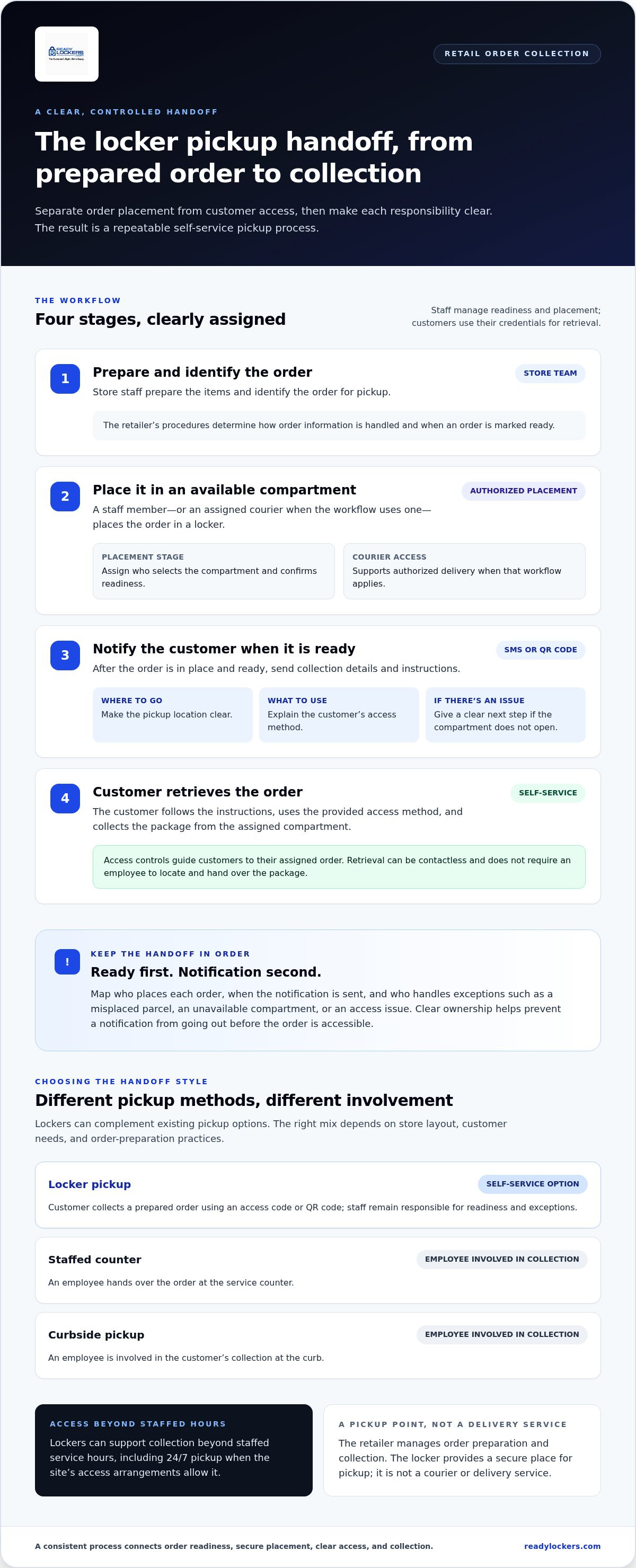
The process starts when a customer places an order through the retailer’s chosen sales channel. Store staff prepare the items, identify the order for pickup, and place it in an available locker compartment. The customer then receives collection details, such as an automated SMS or QR code notification, and follows the instructions to retrieve the order.
The retailer’s procedures determine how order information is handled and when an order is marked ready. If a courier brings a parcel to a locker, courier access is a separate stage from the retailer’s order preparation. Staff manage readiness and placement, while courier access supports authorized delivery when that workflow applies. Assigning clear responsibility for each step helps prevent confusion about who places the order and when the customer should be notified.
Which retail situations can benefit from locker collection?
Lockers can suit retailers that prepare online orders for collection, manage scheduled pickups, or want an alternative to handing every order over a staffed counter. For example, a customer collecting a prepared clothing order can retrieve it without waiting for an employee to locate it at a service desk. A store with regular pickup orders can also use compartments to keep orders organized until customers arrive.
Flexible access is useful when customers cannot collect during staffed service hours. A locker system can support contactless collection beyond those hours, including 24/7 pickup when the site’s access arrangements allow it. The retailer still controls how orders are prepared and when they are made available; the locker provides a secure point for collection.
How Retail Package Pickup Lockers Coordinate Orders, Access, and Notifications
A reliable locker handoff depends on clear steps and responsibilities. Retail store package pickup lockers bring order preparation, controlled access, and customer collection into one workflow, while the retailer defines how orders move through it. This is part of the wider omnichannel retail tactic of letting customers order online and collect in-store.
A locker notification tells the customer how to access a prepared order, while access controls separate the placement and collection stages. That division helps customers understand what to do and gives staff a repeatable process to follow.
From prepared order to secure locker placement
First, the store prepares and identifies the customer’s order. A staff member, or an assigned courier where the retailer’s workflow uses one, places it in an available compartment. Courier access management supports authorized placement, while customer credentials are used for retrieval.
These are separate workflow stages, so retailers should assign responsibility for selecting a compartment, confirming that the order is ready, and resolving exceptions such as a misplaced parcel or an unavailable compartment. Clear ownership helps prevent a notification from going out before the order is accessible. Retailers can define the steps around their own order-preparation practices.
How customers receive access and collect orders
Once the order is in place and ready, the customer receives an SMS or QR code notification with collection instructions. At the store, they follow the steps and use the provided access method at the locker. The assigned compartment opens, the customer retrieves the order, and the collection is complete without an employee needing to locate and hand over the package.
Keep customer instructions direct: where to go, what to use for access, and what to do if the compartment doesn’t open. Store teams should also know how to handle access issues, so self-service customers have a clear next step. The locker management platform supports the handoff with courier access management and automated SMS or QR code notifications.
This approach can reduce reliance on a staffed counter for each collection while keeping staff responsible for order readiness and exceptions. Map who places each order, when the notification is sent, and who helps if pickup doesn’t go as expected.
Retail Package Pickup Lockers Compared with Staffed and Curbside Pickup
Each pickup method creates a different handoff. Retail store package pickup lockers give customers a self-service option, while staffed counters and curbside pickup involve an employee in each collection. The right mix depends on store layout, customer needs, and order-preparation practices. Lockers can complement existing options rather than replace them all.
| Pickup method | Customer access and steps | Staff involvement and trade-offs |
|---|---|---|
| Locker pickup | Customers follow the access instructions to retrieve a prepared order from a compartment. Access may extend beyond staffed service hours, depending on the site’s arrangements. | Staff prepare and place orders, then support exceptions. The store needs suitable locker space and a process for assigning orders and handling access issues. |
| Staffed counter | Customers visit the service point during its staffed hours and request their order. | An employee locates and hands over each order. This offers direct assistance, but collection depends on counter coverage and customer-staff coordination. |
| Curbside pickup | Customers arrive at the store and follow its process to identify themselves and their vehicle. | A team member brings the order out. This avoids an in-store counter visit, but requires staff coordination with arriving customers and vehicle locations. |
When self-service lockers fit better than a staffed handoff
Lockers can be a good fit when customers need to collect orders outside service-counter hours or when prepared orders follow a predictable pickup process. Customers use the designated access method themselves, so staff don’t need to coordinate every handoff at the counter. Employees still prepare orders, place them correctly, and resolve exceptions such as access problems or order changes.
A staffed counter may suit customers who often need help at collection. Curbside can work well for shoppers who prefer to remain in their vehicles. Retailers can offer more than one method and direct different order types through the process that best supports customers and store operations.
How to compare pickup options for your store
Start with the operational pattern, not just the hardware. Review order volume, typical package sizes, available installation area, expected collection windows, and how customers move through or around the store. Map the steps each option requires from order preparation through handoff. Check whether the locker location is easy to reach without disrupting sales-floor activity, and decide how staff will handle orders outside the standard workflow.
For broader planning criteria, explore this smart package locker buyer guide. It can help organize the questions to weigh before deciding how locker collection fits alongside staffed and curbside pickup.
How to Plan Retail Package Pickup Lockers Around Store Operations
Successful locker planning starts with the store’s daily routines, not just the installation footprint. Retail store package pickup lockers should be easy for customers to find and reach while fitting the routes staff use to prepare and stage orders. Planning around both routes helps keep collection convenient without obstructing store circulation.
Map space, order flow, and locker capacity needs
Walk the customer route from the store entrance to the proposed pickup area. Consider visibility, access, and proximity to relevant store areas, and check that customers collecting orders won’t block busy aisles or staff work zones. Then review operational data such as package dimensions, pickup volume, order patterns, and expected collection windows. These details help estimate compartment needs and identify periods when demand may cluster.
Locker configurations can be tailored to the site layout and package volume requirements. A modular setup lets retailers plan around the available area and the types of orders customers actually collect, rather than starting with a generic footprint.
Prepare customer communication and store procedures
Make pickup instructions straightforward. Customers need to know where to go, how to access their order, and what to do if they encounter a problem. Internally, define who places orders in compartments, who sends or verifies pickup notifications, how uncollected orders are handled, and who resolves exceptions. Clear ownership helps keep the process consistent across shifts.
Locker management software supports the operational side of the handoff, including access management and customer notifications. For more detail on platform workflows, see the guide to smart locker management software.
Use this checklist to frame an initial plan:
- Customer route: Is the pickup point easy to find and reach without disrupting store circulation?
- Staff workflow: Who prepares, identifies, and places each order?
- Order profile: What package sizes, pickup volumes, and collection patterns should the setup accommodate?
- Customer instructions: Are access and collection steps clear, including what to do if pickup doesn’t go as expected?
- Exception handling: Who manages uncollected orders, access issues, and other pickup problems?
Use these answers to shape a locker plan around your store’s space and processes. Plan your retail locker setup around the customer route, order flow, and collection needs.
ReadyLockers Retail Package Pickup Lockers: A Connected Pickup Experience
A retail pickup system works best when its physical compartments and digital processes support the same handoff. ReadyLockers brings together modular smart package lockers, cloud-based locker management software, courier access management, and customer notifications. These components help retailers coordinate locker placement and recipient collection.
What the ReadyLockers platform brings together
Modular hardware provides compartments for prepared orders, with configurations tailored to a site’s layout and package volume. The cloud platform supports locker management and courier access, helping retailers organize the delivery handoff. When an order is ready for pickup, automated SMS or QR code notifications provide the recipient with an access method. The customer uses that method at the locker to retrieve the order without a direct staff handoff.
This contactless process can make collection more flexible, including access beyond staffed service hours where site arrangements allow it. For a broader look at the technology behind this approach, read the contactless delivery locker technology guide.
Usage analytics provide another operational reference point. Retail teams can review locker use and consider that information alongside order patterns and staff feedback when assessing the pickup process.
Next steps for planning a retail locker project
Before selecting a configuration, bring the practical inputs together: store layout, customer access routes, package volume and mix, expected collection patterns, and staff responsibilities. Define how orders move from preparation to placement, how customers receive instructions, and who handles exceptions. These decisions connect the locker setup to the store’s operating routine.
Retail store package pickup lockers can support different store footprints and order volumes when the configuration is planned around project requirements. ReadyLockers’ modular configurations are tailored to site layout and volume, while cloud management, courier access, notifications, and usage analytics support the pickup workflow.
Ready to plan a system around your retail space and pickup process? Explore a tailored retail locker solution.
Build a Pickup Workflow That Fits Your Store
Retail store package pickup lockers can give customers a convenient self-service option and help teams follow a consistent order handoff. A useful setup starts with practical planning: consider your store layout, package volume, customer access needs, and the steps staff follow to prepare and place orders. Lockers can complement staffed or curbside collection, giving your retail operation more than one way to handle pickup.
ReadyLockers combines modular configurations tailored to property layout and package volume with cloud-based management, courier access control, and SMS or QR code notifications. Customers use those notifications to access prepared orders, while usage analytics give retailers an operational input for reviewing locker activity and pickup patterns.
With a clear workflow, lockers can support a contactless handoff that fits your store’s space and processes. Explore retail package pickup locker solutions and plan a pickup experience around your operation.
Frequently Asked Questions
What are retail store package pickup lockers?
Retail store package pickup lockers are secure, self-service compartments where customers collect orders prepared by a retailer. Staff or an authorized courier places an order in a compartment, and the recipient uses an access method such as a code or QR code to retrieve it. Unlike a directory of third-party pickup locations, these lockers are part of the retailer’s own order-collection process.
How do package pickup lockers work for retail orders?
A retailer prepares and identifies an order, then places it in an available locker compartment or assigns an authorized courier to complete the placement. The customer receives an SMS or QR code notification with pickup access details. At the store, they use those details to open the assigned compartment and collect the order. Retailers define responsibilities for placement, customer instructions, and pickup exceptions.
Can customers pick up retail orders from lockers after store hours?
Yes. Smart locker systems can support pickup beyond staffed service hours, and ReadyLockers supports 24/7 collection. Customers receive access instructions by SMS or QR code and use them to retrieve a prepared order without a staffed counter handoff. Retailers should plan the locker location and customer route around the property’s entry arrangements.
Are retail package pickup lockers better than staffed pickup counters?
Neither option is best for every retailer. Lockers offer self-service collection and can support access beyond staffed hours, while a counter provides direct employee assistance during service hours. Retailers can also retain curbside pickup for customers who prefer collection at their vehicle. Compare order patterns, customer needs, staffing steps, and available space to decide whether lockers should complement existing pickup methods.
How do customers get access to a retail pickup locker?
Customers typically receive an SMS or QR code notification after an order has been placed in a locker and made ready for collection. They follow the instructions at the pickup point and use the provided access method to open the assigned compartment. Keep the message clear about where to go and what to do if the access method doesn’t work or the order can’t be retrieved.
What should a retailer consider before installing package pickup lockers?
Plan around the customer route, staff workflow, and available installation area. Review order volume, package dimensions, pickup patterns, and expected collection windows to inform locker capacity and configuration. Decide who places orders, sends or verifies pickup notifications, handles uncollected orders, and assists customers with exceptions. Modular configurations can be tailored to a store’s layout and package volume requirements.
Do package pickup lockers require separate management software?
Smart locker systems use management software to coordinate functions such as access control, SMS or QR code notifications, and usage analytics. ReadyLockers’ cloud-based locker management supports these capabilities alongside the locker hardware and courier access interface. Retailers should define how software fits into their order-preparation and collection procedures.

Frequently Asked Questions
Which retail situations can benefit from locker collection?+
Lockers can suit retailers that prepare online orders for collection, manage scheduled pickups, or want an alternative to handing every order over a staffed counter. For example, a customer collecting a prepared clothing order can retrieve it without waiting for an employee to locate it at a service desk. A store with regular pickup orders can also use compartments to keep orders organized until customers arrive. Flexible access is useful when customers cannot collect during staffed service hours. A locker system can support contactless collection beyond those hours, including 24/7 pickup when the site’s access arrangements allow it. The retailer still controls how orders are prepared and when they are made available; the locker provides a secure point for collection. A reliable locker handoff depends on clear steps and responsibilities. Retail store package pickup lockers bring order preparation, controlled access, and customer collection into one workflow, while the retailer defines how orders move through it. This is part of the wider omnichannel retail tactic of letting customers order online and collect in-store. A locker notification tells the customer how to access a prepared order, while access controls separate the placement and collection stages. That division helps customers understand what to do and gives staff a repeatable process to follow.
What are retail store package pickup lockers?+
Retail store package pickup lockers are secure, self-service compartments where customers collect orders prepared by a retailer. Staff or an authorized courier places an order in a compartment, and the recipient uses an access method such as a code or QR code to retrieve it. Unlike a directory of third-party pickup locations, these lockers are part of the retailer’s own order-collection process.
How do package pickup lockers work for retail orders?+
A retailer prepares and identifies an order, then places it in an available locker compartment or assigns an authorized courier to complete the placement. The customer receives an SMS or QR code notification with pickup access details. At the store, they use those details to open the assigned compartment and collect the order. Retailers define responsibilities for placement, customer instructions, and pickup exceptions.
Can customers pick up retail orders from lockers after store hours?+
Yes. Smart locker systems can support pickup beyond staffed service hours, and ReadyLockers supports 24/7 collection. Customers receive access instructions by SMS or QR code and use them to retrieve a prepared order without a staffed counter handoff. Retailers should plan the locker location and customer route around the property’s entry arrangements.
Are retail package pickup lockers better than staffed pickup counters?+
Neither option is best for every retailer. Lockers offer self-service collection and can support access beyond staffed hours, while a counter provides direct employee assistance during service hours. Retailers can also retain curbside pickup for customers who prefer collection at their vehicle. Compare order patterns, customer needs, staffing steps, and available space to decide whether lockers should complement existing pickup methods.
How do customers get access to a retail pickup locker?+
Customers typically receive an SMS or QR code notification after an order has been placed in a locker and made ready for collection. They follow the instructions at the pickup point and use the provided access method to open the assigned compartment. Keep the message clear about where to go and what to do if the access method doesn’t work or the order can’t be retrieved.
What should a retailer consider before installing package pickup lockers?+
Plan around the customer route, staff workflow, and available installation area. Review order volume, package dimensions, pickup patterns, and expected collection windows to inform locker capacity and configuration. Decide who places orders, sends or verifies pickup notifications, handles uncollected orders, and assists customers with exceptions. Modular configurations can be tailored to a store’s layout and package volume requirements.
Do package pickup lockers require separate management software?+
Smart locker systems use management software to coordinate functions such as access control, SMS or QR code notifications, and usage analytics. ReadyLockers’ cloud-based locker management supports these capabilities alongside the locker hardware and courier access interface. Retailers should define how software fits into their order-preparation and collection procedures.